Network Setup
In addition to a Command Line Interpreter ("CLI"), VersaSync offers a web user interface
("Web UI") that is used to configure and monitor the unit. Described below is how to setup com
munication with the WebUI.
Note: VersaSync supports zeroconf: If you have a DHCP enabled network, you
can use zeroconf for initial setup. For more information, see "Zero Configuration
Setup" on page6. Otherwise follow the instructions below for conventional setup.
Default settings:
VersaSync network settings default to DHCP, i.e. if the unit is connected to a DHCP server via
ETH0 or ETH1, it will accept an assigned dynamic IP address.
In order to apply a static IP address, DHCP must be disabled, as described below. (Your net
work administrator will provide you with an IP address you can use for the VersaSync unit.)
Setup procedure:
1.
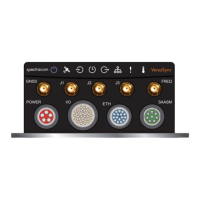
Hardware connections
Table 1-1:
Connections: Overview
Requirement Action Evaluation kit cable
Power up Connect 12 V
DC
to the
power connector.
Attach a cable and apply 12 V
DC
to the plug
labeled "Main" (CA08R-CRPB-0002)
USB con
nection
Connect USB to the Multi
I/O connector.
Connect the USB plug to a PC with a terminal
emulator program (CA08R-CRUB-0002)
Network
connection
Connect at least one of the
two Ethernet connectors to
a network.
Connect the RJ45 jack labeled ETH0 or ETH1
to a network hub/switch or directly to a PC
(CA08R-CRET-0002)
a.
POWER: Connect power to the unit: If you are using the Evaluation Kit, con
nect the barrel connector of the 12 V transformer cable to the power cable
labeled "Main". Connect the 110V/240V connector of the 12 V trans
former to an outlet. The unit will start up (the power LED will pulsate.)
b.
USB: Connect the Multi I/O connector to the VersaSync unit. If you are
using the Evaluation Kit, connect the Multi I/O USB output to a PC. Install a
terminal emulator program on the PC (e.g., TeraTerm
®
or PuTTY
®
).
c.
Ethernet: Connect the Ethernet cable to the ETH port of the unit. If you are
using the Evaluation Kit, connect at least one of the two I/O cable Ethernet
CHAPTER 1 • VersaSync Evaluation Kit Quick Reference Guide Rev. 5
1


 To Next Page