Chapter 2: Installing a ControlLogix 1756sc-CTR8-SC Module 2-5
Owner’s Guide 0300199-01 Rev. D
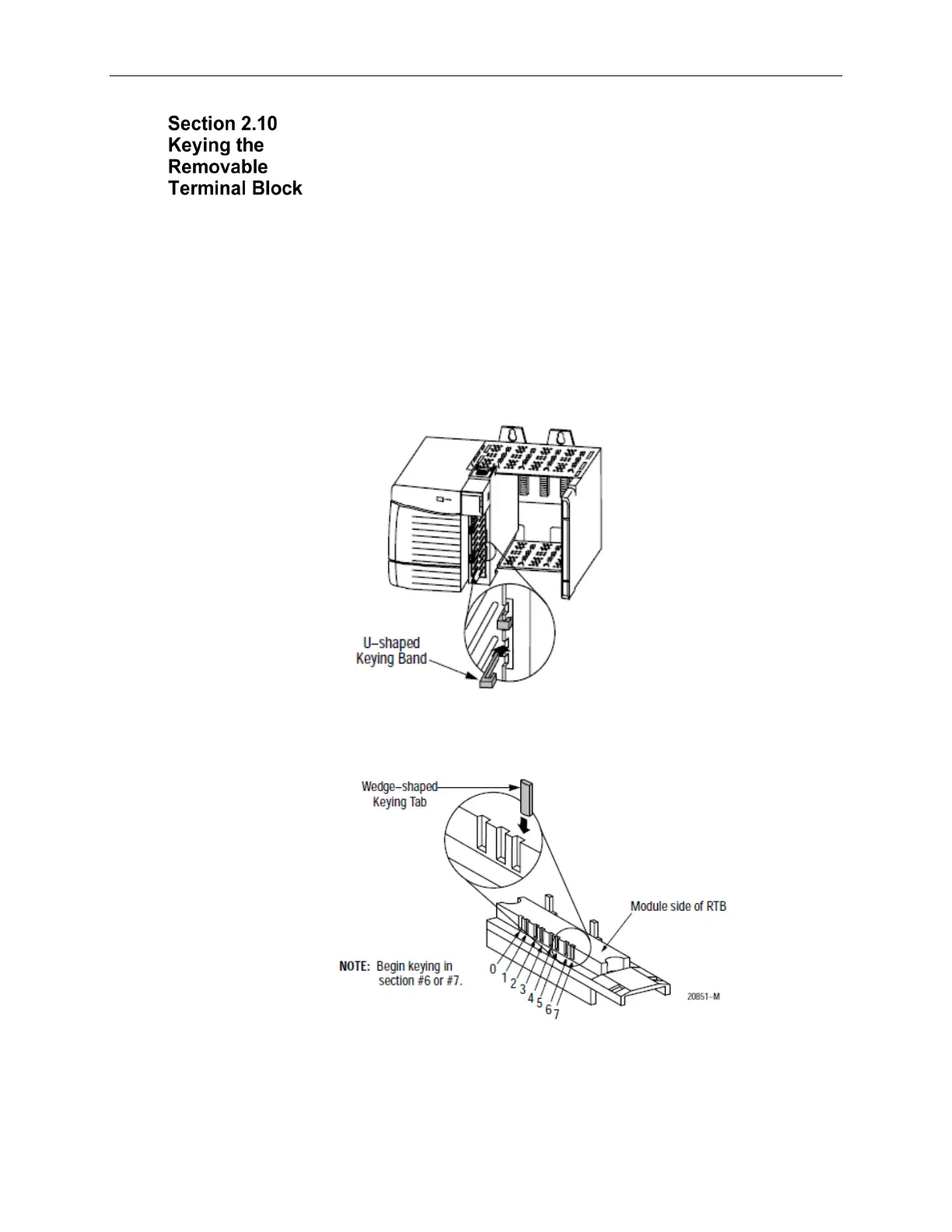
Key the RTB to prevent inadvertently making the wrong wire connections to
your module. Use a unique keying pattern for each module. You can use a
minimum of one key.
When the RTB mounts onto the module, keying positions will match up. For
example, if you place a U-shaped keying band in position #4 on the module, you
cannot place a wedge-shaped tab in #4 on the RTB or your RTB will not mount
on the module.
We recommend that you use a unique keying pattern for each slot in the chassis.
1. Key the module. Insert the U-shaped band with the longer side near the
terminals. Push the band onto the module until it snaps into place.
2. Key the RTB in positions that correspond to un-keyed module positions.
Insert the wedge-shaped tab on the RTB with the rounded edge first.
3. Push the tab onto the RTB until it stops.
4. Reposition the tabs to rekey future module applications.


 To Next Page