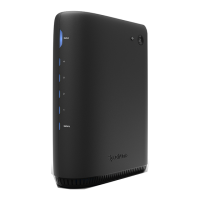
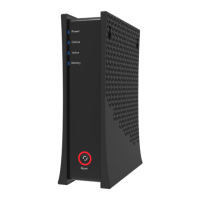
The Spectrum ONU (SONU) Modem is a 10G EPON DPoE Advanced Fiber Voice Modem designed to provide high-speed internet and voice services. This device serves as a central hub for fiber optic connectivity, enabling users to connect various Ethernet-enabled devices and analog telephones.
Function Description:
The SONU Modem acts as an Optical Network Unit (ONU), converting optical signals from the fiber optic network into electrical signals that can be used by your devices. It supports 10G EPON (Ethernet Passive Optical Network) technology, ensuring high-bandwidth capabilities for both internet and voice services. The modem includes multiple ports for connecting to a variety of devices:
- 10G Ethernet (Internet) Port: This port is designed for connecting to high-speed Ethernet-enabled devices such as wireless access points, routers, or LAN switches, facilitating internet access.
- 1G Ethernet (ATA) Port: This port is specifically for connecting an Ethernet-enabled Analog Telephone Adapter (ATA) or an IP Phone, enabling voice services.
- Voice 1-2 Ports: These ports are used to connect analog telephones or a DECT base station, providing carrier-grade VoIP (Voice over Internet Protocol) services.
- Battery Port: This port is used to connect to a dedicated external backup battery unit (eBBU) via a USC link cable. It transmits signal data and alarms related to the battery.
- Power Port: This port connects to the supplied power adapter or the eBBU DC output cable, providing power to the device.
Important Technical Specifications:
- Powering: The device requires an input of 100-127Vac, 50-60Hz, and an output of 12Vdc 1.5A from the power adapter. The AC plug is keyed for proper polarization, and the DC barrel must be fully inserted for a secure connection.
- Operating Temperature Range: The device is designed to operate within a temperature range of 32°F (0°C) to 104°F (40°C).
- Maximum Operating Altitude: The maximum operating altitude for the device is 3962 meters (13,000 ft.).
- Ethernet Standards: Supports 10 Gigabit Ethernet (10G) for the internet connection and 1 Gigabit Ethernet (1G) for the ATA connection.
- Voice Lines: Provides 2 FXS (Foreign Exchange Subscriber) lines for carrier-grade VoIP.
Usage Features:
- Connectivity: The modem offers robust connectivity options for both data and voice. The 10G Ethernet port ensures high-speed internet access, while the 1G Ethernet (ATA) and Voice 1-2 ports cater to various voice communication needs.
- Easy Setup: Connections are straightforward, with clearly labeled ports for power, battery, internet, ATA, and voice.
- LED Indicators: The device features comprehensive LED indicators on both the front panel and the back panel ports to provide real-time status information.
- Front Panel Status Light (RGB LED):
- Blue (Flashing): Indicates powering up.
- Blue (Pulsing): Indicates finding connection (PON signal).
- Blue (On): Indicates normal operation.
- Red (Pulsing): Indicates PON not operational.
- Red and Off (Pulsing): Indicates PON loss of signal.
- Red and White (Pulsing): Indicates PON loss of signal.
- Front Panel Voice Status Light (Blue LED):
- Off: Voice service not provisioned.
- On Blue: Voice service provisioned.
- Blue (Flashing): Any phone off-hook on battery.
- Blue (Pulsing): Any phone off-hook on AC power.
- Off: Unable to establish phone network connection.
- Internet Back Panel 10G LED (Left LED - Speed Status):
- Green: 10G connection.
- Amber: 1G connection.
- Off: 100MB connection.
- Internet Back Panel 10G LED (Right LED - Activity Status):
- Amber (Blinking): Activity data is being passed.
- Off: No activity.
- ATA Back Panel 1G LED (Left LED - Speed Status):
- Green: 1G connection.
- Green (100MB): 100MB connection.
- Off: 10MB connection.
- ATA Back Panel 1G LED (Right LED - Activity Status):
- Amber (Blinking): Activity data is being passed.
- Off: No activity.
- Firmware Upgrade Indication: During a firmware download, the 'Status, Voice, Battery' LEDs will loop on Blue for 0.75 seconds in a 3-second cycle, repeating until the download is complete.
- External Battery Support: The dedicated battery port allows for connection to an eBBU, providing backup power and ensuring continuous service during power outages. This port also transmits signal data and alarms from the eBBU.
- Voice Service Activation: Telephone service must be enabled through spectrum.net/support.
Maintenance Features:
- Device Reset: The device offers two types of resets:
- Power Cycle (Restart): Press and hold the reset button for 4 seconds when the front panel lights are illuminated to initiate a power cycle.
- Factory Reset: Press and hold the reset button for 10 seconds to restore the device to its factory default settings. Note that a factory reset will delete all current settings.
- Troubleshooting Support: In case of connectivity issues, users are advised to refer to support articles at spectrum.net/support or contact Customer Service at (800) 495-6590.
- Safety Notices:
- Power Adapter: Ensure the power adapter's AC plug is correctly polarized and the DC barrel is fully inserted into the power connector port for a snug and secure connection.
- Damage/Abnormality: If the modem becomes damaged or exhibits any abnormal behavior, immediately disconnect the power adapter from the AC wall outlet to prevent further issues or hazards.
The Spectrum ONU (SONU) Modem is designed to be a reliable and high-performance solution for modern fiber optic internet and voice services, offering advanced features and user-friendly indicators for efficient operation and troubleshooting.

 Need help?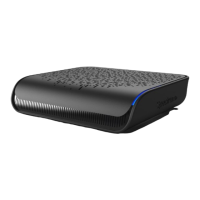

 To Next Page
 General