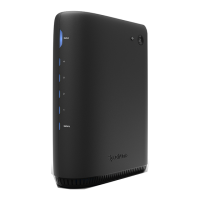
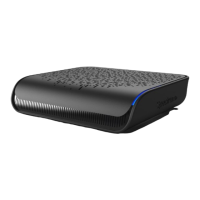
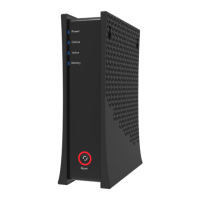
The Spectrum D3.1 eMTA DOCSIS 3.1 Advanced Voice Modem is a device designed to provide high-speed internet and voice services. It features a sleek black design with LED indicators on the front panel for Power, Online, Voice, and Battery status, along with a Reset button.
Function Description:
This modem serves as an advanced voice modem, supporting DOCSIS 3.1 for high-speed internet connectivity and PacketCable 1.5 (NCS) or 2.0 (IMS/SIP) for voice services. It allows users to connect to their internet service provider via a coaxial cable and provides Ethernet ports for connecting to a wireless router or other Ethernet-enabled devices. Additionally, it includes RJ-11 ports for connecting analog telephones, enabling telephone service when provisioned by the service provider. An optional external battery can be connected to ensure voice services remain operational during power outages.
Important Technical Specifications:
Interfaces & Standards:
- Cable: F-Connector, female
- Models: E31N2V1, E31T2V1, E31U2V1 (for 10/100/1000 Mbps LAN); EN2251, ET2251, EU2251, ES2251 (for 10/100/2.5 Gbps LAN)
- LAN: One RJ-45 port (10/100/1000 Mbps or 10/100/2.5 Gbps, depending on model)
- Telephony: 2 RJ-11 ports
- PacketCable: 1.5 (NCS) or 2.0 (IMS/SIP) compatible
- DOCSIS: 3.1 certified
- Compatibility: DOCSIS 3.1/3.0/2.0/1.1/1.0 certified, Ethernet 100/1000/2500 Mbps, PacketCable 1.5 and 2.0
Downstream (Actual speeds may vary):
- Frequency Range: 258MHz-1218MHz
- Capture Bandwidth: 1.218GHz
- Modulation: 64 or 256 QAM and OFDM: up to 4096 QAM
- Maximum DOCSIS 3.1 Data Rate: 2 x 192MHz OFDM channels provide capacity up to 5Gbps
- Maximum DOCSIS 3.0 Data Rate: 32 downstream channels provide speeds up to 1372Mbps
- Symbol Rate: 5361 Ksps
- RF (cable) Input Power: -15 to +15dBmV (64/256 QAM), -6 to +15dBmV (4096 QAM)
- Input Impedance: 75 Ω
Upstream (Actual speeds may vary):
- Frequency Range: 5MHz ~ 42MHz/85MHz switchable
- Modulation: QPSK or 8/16/32/64/128 QAM and OFDMA: up to 4096 QAM
- Maximum DOCSIS 3.1 Data Rate: 2 x 96MHz OFDMA channels provide capacity up to 2Gbps
- Maximum DOCSIS 3.0 Data Rate: 8 upstream channels provide speeds up to 246Mbps
- Symbol Rate: 160, 320, 640, 1280, 2560, 5120 Ksps
- RF (cable) Output Power: A-TDMA/S-CDMA (one channel): +65dBmV, OFDMA: +65dBmV
Security:
- DOS (denial of service) attack protection
Regulatory:
- UL/FCC Class B, Energy Star Certified
Voice:
- PacketCable: 1.5 (NCS) or 2.0 (IMS/SIP) compatible
- Line Voltage On-hook: -48 Volts
- Loop Current: 20mA/41mA
- Ring Capability: 2K ft., 5REN
- Hook State: Signaling Loop Start
- Features: DTMF Tone Detection, T.38 Fax Relay (G.711), Echo Cancellation (G.168) / Silence Suppression, Voice Active Detection and Comfort Noise Generation
- Codec: G.722 codec, WB SLIC
Physical and Environmental:
- Dimensions: 70.8mm (2.8 inches W), 215mm (8.46 inches H), 170mm (6.7 inches D)
- Weight: 632.6g (1.4 lbs), unit only
- Power: 12V 1.5A (output), 100-240VAC, 50-60Hz, 1A Max (input), external PSU
- Operating Temperature: 0°C ~ 40°C (32°F ~ 104°F)
- Humidity: 5 ~ 95% (non-condensing)
- Optional External Battery
Usage Features:
- Device Connections:
- Voice 1-2: Connect analog telephones.
- Cable: Connect to the coaxial cable from your internet service provider.
- Ethernet (Internet): Connect to an Ethernet-enabled device (e.g., wireless router) using an RJ45 Ethernet cable.
- Power: Connect to the power adapter and then to a wall outlet.
- Battery: Connect to an optional external battery for voice service backup.
- Installation:
- Connect the coaxial cable to the Cable connector on the modem and the wall outlet. Use a splitter if connecting both the modem and a television to the same outlet.
- Connect the Ethernet cable from the modem's Ethernet (Internet) port to an Ethernet port on a wireless router or other device.
- If voice service is provisioned, connect an RJ-11 phone cable from the modem's Voice 1 or 2 port to a telephone.
- Connect the power adapter to the modem's Power port and then to a power outlet.
- Wall Mount: The modem can be mounted on a wall using two mounting brackets. Screws should be installed horizontally 140 mm (5.51 inches) apart. Ensure screws protrude enough to fit the device. For drywall, use hollow wall anchors.
Maintenance Features:
- Reset Button:
- Reboot (Power Cycle): Press and hold the Reset button for 4 to 10 seconds. The device will reboot.
- Factory Reset: Press and hold the Reset button for 10 seconds or more. The modem will reset to factory default settings.
- Reset LED Behavior:
- Red Ring: Indicates the device is waiting to be power cycled, easing between On Red and Off.
- Note: A factory reset cannot be performed if the device is in a state suggesting a power cycle (button icon and surrounding ring are lit). The device must be power cycled first.
- LED Indicators: Provide visual status of the modem's operation:
- Power (Blue): Flashing during power-up, solid blue for normal operation.
- Online (Blue/White): Easing between On Blue and On White during connection determination, solid white for DOCSIS 3.0 bonded state, solid blue for DOCSIS 3.1 bonded state, off if network access is denied.
- Voice (Blue): Off if not provisioned, solid blue if active or phone cable is connected/not connected, easing between On Blue and Off if off-hook, flashing between On Blue and Off if off-hook with external battery, off if unable to establish phone connection.
- Battery (Blue/Red): Solid blue if charge is 21% or higher, solid red if 20% or lower, flashing between On Red and Off if 10% or lower, off if no battery installed, easing between On Blue and Off if charging.
- Ethernet (Internet) Left Status Light (Green/Amber): Solid green for 100 Mbps connection, solid amber for 2500 Mbps (2.5G) connection, off for 100 Mbps connection.
- Ethernet (Internet) Right Status Light (Amber): Solid amber when data is being passed, off if no link is established.

 Need help?

 To Next Page
 General