5Spectrum Modem
Reseting the Modem
Front Panel:
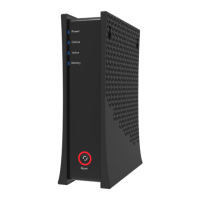
Reset: Use the reset button to either reboot (power cycle) the modem or reset the device
to factory default settings. When the reset button is pressed and held for 4 to 10 seconds,
the device will reboot (power cycle). If the reset button is pressed and held for 10 seconds
or more, the Spectrum eMTA will reset to factory default settings. Refer to the LED Behavior
table on page 5 for the reset button LED behavior.
Reset LED Behavior
Red Ring
Device is waiting to be Power Cycled:
Easing between On Red and O
Reset - Press and hold for 5 seconds to reset modem.
Factory reset - Press and hold for more than 10 seconds
to reset modem to factory default settings.
Note: You will see the ring and text illuminate when you
press the button.
Note: When the device is in a state that suggests a power cycle (the button icon and the surrounding ring are
lit), a factory reset cannot be performed. The user must power cycle the device, then perform a factory reset.



 To Next Page