VAJRA80 Rotorcraft User's manual
14 / 36
X. Landing and Lock VAJRA80
1. Landing
Three kinds of flight mode can be carried out on the aircraft landing, the specific operation of landing as below.
(1) Manual: slowly lower the throttle; adjust the location where is suitable for landing; then quickly lock VAJRA80 when landing to the
ground.
(2) GPS: adjust the aircraft to a suitable location, and then keep hovering; slowly landing after lower the throttle; make the throttle in
lowest position after landing, and then quickly switch to manual mode, finally lock VAJRA80. ( users can adjust the position of
landing through controlling the direction of rocker during hovering)
(3) Auto Land: switch to this mode after adjusting the aircraft to a suitable location, and then the aircraft will autoland. Do not need
manual intervention, if the landing site is smooth; if not, you can adjust the position of landing through controlling the direction of
rocker in the whole process of landing. The propeller will continue to low-speed rotation after landing, quickly switch to manual
mode and then lock VAJRA80.
2. Lock VAJRA80
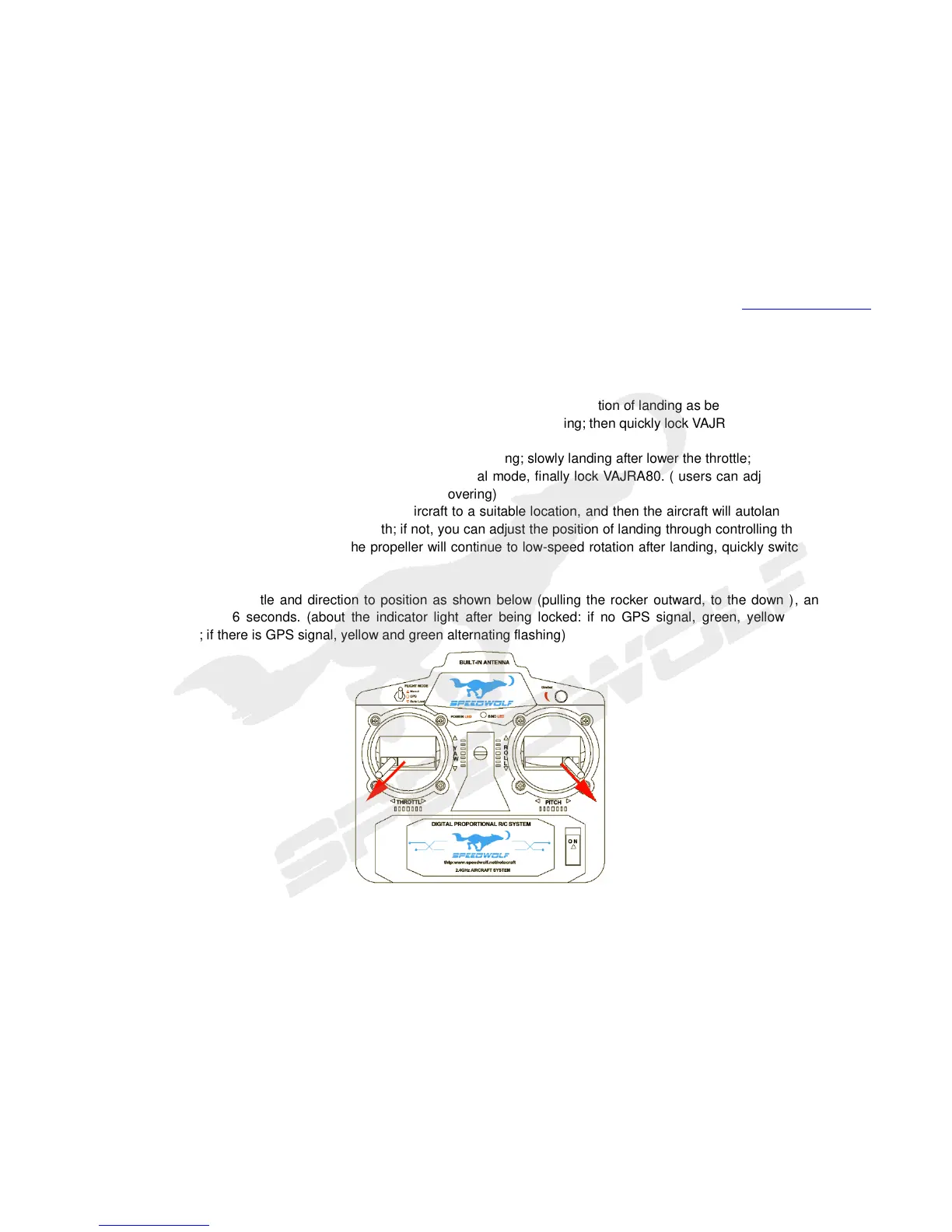
Operate the rocker of throttle and direction to position as shown below (pulling the rocker outward, to the down ), and locked
VAJRA80 after keeping 6 seconds. (about the indicator light after being locked: if no GPS signal, green, yellow and red light
alternating flashing ; if there is GPS signal, yellow and green alternating flashing)
Image10 Lock VAJRA80



 To Next Page