USB VCP
UART1
UART2
UART4
UART3
UART5
115200
Disabled
AUTO
Disabled
AUTO
Disabled
AUTO
Disabled
AUTO
Disabled
AUTO
Disabled
AUTO
Disabled
AUTO
Disabled
AUTO
Disabled
AUTO
Disabled
AUTO
Disabled
AUTO
Disabled
AUTO
Disabled
AUTO
Disabled
AUTO
Disabled
AUTO
Disabled
AUTO
Disabled
AUTO
Disabled
AUTO
115200
115200
115200
115200
115200
UART6
Disabled
AUTO
Disabled
AUTO
Disabled
AUTO
115200
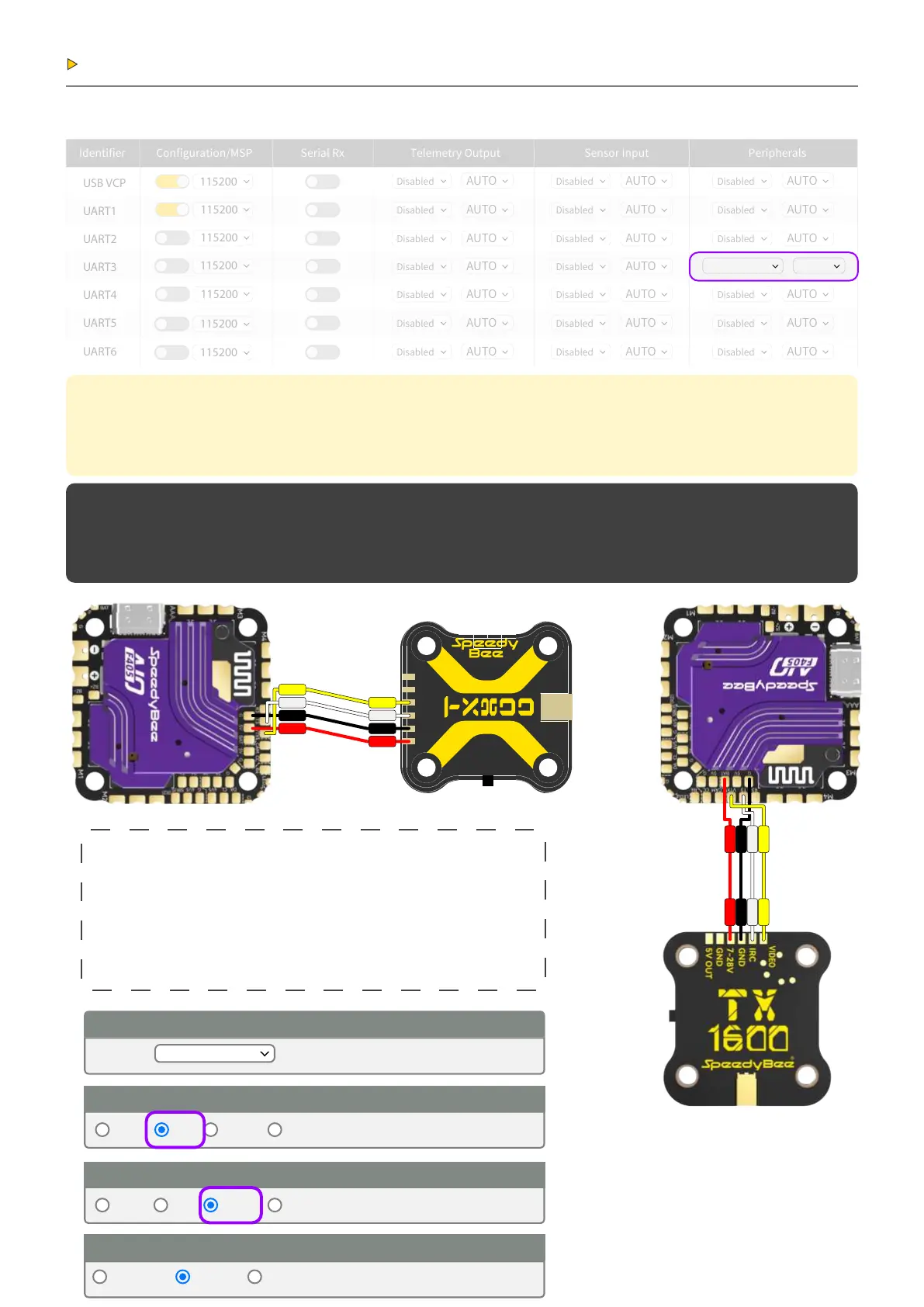
Peripheral Connection
Analog VTX Connection and Settings:
2.1
已禁用
AUTO
已禁用
AUTO
已禁用
AUTO
已禁用
AUTO
已禁用
AUTO
已禁用
AUTO
已禁用
AUTO
已禁用
AUTO
已禁用
AUTO
已禁用
AUTO
已禁用
AUTO
已禁用
AUTO
已禁用
AUTO
已禁用
AUTO
已禁用
AUTO
VXT(IRC Tr
AUTO
已禁用
AUTO
已禁用
AUTO
已禁用
AUTO
已禁用
AUTO
已禁用
AUTO
Note:Leaving CLl tab or pressing Disconnect will automatically send "exit"to the board.
With the latest rmware this will make the controller
resta and unsaved changes will be lost.
Warning:Some commands in CLl can result in arbitra signals being sent on the motor output pins.
This can cause motors to spin up if a batte is is connected. Therefore it is highly recommended to make sure that
no batte is connected before entering
Setting Steps
1. Set UART6 Peripheral to “IRCTramp” and save.
2. In the CLI page, enter the following commands:
set osd_displaypo_device = MAX7456
save
3. In the OSD tab, set the video format to PAL or NTSC
(depending on the camera protocol).
Entering CLI Mode, type 'exit' to return, or ‘help’
#
#Building AutoComplete Cache ... Done!
#
# set osd_displaypo_device = MAX7456
osd_displaypo_device set to MAX7456
Analog VTX
Analog VTX
5V
GND
VIDEO
IRC
PGND
3.7-5 V
GND
GND
7-28V
Active OSD Prole
Current:
Imperial
Auto PAL
OSD Prole 1
NTSC HD
Metric British
Video Format
Units
Auto PAL NTSC HD
Video Format
5V
5V
BAT
GNDGND
VTX
VIDEO
T3IRC
VTX
T3
VIDEO
IRC


 To Next Page