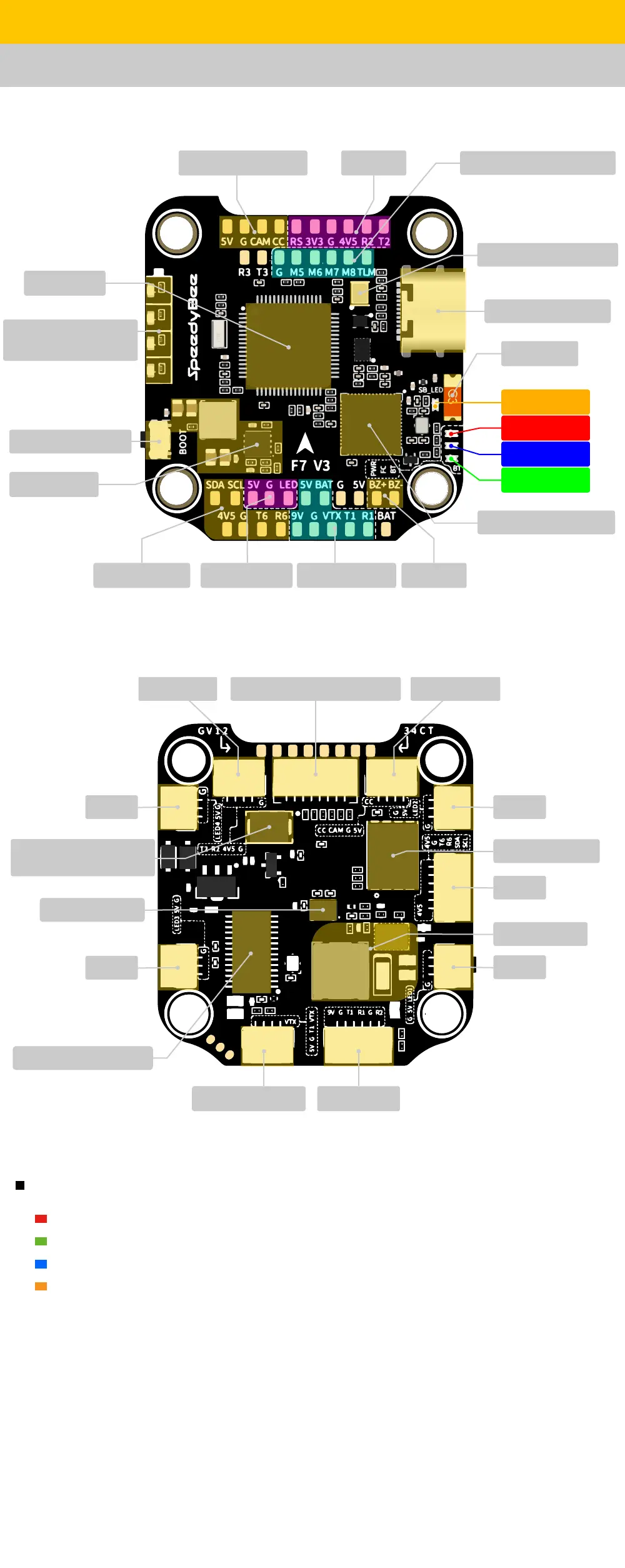
Layout
Pa 2 - SpeedyBee F7 V3 Flight Controller
LED Indicator Denition
RED LED - Power Indicator.
Solid Red after powering up.
GREEN LED - Bluetooth status light. Solid Green indicates Bluetooth is connected.
BLUE LED - Flight controller status light which is controlled by the ight controller rmware.
Orange LED - LED Control Mode Indicator. It indicates the 4 sets of LEDs connected to LED1-LED4
connectors on the bottom side are controlled by Betaight rmware(BF_LED mode) or the
Bluetooth Chip(SB_LED mode).
Solid Orange :indicates the 4 x LEDs are in SB_LED mode. In this mode, when the FC is
powered on and in standby mode, press the BOOT button to cycle the display modes of the LEDs.
You could also change modes in the app wirelessly.
OFF :indicates the 4 x LEDs are controlled by Betaight rmware.
Long press the button for 3 seconds to switch the control modes between BF_LED
mode and SB_LED mode.
Bluetooth/WiFi Chip
5V 2A BEC
GPS&Compass
5/13
Betaight LED VTX(Analog/DJI) Buzzer
FPV Cam(Analog)
Receiver
BOOT Button
4-level LED battey
indicator
MCU: F722
8pin Connector(to ESC) FPV CameraReceiver
TVS Diode
(Anti-Voltage Spike)
BlackBox Flash
9V 4A BEC
LED2
GPS
LED4
Gyro(BMI270)
LED3
OSD Chip(AT7456E)
LED1
DJI Air UnitAnalog VTX(5V)
Orange LED
RED LED
GREEN LED
BLUE LED
USB TYPC-C Po
For Second 4-in-1 ESC
Antenna
Barometer(BMP280)


 To Next Page