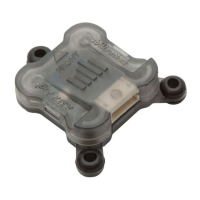
The Spektrum A9500 SkyID Module is a sophisticated hobby product designed to provide real-time GPS telemetry broadcast via Bluetooth, ensuring compliance with FAA remote ID requirements (FAR14 Section 89). This module is intended for use with unmanned, hobby-grade, remote-controlled vehicles and aircraft. It transmits a unique serial number that can be used to identify your aircraft and its location, with Bluetooth broadcasts adhering to ASTM F3411-19 standards.
Function Description:
The primary function of the A9500 SkyID Module is to broadcast identification and location data over Bluetooth, fulfilling the necessary Remote ID requirements. When integrated with a Spektrum telemetry system, it offers pilots comprehensive status updates, including location, ground speed, altitude (above mean sea level), and distance from home. It also provides access to the unique serial number directly on the transmitter. The module communicates its operational status through an internal LED and via Spektrum Telemetry. A key feature is its ability to operate independently of a Spektrum telemetry system, functioning on any model aircraft through an open servo port or by connecting to any 3.3V to 9V DC power source.
Important Technical Specifications:
- Type: Remote ID Module
- Dimensions (L × W × H): 35mm x 23mm x 16.5mm
- Weight: 14 grams
- Voltage Range: 3.3V – 9V
- Radio Frequency Range: 2.400GHz to 2.4835GHz (for internal radio transmitter)
- FCC ID: BRWSPMA9500
- Compliance: FAA remote ID requirements (FAR14 Section 89), ASTM F3411-19, FCC Part 15 rules.
Usage Features:
- FAA Registration: To ensure compliance, the unique serial number from the SkyID Module must be registered with the FAA. This number can be found on the product case sticker, accessed via telemetry with a compatible Spektrum transmitter, through a third-party mobile app, or using the SPMA3065 USB Programmer with a PC.
- Quick Start Guide:
- Register Serial Number with FAA: Access the FAA DroneZone website, log in, navigate to the Drone owners and pilots dashboard, select "Manage Device Inventory," then "Add Device." Confirm that your drone broadcasts remote ID information ("Yes"), select "Remote ID broadcast module" as the device type, enter "Spektrum" as the UAS manufacturer, "SPMA9500 SkyID" as the UAS Model, and input the Remote ID Serial Number from the sticker. Finally, select "Add Device."
- Secure Module: Attach the SPMA9500 module securely to your aircraft using the provided adhesive-backed hook and loop pads or double-sided tape. It's crucial to select a location on the airframe that does not have metal or carbon surfaces above the module's case to ensure optimal GPS signal reception.
- Connect Power/Telemetry: Connect the module to your receiver or power source. Connection options, in order of preference, include:
- SRXL2 or XBUS Telemetry port (recommended for PowerSafe receivers operating on 3S).
- Any open servo port operating at standard servo voltages.
- Any DC power source within the 3.3V-9V range.
- Verify Operation: Confirm proper functioning by observing the module's LED status or by checking the Remote ID mobile app.
- Wiring Options: The module includes three wiring harnesses to facilitate various connections:
- 4-Pin ZH to 3-Pin Servo Connector: For Spektrum receivers with an SRXL2 connection or any standard servo port.
- 4-Pin ZH to 4-Pin ZH Connector: For Spektrum receivers with an SRXL2 or XBUS port.
- 4-Pin ZH to 3-Pin ZH Connector: For Spektrum Micro Receivers with a 3-pin ZH connector.
- 3-Pin Female Servo Connector to 3-Pin Female Servo Connector: For connection with the SPMA3065 USB programmer.
- LED Status Guide:
- Slow flash: Acquiring GPS signal; wait to fly.
- Solid: Ready; fly safely.
- Rapid flash: Error; do not fly.
- Troubleshooting:
- Cannot acquire a GPS lock: Possible causes include being indoors, too close to large metal objects, tall buildings, or high voltage lines. Solutions involve moving the model outdoors to an open flying area.
- Rapid flash indicates error: This could mean GPS was lost during flight or the model began flight before the module was ready. Disconnecting and reconnecting power to the Remote ID module may resolve the issue.
Maintenance Features:
- Firmware Updates: The SkyID module can be updated using the Spektrum USB Programmer (SPMA3065) and its associated PC programmer application, ensuring the device remains current with the latest features and compliance standards.
- Warranty: Horizon Hobby, LLC provides a 1-year limited warranty covering defects in materials and workmanship from the date of purchase. This warranty does not cover cosmetic damage, damage due to misuse, improper installation, or unauthorized modifications.
- Service and Support: For product literature, users should visit horizonhobby.com or towerhobbies.com. For warranty claims, service, or technical assistance, users are directed to contact Horizon Hobby directly through their website (www.horizonhobby.com) or by phone. It is crucial to purchase from an authorized Horizon dealer to ensure authenticity and warranty support. Horizon Hobby disclaims support for counterfeit products or products claiming compatibility with DSM or Spektrum technology.
- Product Compliance: Horizon's service is limited to products compliant in the country of use and ownership. Non-compliant products will not be serviced and will be held for 60 days before being discarded, with the sender responsible for return shipment.
- LiPo Battery Notice: Users are advised not to ship LiPo batteries to Horizon for service; any issues with LiPo batteries should be addressed by contacting the appropriate Horizon Product Support office.
This product emphasizes safety and responsible operation, requiring caution and common sense. It is not intended for use by children without direct adult supervision and should not be disassembled or used with incompatible components without Horizon Hobby's approval.



 To Next Page
 General