EN
3
Quick Start Guide
IMPORTANT: Know and comply with all laws for the
operation of Unmannned Aircraft Systems (UAS).
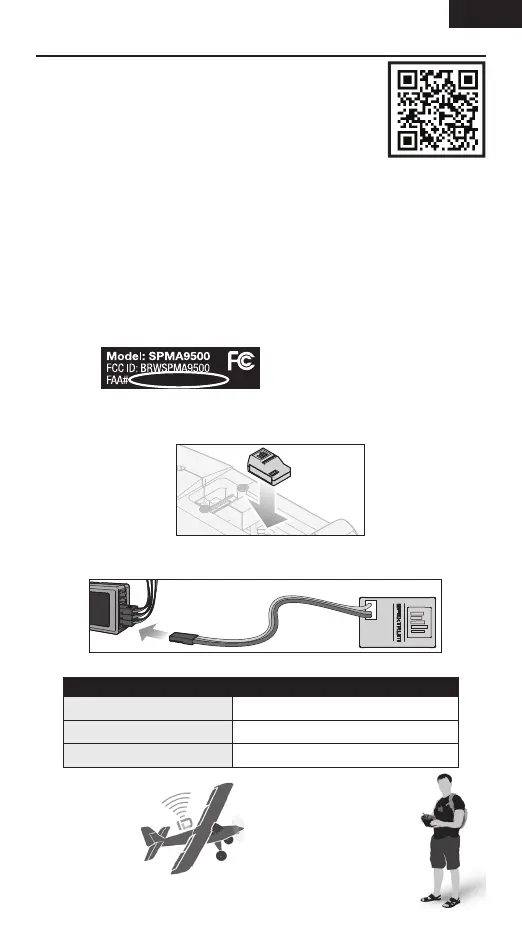
1. Register your serial number with the FAA.
2. Secure the SPMA9500 module to your aircraft.
3. Connect to a Spektrum telemetry port, an open servo port (up to 9v),
or a 3.3V to 9V power source.
4. Verify operation by viewing solid LED or Remote ID mobile app.
5. Fly!
LED Status Guide
Slow ash Aquiring GPS signal, wait to y
Solid Ready, y safely
Rapid ash Error, do not y
FAA DroneZone
1. Open the FAA DroneZone website.
2. Register and/or log into the DroneZone.
3. Launch the Drone owners and pilots
dashboard.
4. Select Manage Device Inventory.
5. Select Add Device.
6. Does your drone broadcast remote ID information? Select Yes.
7. Device type? Select Remote ID broadcast module.
8. UAS manufacturer? Enter Spektrum.
9. UAS Model? Enter SPMA9500 SkyID.
10. Remote ID Serial Number? Enter number from sticker on case.
11. Select Add Device.
XXXXXXXXXX



 To Next Page