21
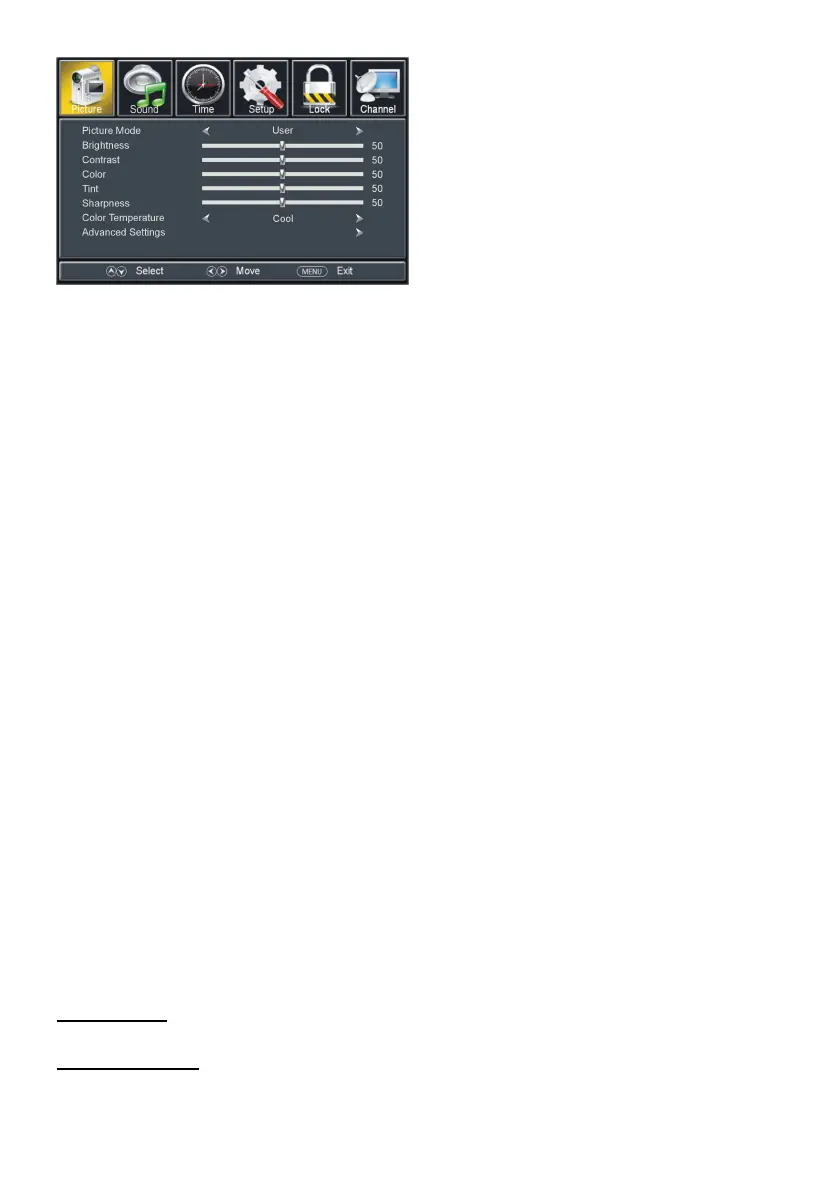
Available options: User, Standard, Dynamic, Soft, Power Saving.
The value of Brightness can be adjusted from 0-100.
The value of Contrast can be adjusted from 0-100.
The value of Color can be adjusted from 0-100.
The value of Tint can be adjusted from 0-100.
NOTE: Tint is adjustable only in certain TV system.
The value of Sharpness can be adjusted from 0-100.
Available options: Normal, Warm, Cool.
Available options: Normal, Wide, Zoom, Cinema.
Available options: Off, Low, Medium, High, Auto.
Notes: Power saving is the default setting, if you select some other options, the
power consumption may change.
The is product default mode (Power saving) already pass the Energy star test, if TV
set in other mode, may increase energy consumption beyond the limits required for
ENERGY STAR qualification.


 To Next Page