
 Need help?
Do you have a question about the Sperry instruments DM6800 and is the answer not in the manual?
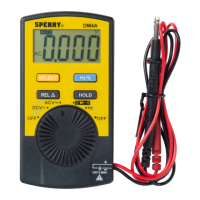
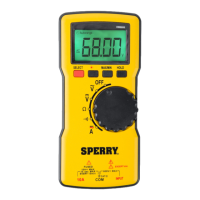
The Sperry Instruments DM6800 is a thin autoranging multimeter designed for various electrical measurements. It features a 1999-count LCD screen with a backlight for easy readability in different lighting conditions. The device is powered by two AAA batteries and has an auto power-off feature to conserve battery life, which can be disabled if continuous operation is required.
The DM6800 offers a range of measurement functions, including AC/DC voltage, AC/DC current, resistance, and continuity.
Voltage Measurement (AC/DC): To measure AC voltage, the black test lead is inserted into the COM terminal and the red test lead into the INPUT terminal. The rotary switch is set to the AC voltage position. The test leads are then touched to the circuit under test. For AC voltage, the polarity of the test leads does not matter. It is recommended to touch one test lead to ground or neutral first, then the second to the hot wire. Typical AC voltage measurements include wall outlets, appliance outlets, motors, light fixtures, and switches.
For DC voltage measurement, the setup is similar: black test lead in COM, red test lead in INPUT, and the rotary switch set to the DC voltage position. When touching the circuit, the black (common) test lead should be connected to the negative DC source (ground) first, and the red (positive) test lead to the "live" source second. If the leads are reversed, a "-" indicator will appear on the display. Common DC voltage measurements include car batteries, automotive switches, motors, and household batteries. It is crucial not to measure voltages higher than 600V AC or DC to avoid personal injury or damage to the meter.
Current Measurement (AC/DC): For current measurements, the black test lead goes into the COM terminal, and the red test lead goes into the 10A terminal. The rotary switch is set to the current position. For AC current, the "SELECT" button is pressed until "AC" is shown on the display. Before measuring, power to the circuit must be turned off, and the circuit opened. The red test lead is connected to one side of the break, and the black test lead to the other. Polarity does not matter for AC current. After connecting, power is returned to the circuit, and the amps are read from the display.
For DC current, the process is similar. After setting the rotary switch to the current position, the "SELECT" button is pressed until "DC" is shown. With power off and the circuit open, the red test lead is connected to the positive side of the break, and the black test lead to the negative side. Power is then restored, and the amps are read. It is important not to measure currents exceeding 10A AC or DC. If the fuse burns out during measurement, the meter may be damaged or personal injury may occur. Continuous measurement for currents between 5-10 amps should not exceed 10 seconds, with a 15-minute wait before additional measurements.
Resistance Measurement: To measure resistance, ensure the power to the circuit is off. The black test lead is inserted into the COM terminal, and the red test lead into the INPUT terminal. The rotary switch is set to the Ω (ohms) position. The test leads are then touched to the resistor or non-energized component to be measured. Polarity is not a factor for resistance measurements. Typical resistance measurements include resistors, potentiometers, switches, extension cords, and fuses. For measurements greater than 1MΩ, the meter may take a few seconds to stabilize, which is normal for high resistance readings. If the input is not connected (open circuit), "OL" will be displayed.
Continuity Test: For continuity testing, disconnect circuit power and discharge any high-voltage capacitors before measuring. Do not input 60V DC or 30V AC. The black test lead goes into the COM terminal, and the red test lead into the INPUT terminal. The rotary switch is set to the continuity position. When the test leads are connected across the object being measured, the buzzer will sound continuously if the resistance is less than approximately 30Ω, indicating a good connection. If the resistance is greater than 100Ω, the buzzer will not sound, indicating a possible broken circuit. For resistances between 30Ω and 100Ω, the buzzer may or may not sound. Typical continuity measurements include switches, extension cords, and fuses. An open circuit will display "OL."
Display and Controls: The DM6800 features a clear LCD display that shows the measurement value, along with various symbols indicating the active mode or status.
Safety Features: The meter is designed with safety in mind, conforming to CAT III 600V, Pollution Degree 2 standards. It includes overload protection with a 10A/600V fast fuse. Warnings are provided against measuring high voltages or currents, using the meter in the presence of flammable gases, or operating it with wet hands or damaged leads.
Battery Replacement: To avoid false readings and potential electric shock, the battery indicator will appear when the battery is low, signaling the need for replacement. To replace the batteries:
Fuse Replacement: If the fuse burns out, it must be replaced with a specified 10A/600V fast-type fuse (6.35mm x 32mm).
General Service:
 General
| Continuity | Yes |
|---|---|
| Diode Test | Yes |
| Auto Ranging | Yes |
| Data Hold | Yes |
| Backlight | Yes |
| Display | LCD |
| DC Voltage Range | 600mV, 6V, 60V, 600V, 1000V |
| Temperature Range | -40°C to 1000°C |
| Safety Rating | CAT III |


 To Next Page