6875 Freezer/Mill
Page 29 of 42 SPEX® SamplePrep LLC DEC 2015
8.0 RESOURCES
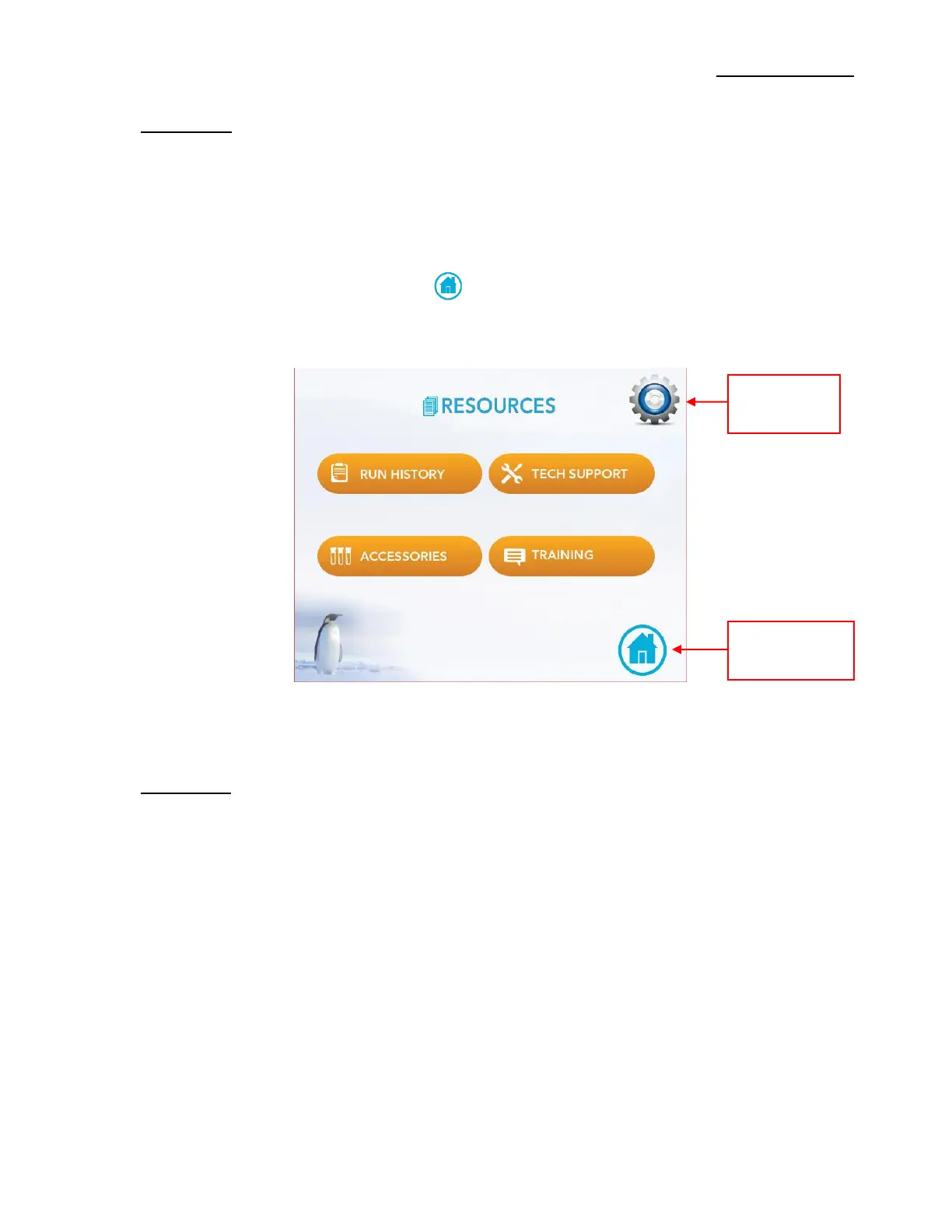
The Resources screen button is located on the Home screen (Figure 4). To access the Resources
screen touch the Resources button. On the Resources screen, as seen in Figure 14, are additional
buttons to recall the run history, technical support, accessories (e.g. vials, holders, etc.), and
training information (e.g. how-to videos, operating manual). Located at the top right on the
Resources screen is the Settings button shaped as a Gear Icon. At the bottom right on the
Resources screen is the Home Icon button . Touching the Home Icon returns the user to the
Home screen (Figure 4).
8.1 Run History
To recall the Run History touch the Run History button. The Date, Time, and Run Protocol data
are stored on this screen, as shown in Figure 15. The run information can be exported to other
computer devices via the USB Port located on the back of the Controller. To export run data
touch the Export History button at the bottom right of the screen. To clear Run History or delete
Run History permanently from data storage touch the Clear History button at the bottom left of
the screen. To return to the Resources screen touch the back arrow button at the top left corn of
the screen.
Figure 15 – Resources Screen


 To Next Page