Need help?
Do you have a question about the SPI 40G03 and is the answer not in the manual?
Sets the instrument to zero in ABS mode or allows for a preset value.
Explains the difference between absolute and incremental measurement modes.
Details how to toggle between Absolute and Incremental measurement modes.
Describes how to access various mode options like tolerance and calibration.
Guides on setting lower and upper tolerance limits for measurements.
Instructions for setting a specific measurement value as a reference point.
How to use the MAX/MIN functions to capture extreme measurement values.
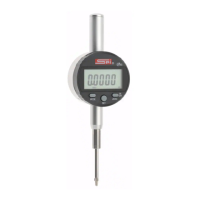
This document describes the IP65 Digital Indicator, a precision measuring device with various functionalities for accurate measurements.
The IP65 Digital Indicator is designed for precise measurements, offering both absolute and incremental modes. It features a digital display (LCD) for clear readings and various icons to indicate the current mode, tolerance status, and measurement units. The device can display measurements in both millimeters (mm) and inches (INCH). It also includes a MAX/MIN function to record the maximum and minimum spindle movement values, and can calculate the difference between them. Tolerance settings allow users to define upper and lower limits, with visual indicators for values within, above, or below these tolerances.
The device is operated through several buttons:
Zero Setting:
Absolute and Incremental Modes:
Switching Between Mode Options:
Setting Tolerance Parameters:
Setting a Preset Value:
Change Display Sign:
MAX/MIN Function:
 General
| Brand | SPI |
|---|---|
| Model | 40G03 |
| Category | Measuring Instruments |
| Language | English |

 To Next Page