ITEMS
6
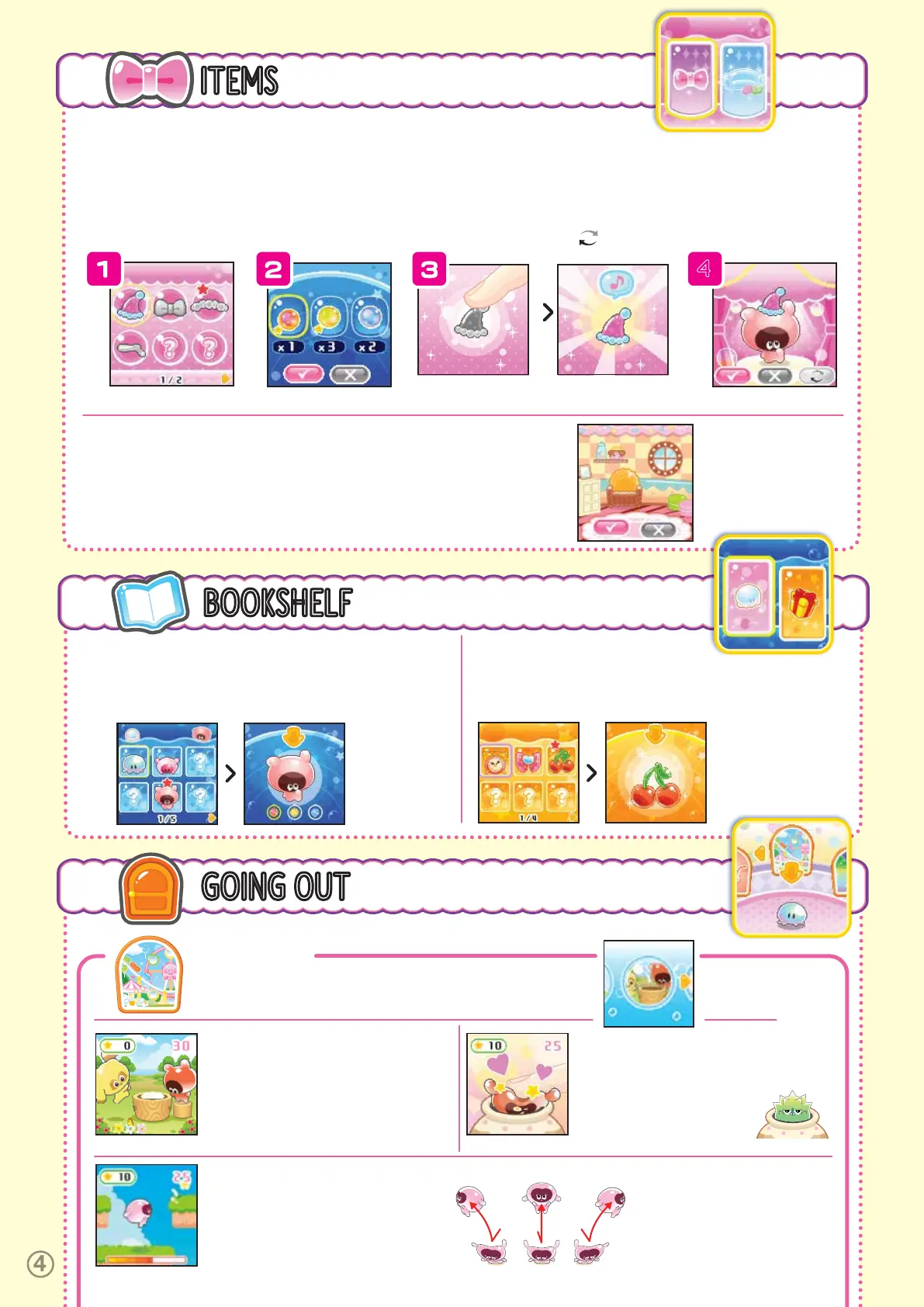
There are 2 categories of Items: Dress Up and Decorate.
Choose a category and press B.
DECORATE
Choose the room you would like to switch to from the rooms you bought at the Market
((8) Going Out > Market > Decorate). Choose
ü
to change to the room you selected.
GIVE THEM
A SQUISH!
THE COLOR
CHANGED!
DRESS UP
1.
Select the items you want to dress your Punirunes in from the items
you bought at the Market ((8) Going Out > Market > Dress Up).
*If you choose an item that has already been colored, you’ll go to screen 4.
2.
You can color the item you chose by adding 2 Seeds to it. You can
also choose 2 Seeds of the same color and choose
ü
.
3.
Press the Squishy Button to give it a squish and change the
color! The color you end up with will depend on the Seeds you
choose to combine.
4.
Choose
ü
to change your Punirunes into the items you selected
and go back to the Room. Choose
û
to remove the items and go back
one step. Choose to go back to step 2.
4
BOOKSHELF
7
There are 2 categories in the Bookshelf:
Punirunes and Gifts. Select and press B.
PUNIRUNES
See all the Punirunes you have raised . Choose the Punirunes you
want to check and press B. You can change the color of Adult
Punirunes by pressing A. (See: 5. Punirunes Growth.)
GIFTS
You can see the Gifts left by Punirunes you’ve said goodbye to.
Choose the Gift you want to check and press B.
GIFTS ARE
ALSO SQUISHY!
GIVE THEM
A SQUISH!
GOING OUT
8
Press A to select the place you want to visit, then jump up by
holding down and releasing the Squishy Button to go out.
THEME PARK
Play 6 different games at the Park. Select the game you want to play and
press B. Press
ü
to start the game.
MOCHI POUNDING
Use the Squishy Button to flip the mochi
over in time with the mallet swings, but be
careful not to smash your hands!
SQUISH N’ JUMP
Use the Squishy Button to jump up and
collect the stars as you make your way to
the goal. Be careful not to hit any crabs or
birds!
Hold down and release the Squishy
Button normally to jump up. Press it
to the right to jump right, and press it
to the left to jump left. Hold the button
down for a while to do a big jump!
SQUISH PANIC
Press the Squishy Button when the
Squishy Punirune comes out of the jar!
Be careful to avoid the Prickly
Punirune, or you won’t be able to
move for a little while.



 To Next Page