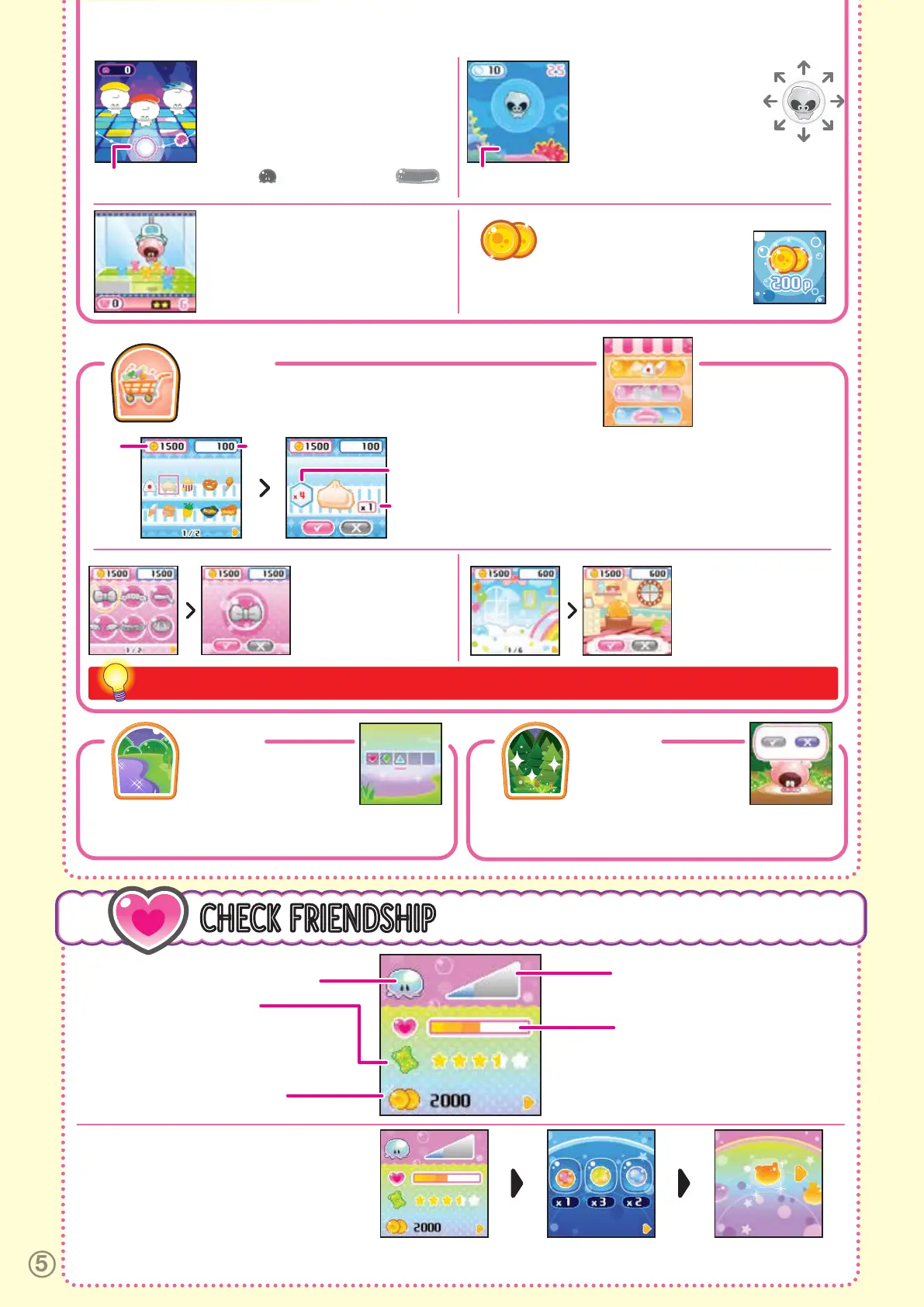
CHECK FRIENDSHIP
9
FRIENDLINESS
Fill this bar to get your Punirunes to grow.
Take really good care of them!
PUNIRUNES YOU’RE RAISING
FULLNESS
The bar fills up when you feed them!
CHECK
FRIENDSHIP
HOW MANY SEEDS
YOU HAVE (MAX. 99 EACH)
THE KIND OF MAGIC
SQUISHY YOU HAVE
COINS
These are Coins you can use at the Market.
Earn Coins by playing games at the Park!
(max. 9999 coins)
See how the Punirunes you are raising is doing.
WHEN YOU PRESS B, THE
SCREEN WILL CHANGE IN THE
ORDER SHOWN ON THE RIGHT.
SQUISH ZONE
HOW
MANY
COINS
YOU
HAVE
PRICE
HOW MANY
YOU WANT
TO BUY
HOW
MANY
YOU HAVE
PLAY TO WIN COINS!
Finish each game to win Coins based on your
score. Use the Coins to buy things at the Market.
SQUISH DANCE
A Puniroo will flow along the screen in time
with the music. Press the Squishy Button
when a Puniroo enters the Squish Zone!
Hold down the Squishy Button when you
see a Looooong Puniroo!
DRESS UP
Press B after choosing the
items you want to buy to go
to the Details Screen.
Choose
ü
to buy.
DECORATE
Choose the room you want
to buy and press B.
Choose
ü
to buy.
INGREDIENTS
Press B after choosing the ingredients you want to buy to go to
the Details Screen. Choose the number you want to buy.
Choose
ü
to buy.
Pressing the Squishy Button away from you
will make your Punirune float, while
pressing it toward you will make them sink.
PUNIROO BUBBLESLOOOOONG PUNIROO
SQUISH CRANE
Use the Squishy Button and B to control the
crane and collect the gummies by getting
them to stick to your Punirune. If they get
stuck in the wrong spot, the gummies might
fall off!
MARKET
Use Coins to buy Ingredients, Dress Up items and room Decor for your
Punirunes.
FOREST
You can visit the Forest when
your Punirune becomes
an Adult. When you want to
part ways with your Punirunes, you can say goodbye to them here.
(See: 5. Punirunes Growth > Saying Goodbye to Your Punirunes.)
LAKE
Collect items by entering
passwords here. Parents,
check out Spin Master’s
official Punirunes website for details about releasing passwords!
www.spinmaster.com/punirunes
Once you buy a Dress Up or Decorate item, a sign reading X will appear, meaning that item is sold out.
PUNIRUNES TYPE
Low = BABY, Medium = KID, High = ADULT
BUBBLE UP
Use the Squishy Button to control
your Punirune, and collect small
bubbles
to make their bubble bigger!



 To Next Page