battery will provide approximately 3-4 hours of practice time. Higher
ball speed requires more power and therefore will drain the battery
faster.
It is very important to CHARGE THE BATTERY IMMEDIATELY
AFTER EACH USE.
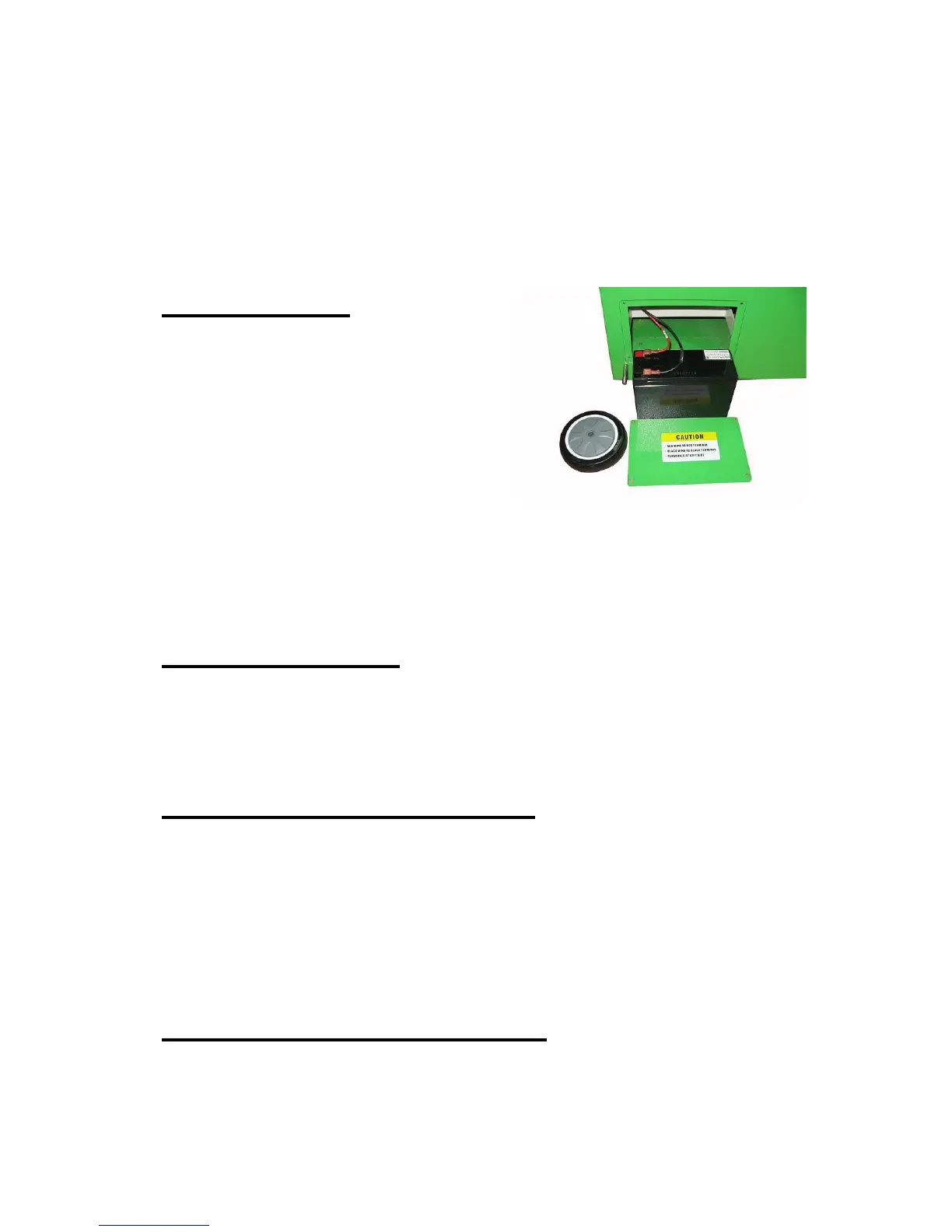
Battery Cage
The battery cage enables the user to
easily install and replace the battery
or an AC module. Disassemble the
wheel first before opening the battery
cage door. If wheel was installed too
tight, screw it down. After opening the
cage, you will find 2 wires which
should be connected to the battery
terminals. The red wire should be
connected to the red terminal and black wire to the black terminal. Care
must be taken to ensure you put the battery terminals to the top left
side when you insert the battery into the cage.
Static Electricity
It is possible that the action of the tennis balls rubbing against the
throwing wheels will cause a small static electric shock when you touch
the control panel. To eliminate this connect a wire from the control
panel to the court surface.
Transporting and Storage
Remove all balls and close the ball hopper before transporting your
SPINSHOT ball machine. Store the machine in a clean, dry location.
Never store the machine in a closed trunk where temperatures can be
very high. Extreme temperatures and conditions can affect the
machine’s electronic board and battery. Never store the machine
outside. Exposure to rain and snow will shorten the life of the machine.
Maintenance and Cleaning
It is suggested that you clean the ball throwing wheels every year or
after 150 hours of use especially when the machine is not throwing the


 To Next Page