Section-2: Operating Machine
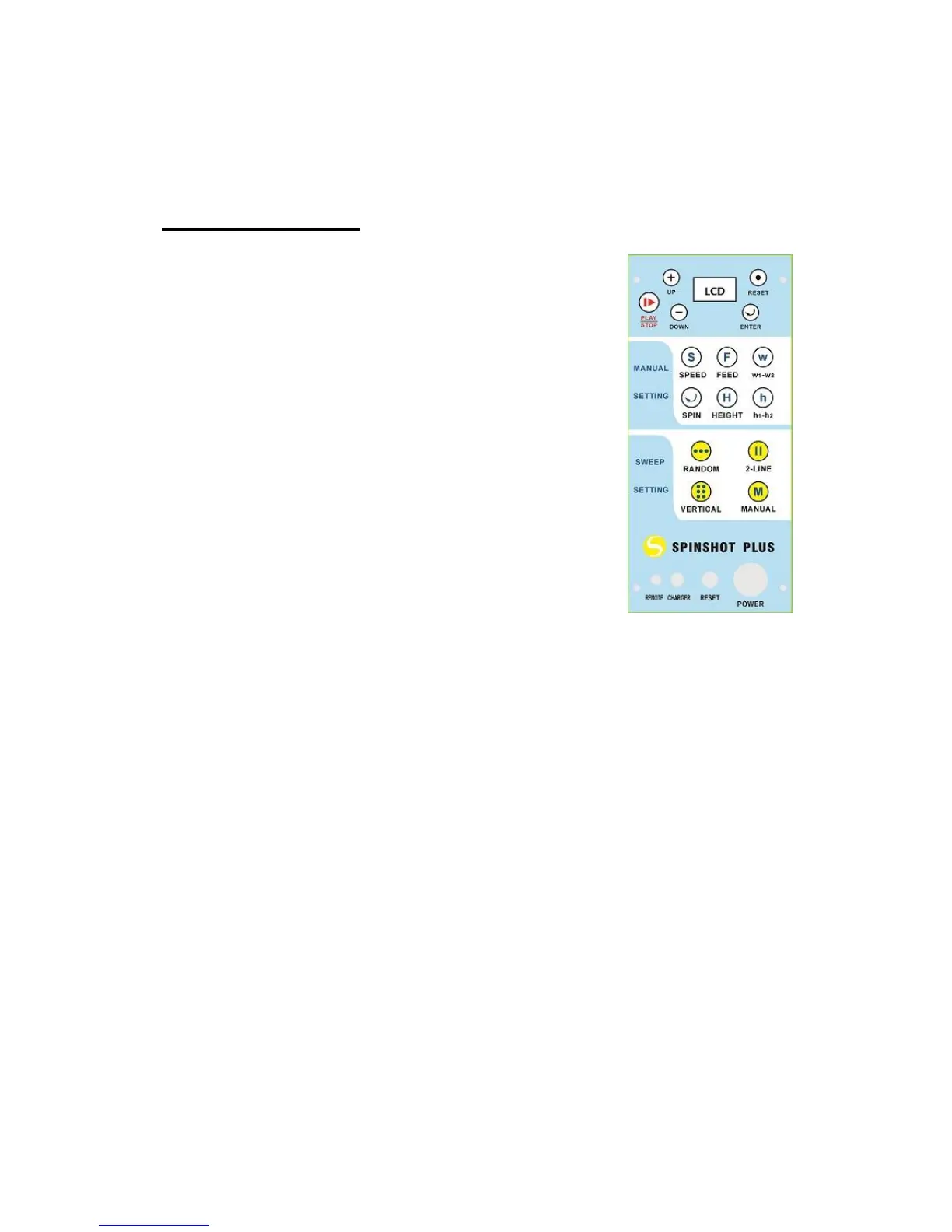
Control Panel
POWER: The power switch is used to turn on or
off the machine. After you turn on the power, the
machine will show its battery voltage on the LCD.
Both horizontal and vertical motors will perform a
functional initialization for proper function of the
machine. Then user needs to put the machine at
the centre of the baseline and in proper direction,
which will make machine sweep the balls evenly
across the court.
Powering on the machine will not make machine
start to propel balls. The user needs to select the
settings and then push the “PLAY/STOP” button.
After switching the power on, the machine will be
default to work on manual mode without
oscillation.
If at anytime the machine functions improperly, the user can turn
off the power button to reset machine’s control logic. Most of the
time, the improper working of the machine is caused by low
battery voltage.
RESET: The white reset switch protects the electronics and motors.
When activated, this switch pops out approximately 6mm. In the event
when the reset is activated, turn off the main power, press the reset
switch, check for any balls jammed inside machine and then turn on the
main power to normal operation status. The “reset” can be caused by
excessively dirty or slick ball throwing wheels which prevent the wheels
from properly grabbing the ball. Cleaning the ball throwing wheels as
described in the section “Maintenance and Cleaning” will restore
proper performance.
CHARGER JACK: Plug the charger into the jack and the other end into
a power outlet to start the charging of your machine.
REMOTE: Plus machine can support phone remote to control the


 To Next Page