Phonitor xe – Quickstart Phonitor xe – Quickstart
~ 115V AC / ~230V AC, 50 Hz / 60 Hz, P max. 45 W
RL
LR
USBOPTICAL
COAX
Phonitor xe
Serial
Number
Made in Germany
PGM
VOLUME
Refer to
Manual
IR
AVIS: RISQUE DE CHOC ÉLECTRIQUE • NE PAS OUVRIR
RISK OF ELECTRIC SHOCK
DO NOT OPEN
CAUTION
Fuses:
Voltage Selection:
230V AC: T 500 mA L 250 V
115V AC: T 1 A L 250 V
1. Remove Fuse Holder
2. Exchange Fuses
3. Flip Over 4. Reinstall
XLRs: balanced, Pin 2 = Hot (+)
For unbalanced operation
bridge Pin 3 to GND.
RCAs: Unbalanced, Tip = Hot (+)
WIRING
ON BOTTOM SIDE:
DIP SWITCHES
1 ON: HP Out +22dB
2 ON: RCA -10dBV to 0dBu
ANALOG SOURCES DIGITAL SOURCES
ANALOG SOURCES DIGITAL SOURCES
HEADPHONES OUTPUTS
HEADPHONES OUTPUTS
AES
R
L
StandardBalanced
Phonitor
xe
V
O
L
U
M
E
M
I
N
2
3
4
5
M
A
X
Off On
MATRIX
C
R
O
S
S
F
E
E
D
2
2
°
3
0
°
4
0
°
5
5
°
A
N
G
L
E
VOLTAiR
120V DC Audio Rail
Headphone Amplifier
ON
RCA
XLR
Coax
Optical
AES
USB
S
O
U
R
C
E
Mono
Stereo
MODE
L
A
T
E
R
A
L
I
T
Y
L
e
f
t
C
e
n
t
e
r
R
i
g
h
t
StandardBalanced
0 +12
F R
VU
+6
Start up
Read the security advices on page !
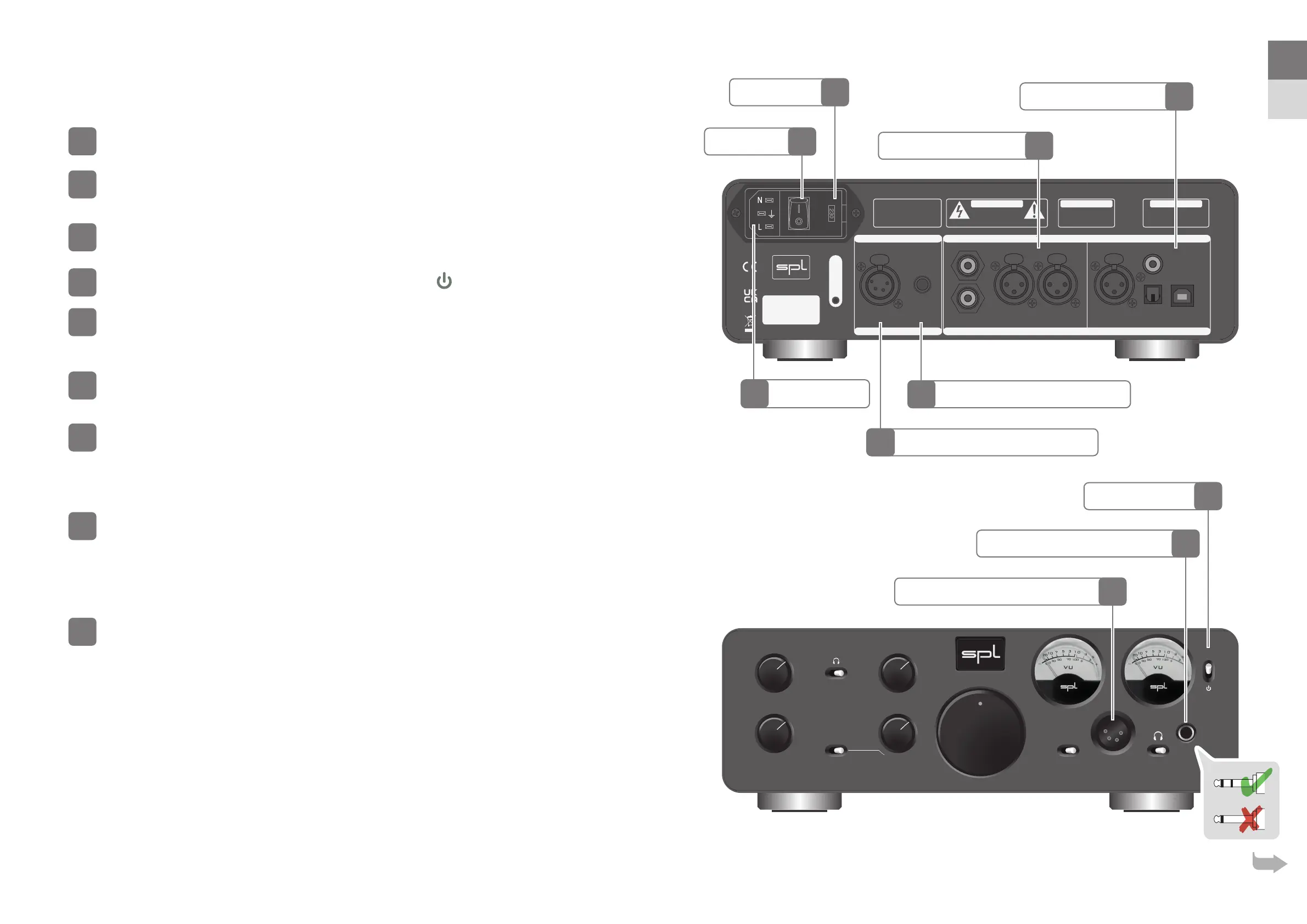
Make sure that the selected mains voltage of the Phonitor xe is according to the
mains voltage of your region.
Make sure that the mains switch on the rear of the Phonitor xe is set to O
(O =O/On=I).
The standby switch on the front panel has to be set to
(standby).
Connect the supplied power cord to the Phonitor xe and an appropriate mains
socket outlet.
If the supplied power cord does not match your mains socket outlet, please contact your dealer.
Turn o all devices you wish to connect to the Phonitor xe.
Connect the outputs of your analog sources (e.g. CD Player, Phonos) to the
analog inputs of the Phonitor xe. Please use appropriate audio cables (XLR,
RCA).
Audio cables not included in the scope of delivery.
If the DA converter option is tted connect the outputs of your digital sources
(e.g. Mac, PC or CD Player) to the digital inputs of the Phonitor xe. Please use
appropiate audio cables (USB, coaxial, optical, XLR).
Digital audio cables not included in the scope of delivery.
For Windows
®
computers download the latest driver from spl.audio and have it installed. Macs, iPhones and iPads
do not require a driver since the USB port is Apple-Class compliant.
Connect your headphone to the balanced or standard headphone output of the
Phonitor xe – either on the front or on the rear.
To protect the headphone power ampli er stage and guarantee a long and consistent performance please note:
• Turn down VOLUME before swapping headphones.
• Never insert a mono jack plug into the front panel stereo jack.
• Make sure that the headphones stereo jack is fully inserted.
• If you use an adapter from , mm to /" (, mm) on your headphone make sure that the adapter is fully
screwed on respectively fully plugged in.
2
6
Analog Audio Inputs
Digital Audio Inputs
Balanced Headphone Connection
Balanced Headphone Connection
Standby Switch
Standard Headphone Connection
Standard Headphone Connection
optional
Mains Voltage
Mains Switch
Mains Connector
EN
DE


 To Next Page
 Loading...






