Phonitor xe – Quickstart Phonitor xe – Quickstart
~ 115V AC / ~230V AC, 50 Hz / 60 Hz, P max. 45 W
RL
LR
USBOPTICAL
COAX
Phonitor xe
Serial
Number
Made in Germany
PGM
VOLUME
Refer to
Manual
IR
AVIS: RISQUE DE CHOC ÉLECTRIQUE • NE PAS OUVRIR
RISK OF ELECTRIC SHOCK
DO NOT OPEN
CAUTION
Fuses:
Voltage Selection:
230V AC: T 500 mA L 250 V
115V AC: T 1 A L 250 V
1. Remove Fuse Holder
2. Exchange Fuses
3. Flip Over 4. Reinstall
XLRs: balanced, Pin 2 = Hot (+)
For unbalanced operation
bridge Pin 3 to GND.
RCAs: Unbalanced, Tip = Hot (+)
WIRING
ON BOTTOM SIDE:
DIP SWITCHES
1 ON: HP Out +22dB
2 ON: RCA -10dBV to 0dBu
ANALOG SOURCES DIGITAL SOURCES
ANALOG SOURCES DIGITAL SOURCES
HEADPHONES OUTPUTS
HEADPHONES OUTPUTS
AES
R
L
StandardBalanced
Phonitor
xe
V
O
L
U
M
E
M
I
N
2
3
4
5
M
A
X
Off On
MATRIX
C
R
O
S
S
F
E
E
D
2
2
°
3
0
°
4
0
°
5
5
°
A
N
G
L
E
VOLTAiR
120V DC Audio Rail
Headphone Amplifier
ON
RCA
XLR
Coax
Optical
AES
USB
S
O
U
R
C
E
Mono
Stereo
MODE
L
A
T
E
R
A
L
I
T
Y
L
e
f
t
C
e
n
t
e
r
R
i
g
h
t
StandardBalanced
0 +12
F R
VU
+6
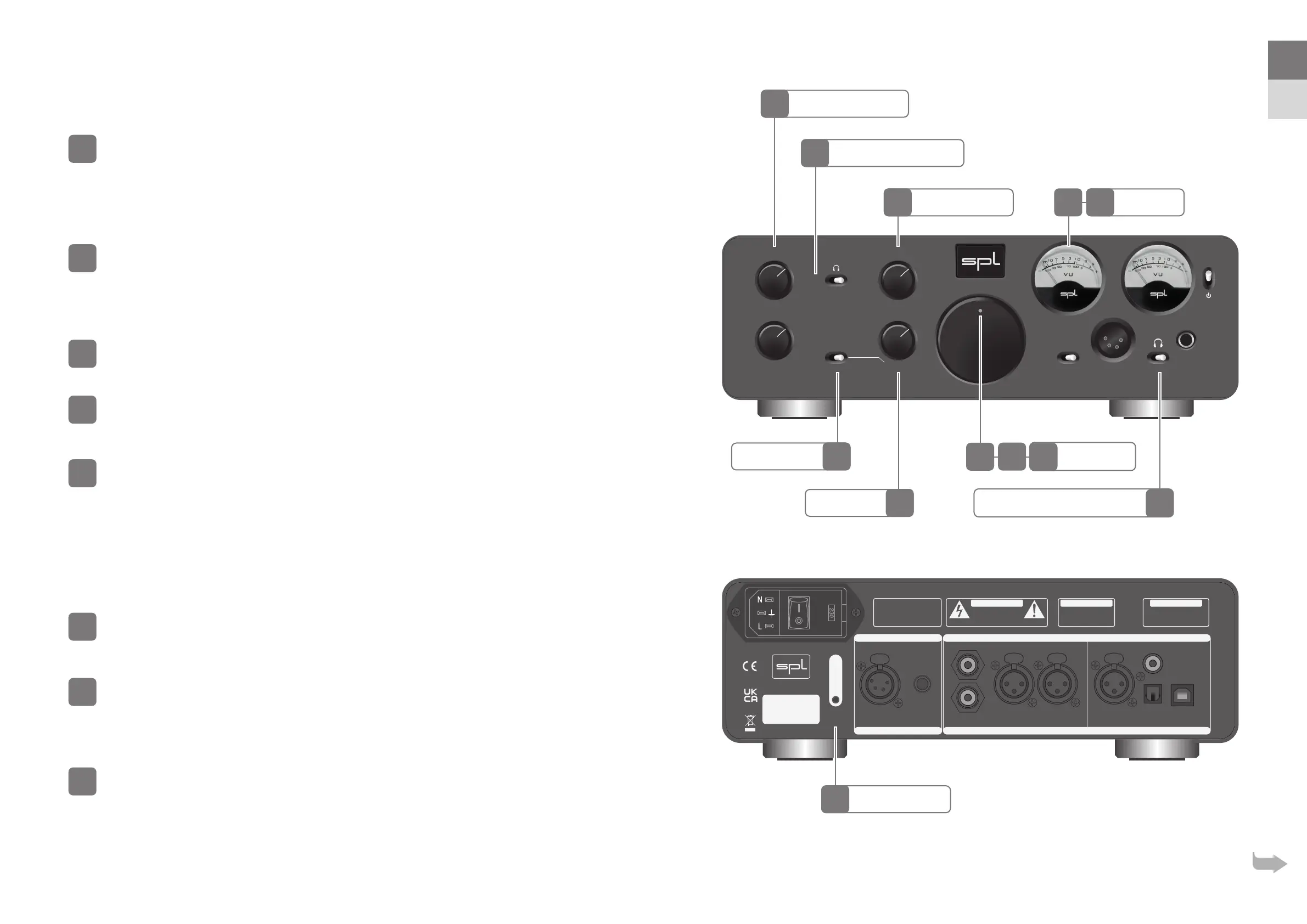
Headphone output selection
By using the F/R switch you can select an output – Headphone outputs on the
front (F) or Headphone outputs on the rear (R) of the Phonitor xe.
Phonitor Matrix settings
By using the MATRIX switch you can activate (ON) or deactivate (OFF) the
Phonitor Matrix.
The Phonitor Matrix creates a speaker-like listening experience on headphones. When listening to speakers sound
coming from one side is also perceived with the ear on the opposite side. The Phonitor Matrix calculates the time
and level di erences with their speci c frequency responses to deliver a true rendition of a speaker playback.
With the CROSSFEED switch you adjust the interaural level di erence.
The size, reflections and absorption characteristics of a room influence the level with which a sound coming from a
speaker is perceived with the opposite ear. The Phonitor Matrix provides positions to adjust this level.
With the ANGLE switch you adjust interaural time di erence.
The placement of the speakers determine the stereo width. In a standard stereo speaker setup the angle is typically
°. The Matrix o ers three more angles. The wider the speakers are apart the higher the time di erence.
The MODE switch selects the playback – mono, stereo and stereo with an
extremely ne balance (LATERALITY).
Learn IR remote control
The volume potentiometer of the Phonitor xe is motorized and can be operated
by any infrared (IR) remote control.
Press the IR PGM VOLUME button (infrared programmable volume).
Power LED now lights up brighter and the Volume control moves fully counter clockwise.
Point your remote control towards the VU display and push the button you wish
to use to
lower
the volume. The Power LED lights up once per push. Press the
same button repeatedly until the Power LED lights up three times within a short
interval – programming of this button is then completed.
Point your remote control towards the VU display and push the button you wish
to use to
increase
the volume. The Power LED lights up once per push. Press
the same button repeatedly until the Power LED lights up three times within a
short interval – programming of this button is then completed.
Learn mode ends automatically a er the second button is learned.
IR PGM Volume
Laterality
Crossfeed Switch
Phonitor Matrix Switch
Angle Switch VU Meter
Power LED
Headphone Output Selection
Mode Switch
EN
DE


 To Next Page
 Loading...






