8
PAUSING A CYCLE
To pause the wash cycle, press the START/PAUSE button again. To start
the wash cycle from the point at which it was interrupted, press and hold
the START/PAUSE button again.
OPENING THE DOOR, IF NECESSARY
Shortly after a cycle starts, the symbol turns on to signal that the door
cannot be opened. While a wash cycle is running, the door remains
locked. To open the door while a cycle is under way, for example, to add
or remove garments, press the START/PAUSE button to pause the
cycle. If the symbol is not lit, the door may be opened. Press and hold
the START/PAUSE button again to continue the cycle.
CHANGING A RUNNING WASH CYCLE
To change a wash cycle while it is in progress, pause the washing machine
using the START/PAUSE button, then select the desired cycle and press
and hold the START/PAUSE button again.
To cancel a cycle that has already begun, press and hold the ON/OFF
button. The cycle will be stopped and the machine will drain any
remaining water in the drum, then shut o.
AT THE END OF THE WASH CYCLE
This will be indicated by the word “ ” on the display; when the
symbol switches o, the door may be opened. Open the door, unload the
laundry and switch o the machine. If you do not press ON/OFF button,
the washing machine will switch o automatically after about 15 minutes.
OPTIONS
- If the selected option is not compatible with the set wash cycle, the
indicator light will ash accompanied by a buzzer and the option will
not be activated.
- If the selected option is not compatible with another previously
selected option, the indicator light will ash accompanied by a buzzer
and the option will not be activated.
Super Wash
This option lengthens the cycle and uses more water, oering a high-
performance wash.
Post Cycle Care
By selecting this function, the wash and spin cycles will be modied in
order to reduce the formation of creases. At the end of the cycle the
washing machine will perform slow rotations of the drum; the “POST
CYCLE CARE” indicator light will continuously blink, and “End” will appear
on the screen..
To end the cycle, press any button or turn the knob.
For the Silk cycle, the machine will end the cycle without performing a
nal spin, so the clothes will remain saturated in order to prevent creases
from forming. The “POST CYCLE CARE” indicator light will continuously
blink, and “End” will appear on the screen.
Extra Rinse
The Extra Rinse option provides an additional rinse to the selected cycle.
Extra Rinse is not available for all cycles.
Delay Start
To set a delayed start for the selected cycle, press the corresponding
button repeatedly until the desired delay period is reached. When this
option has been activated, the symbol lights up on the display. To
remove the delayed start setting, press the button until “OFF” appears on
the display.
Temperature
Each wash cycle has a pre-dened temperature. To modify the
temperature, press the “ Temp” button.
The temperature has 4 selections: Cold - Lukewarm - Warm - Hot.
Spin
Each wash cycle has a pre-dened spin speed. To modify
the spin speed, press the “ Spin” button. The value will
appear on the display.
The spin speed may be adjusted, or the spin cycle can be
excluded altogether by turning OFF all leds.
Prewash
This option performs an additional wash phase with cold water. Add an
additional dose of detergent to the Prewash compartment if using this
option. If this option is used, liquid chlorine bleach cannot be added
TIPS AND SUGGESTIONS
Divide the laundry according to:
Type of fabric (cotton, mixed bres, synthetics, wool, garments to be hand-
washed). Color (separate colored garments from whites, wash new colored
garments separately). Delicates (small garments – such as nylon stockings –
and items with hooks – such as bras: insert them in a fabric bag).
Empty the pockets:
Objects such as coins or lighters can damage the washing machine and
the drum. Check all buttons.
ACCESSORIES
Contact our Technical Assistance Service to check if accessories are available
for this washing machine model.
Technical Service: 1-800-356-0766
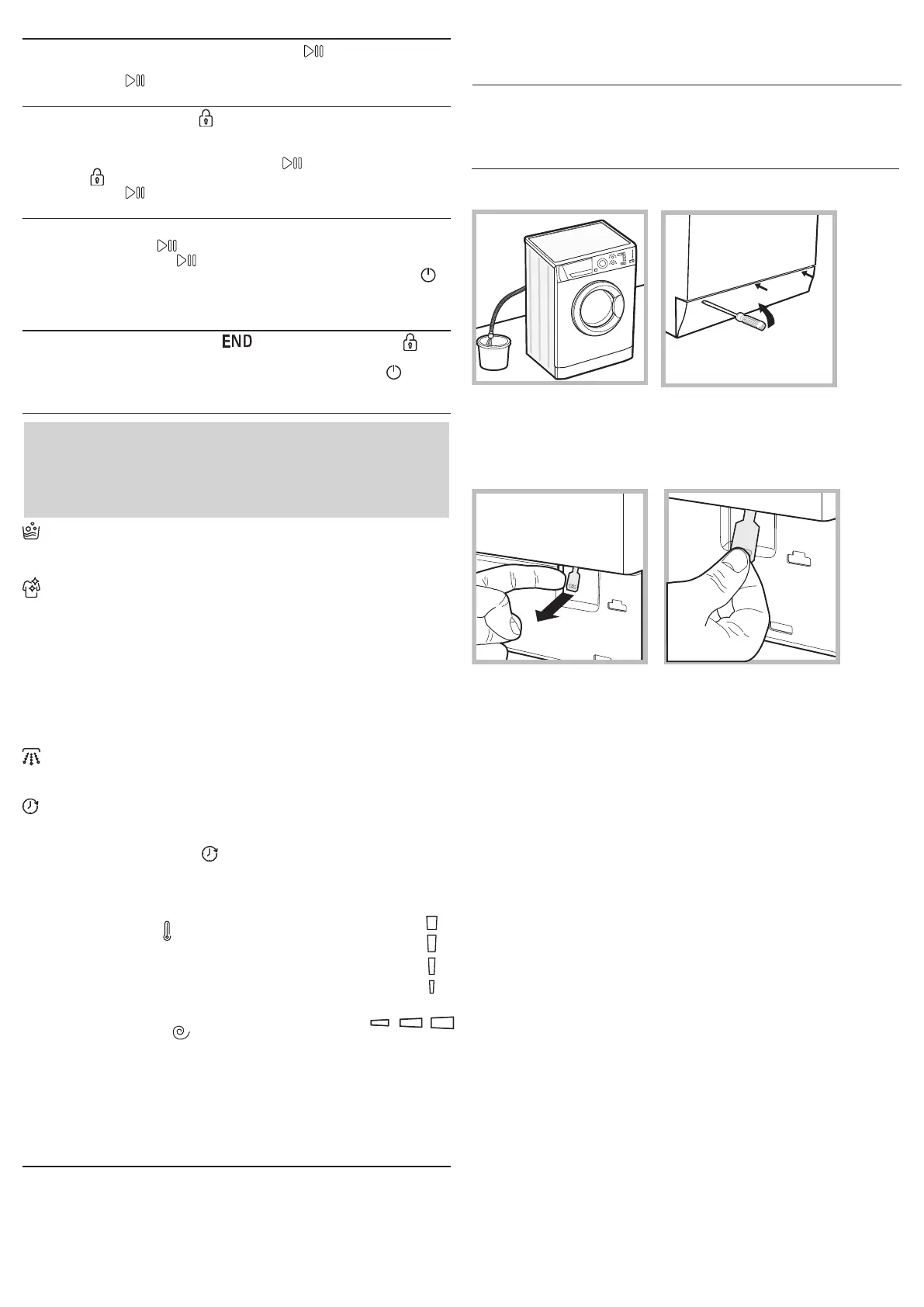
OPENING THE PORTHOLE DOOR MANUALLY
In the event that it is not possible to open the porthole door due to a
powercut, and if you wish to remove the laundry, proceed as follows:
1. Remove the plug from the electrical socket.
2. Make sure the water level inside the machine is lower than the door
opening; if it is not, remove excess water using the drain hose, collecting
it in a bucket as indicated in the gure.
3. Using a screwdriver, remove the cover panel on the lower front part of
the washing machine (see gure).
4. Unscrew and remove the screw that is holding the tab in place.
5. Pull outwards using the tab as indicated in the gure, until the plastic tie-
rod is freed from its stop position; pull downwards and open the door at the
same time.
6. Reposition the panel, making sure the hooks are securely in place before
you push it onto the appliance.


 To Next Page