1 2 3 4 5 6
OFF
ON
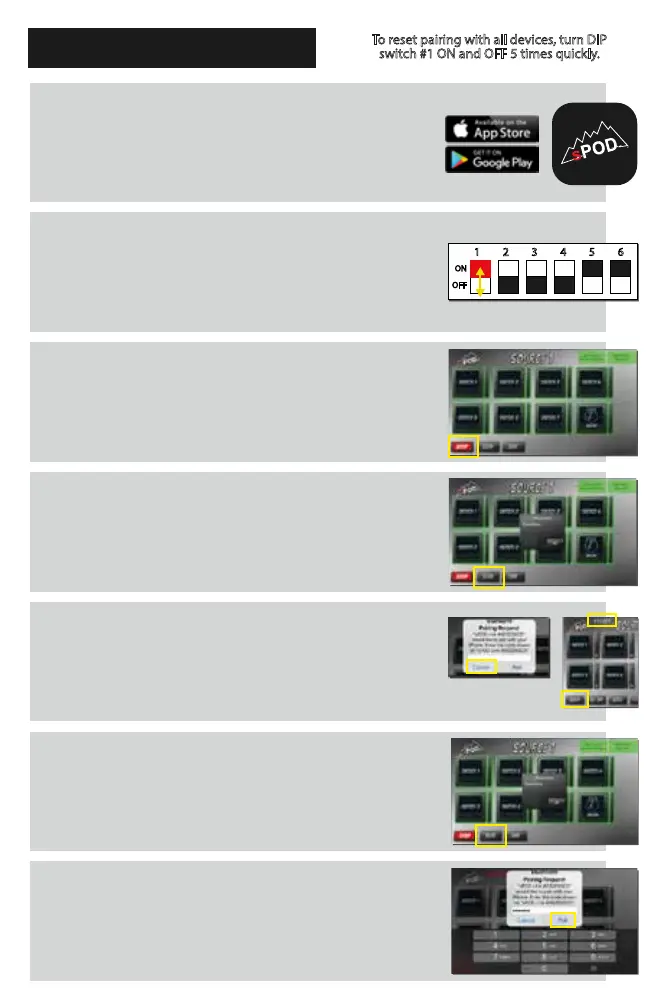
Download the sPOD Bantam app onto your
smartphone or tablet. Be sure that your
device’s Bluetooth option is turned on.
With the app closed and o, ip DIP switch 1
ON then OFF in quick succession to put the
Bantam in PAIRING MODE for 60 seconds.
Open the Bantam app and touch Setup.
Touch the Scan button and wait 10 seconds.
Hit Cancel and wait about 10 seconds for the
PIN to appear in upper left (in white). Touch
the Setup button.
Touch the Scan button and wait 10 seconds.
When Pairing Request dialogue box appears,
enter PIN number and then touch the Pair
button. The app will now be paired to the
Bantam and will be ready to use.
To reset pairing with all devices, turn DIP
switch #1 ON and OFF 5 times quickly.
PAIRING THE BLUETOOTH
R


 To Next Page