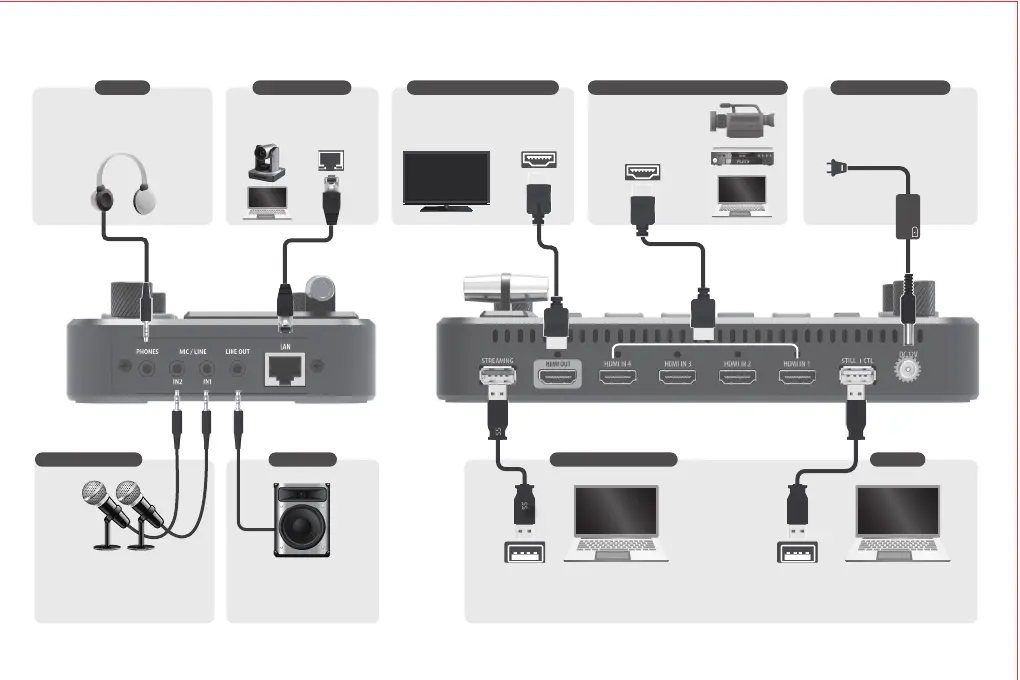
Connection Diagram
PHONE
Support all input channel &
output channel monitoring.
Connect this port to headphones.
LAN CONTROL
Support third party control
Support PTZ control
Default IP:192.168.1.150
LINE IN / MIC IN
Support 2 channel external audio.
Connect this port to mic or
external audio mixer.Choose mic in
level / line in level accordingly.
LINE OUT
Connect this port to amp or
speaker. This audio output
the result of audio mixing.
USB3.0 STREAMING USB2.0
Connect this to your PC with USB3.0 port.Neolive R2 will be
detected by PC as high quality webcam and microphone.You
can use this to live-stream you video and audio content.
Still image upload
System update
MONITOR CONNECTOR
Connect this to display.
This output can be set as
Preview/ Program/ Multi-view
VIDEO INPUT 1-4 CONNECTORS
Connect this to video
devices such as
camera, PC, or media
player.
POWER ADAPTOR
Connect the attached AC power
adaptor to this jack. Make sure
the screw has been fasten.


 To Next Page