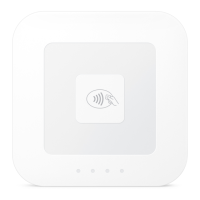
Reader Authentication and Use
Authentication of the Reader
Upon receipt, the Seller can connect the Reader to the USB hub of the Square Stand or to their mobile device
running the Square Point of Sale Application using bluetooth. The Reader is cryptographically authenticated to
both the Point of Sale application and the Square back-end servers. If the Reader is valid, it will register as such
with the Square Point of Sale application. If the Seller has received an unauthorized reader, the Square Point of
Sale application will indicate that the reader cannot be used with the application. The Seller does not have
permissions to configure the Point of Sale application or Reader settings for the authentication function.
Using the Reader
How to obtain a Reader
The Reader may be obtained either via the Square website www.squareup.com or via an approved retail
location. The Reader is ready for use upon receipt. The Seller should verify that Square offers payment
processing in their country of intended operation, from a retailer located in the same country.
Attributes of a Reader
The Reader has the following PCI PTS approval class: Secure Card Reader - PIN. The Reader is intended for use
in countertop and/or handheld environments with attended and semi-attended payments; it is not intended for
use as an unattended payment terminal (UPT). Use of the device in an unapproved method invalidates the PCI
PTS approval of this device.
How to store a Reader
To store the Reader simply remove it from the Square Stand USB port and store for next use. In the event the
Seller will not use the Reader for more than twelve (12) months at a time, be sure to charge the Reader prior to
storage and periodically to preserve its readiness. If the Reader is not fully charged annually it will enter into a
tampered state and become inoperable.
Procedures for using a Reader
It is important that each day or before use the Seller check the Reader to make sure it has not been tampered
with between uses. This can be easily done by looking at the chip card slot to verify there are no foreign objects
such as capture devices, card skimmers, extra wires/cables or other materials.
The Square Point of Sale application will convey operational messages from the Reader including when the
device is ready for payment and when a payment data capture is complete. The Reader has no
user-configurable security options.
Security Self-Tests


 To Next Page
 Loading...