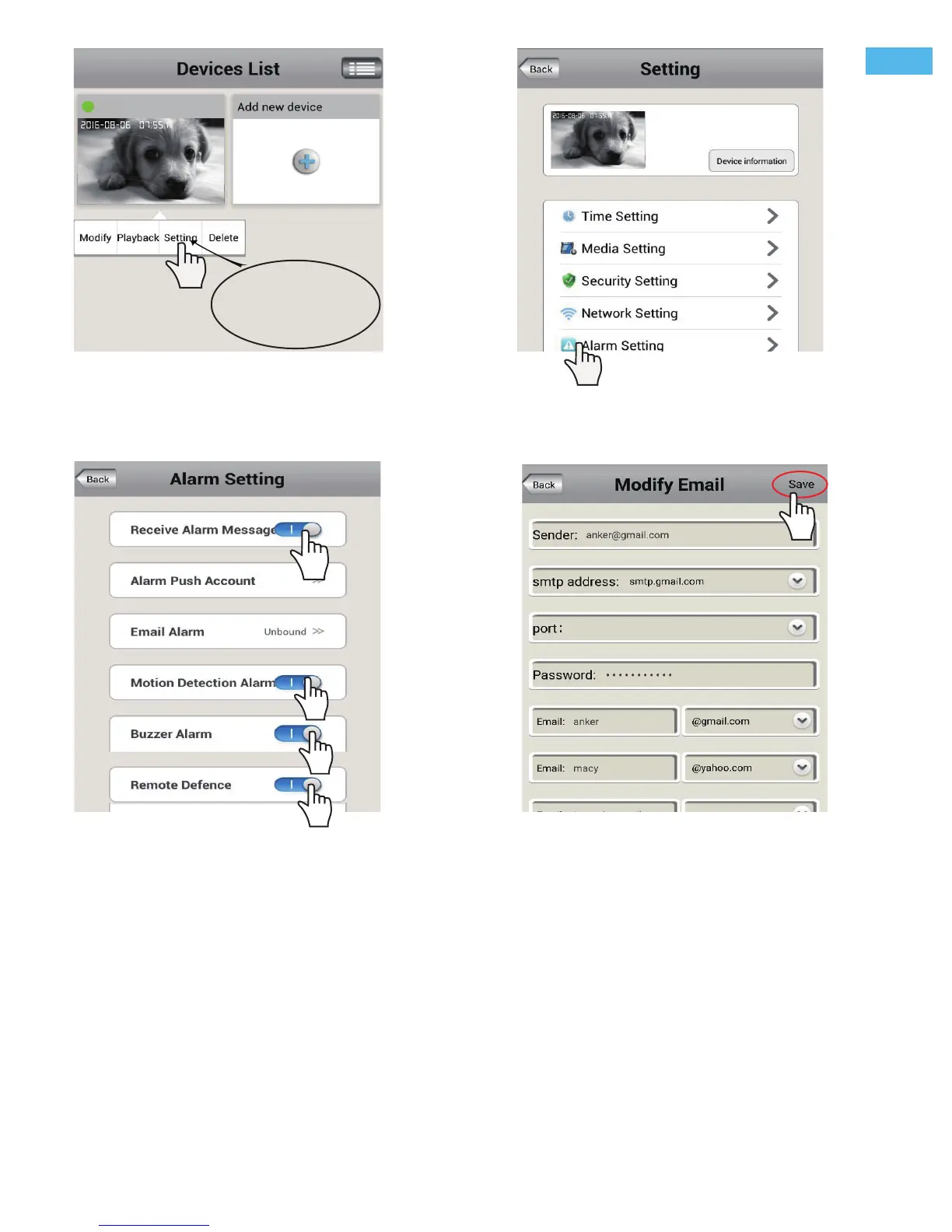
Note:Touch
for play, keepping touch
for setting
587
1. Sender: Please input your email address (e.g., anker@gmail.com).
2. SMTP address: The server address for the Sender's email account.
3.
Port: Please select 587 or 465 if the SMTP address is mtp.gmail.com, Smtp.mail.yahoo.com or smtp.live.com
(Hotmail.com).
If not, please select 25.
4. Password: The Password for the email account.
5. Email: Enter up to three receiving email accounts (e.g., you may have both anker@gmail.com and Marcy@
yahoo. com) as picture FAQ3-4.
2) Second Enable the function you need, such as motion detection alarm, email alarm and
phone push alarm as picture FAQ3-3.
FAQ3-1
FAQ3-3 FAQ3-4
FAQ3-2
home
home
Note:
A: Enable the alarm by tapping the “Motion Detection Alarm” and “ Remote Defence”toggle switch to On .
A beepping sound from the camera signifies the alarm function successful activation.
B: The default Alarm Phone Push ID is your App account, if you don’t need, you can delete the push account.
3) Email Alarm setting
Touch " Email Alarm", and fill in the email information as below guide.
-8-
EN


 To Next Page