5 Installation
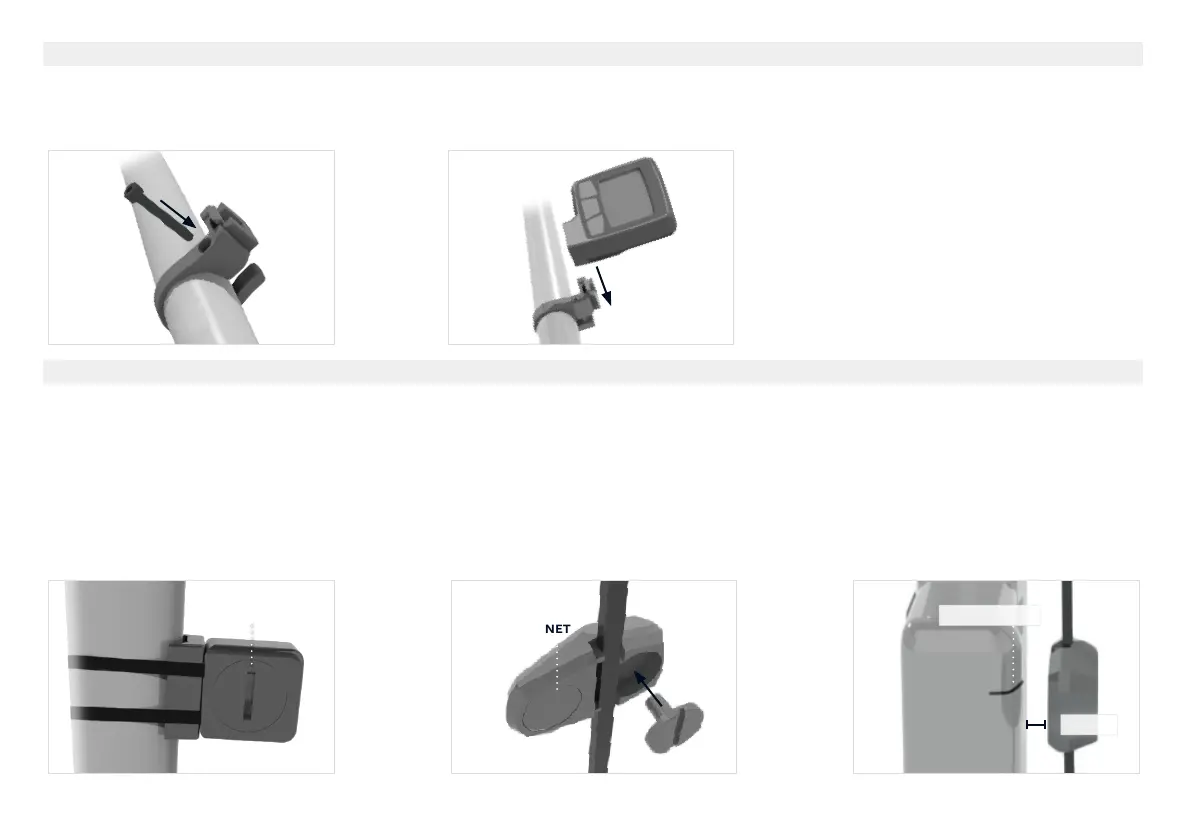
1. Install the handlebar mount onto the handlebar. Use a
3
mm hex key to tighten the bolt to 1-2 N
.
m.
2. Install the PowerControl onto the spring clip of the handlebar mount.
1. Install the speed sensor onto the fork with the two zip ties. Make sure the battery cover faces away from the spokes.
2. Install the speed sensor magnet onto the spoke of the front wheel.
3. Align the magnet with the timing mark on the sensor.
4
4. When the magnet is in the proper position a faint click can be heard as the magnet passes over the speed sensor.
Speed/distance information can be obtained from an external ANT+ speed sensor as described here or via GPS in your connected device. Refer to device manual for
more information.
mm



 To Next Page