EasyManua.ls Logo

SSK Cloud SSM-F200 - User Manual

SSK Cloud SSM-F200
2 pages
Print Icon
To Next Page IconTo Next Page
Loading...
Quick settings
Thank you for purchasing SSK Cloud SSM-F200.
Please read the manual carefully before using:
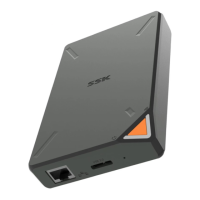
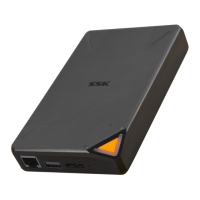
Product interfaces and LED indicators
RJ45 Ethernet port
Power
Power indicator
WiFi indicator
How to charge the pr
oduct
Charge it by PC/Mac
Charge it by USB adapter
Ways to connect PC to SSM-F200
Access to the product by SAMBA
Open my computer, and input \\10.10.10.254 in the
address bar
Visit the product on WEB
Open IE explorer, and enter 10.10.10.254 into the
address bar
Connect SSM-F200 to PC by the wire–
High-speed HDD mode
Remote accessing mode
1.First, connect SSK Cloud to Internet
2.Then click on the remote access icon and login
TIPS AND FAQ o
f SSK
What is “SSM-F200 SSK Cloud”?
“SSM-F200 SSK Cloud” is a solution for the
storage, backup and management of personal
data, the system of which can keep the privacy and
stability of the data effectively, make the complex
backup and management of data become simpler
and easier.
How about its features?
How to connect it with mobile
Can videos stored in it be played directly?
Wireless transmission rate
SSK Cloud adopts 2.4G network output 802.11n
wireless protocol standards, its max transmission
rate can be 300Mbps, with 2.4G network, signal
coverage of which is broad and its signal
penetrability is strong.
The system of SSK Cloud
The Linux of the SSK Cloud uses is developed by SSK, and it
has a good security rate and high efficiency. And it can be
more intelligent and stable by periodical OTA update.
The HDD and Format of SSK Cloud
Please do not shake or drop it when it is powered in order to
make sure its normal work, because of the build-in 2.5” 1TB
HDD. The partition and format of the product has been done
already, so it can be used directly after setup.
The warranty and DATA
One year warranty service is provided after sales, and the HDD can
be changed freely if there is malfunction or damage which is
comply with the warranty regulations during the warranty period.
*And all data in the SSK Cloud will not be saved or recovered when
its HDD need to be changed or repaired, so synchronize backup
your data to the public cloud is recommended.
The dormancy of the product
In order to make sure its efficiency and stability, the HDD of the
product will shift work/dormancy status automatically, to reduce
power consumption and a better protection for the HDD.
RESET
Factory reset)
Wireless connection
Wired connection
USB3.0 typeB port
3
Built-in 2.5 inch 1TB storage, with USB3.0Hi-transmission rate;
Built-in 4000mAh Lithium polymer battery, portable and
convenient to use;
High-gain WiFi antenna, 300Mbps wireless connecting and
transmitting rate;
Simple APP remote management, multiple fast backup modes;
Support remote access and manage, you can read and store the
data anywhere anytime;
Support multiple platforms using, such as IOS, Android,
Windows, Mac OS.
1.
2.
3.
4.
5.
6.
Connect the WIFI hotspot of SSKCLOUD showed in your
mobile phone, and then click the APP to visit the cloud.
No matter what kind of your device is, Apple or Android, can
play the main stream format video directly by SSKCLOUD
client-side software.
Question and Answer IconNeed help?

Do you have a question about the SSK Cloud SSM-F200 and is the answer not in the manual?

Summary

SSK Cloud SSM-F200 Quick Setup

Product Interfaces and Charging

Overview of physical ports, LED indicators, and device charging methods via USB.

Mobile Device Connection

Steps to download and connect using the SSK Cloud App on mobile devices.

PC Connection Methods

Guides for accessing SSK Cloud via SAMBA network share or Web browser.

High-Speed HDD and Remote Access Setup

Connecting via USB for HDD mode and initial steps for remote access.

SSK Cloud Features and Usage Details

SSK Cloud Functionality Explained

Defines SSK Cloud as a personal data storage, backup, and management solution.

Key Product Features

Highlights features like built-in storage, battery, Wi-Fi, app management, and cross-platform support.

Wireless Transmission and System Information

Details on wireless rate, network protocol, and the Linux system of SSK Cloud.

Important Information and Compliance

Product Handling and Data Warranty

Guidelines on handling the device, warranty service, and data backup recommendations.

FCC Statement and Regulatory Compliance

Details FCC compliance, operational conditions, and potential interference warnings.

Overview

The SSK Cloud SSM-F200 is a portable personal data storage, backup, and management solution designed to provide privacy and stability for user data while simplifying complex backup and management tasks. It functions as a personal cloud device, allowing users to access and manage their data from various platforms and locations.

Function Description:

The core function of the SSM-F200 is to offer a secure and private alternative to public cloud storage. It enables users to store, back up, and manage their personal data, including documents, photos, and videos, on a local device that they control. The device supports both wired (USB 3.0) and wireless (Wi-Fi) connections, allowing for flexible data transfer and access. Through a dedicated mobile application ("SSK-Cloud App"), users can remotely access and manage their stored data, perform backups, and stream media. The system is built on a custom-developed Linux operating system by SSK, emphasizing security, efficiency, and stability, with periodic OTA updates for continuous improvement.

Important Technical Specifications:

  • Storage: Built-in 2.5-inch 1TB HDD.
  • Connectivity (Wired): USB 3.0 for high-speed data transmission (HDD mode).
  • Connectivity (Wireless): High-gain Wi-Fi antenna, 300Mbps wireless connecting and transmitting rate, supporting 2.4G network output 802.11n wireless protocol standards. This provides broad signal coverage and strong signal penetrability.
  • Battery: Built-in 4000mAh Lithium polymer battery, making it portable and convenient for on-the-go use.
  • Operating System: Custom Linux developed by SSK.
  • Supported Platforms: iOS, Android, Windows, Mac OS.
  • Interfaces: RJ45 Ethernet port, USB 3.0 Type-B port, Power indicator, WiFi indicator.
  • Power Input: Chargeable via PC/Mac or USB adapter.

Usage Features:

  • Quick Setup: The device can be charged via PC/Mac or a USB adapter.
  • High-Speed HDD Mode: Connects to a PC/Mac via USB 3.0 for fast data transfer, functioning like an external hard drive.
  • Wireless Connection: Users can connect to the SSK Cloud's Wi-Fi hotspot from mobile devices or iPads.
  • Remote Access: After connecting the SSK Cloud to the internet and logging in via the SSK-Cloud App, users can remotely access and manage their data from anywhere.
  • Mobile App Management: The "SSK-Cloud App" (available on App Store and Google Play) provides simple remote management, multiple fast backup modes, and allows users to read and store data.
  • Direct Video Playback: The SSK-Cloud client-side software can directly play mainstream format videos stored on the device, regardless of whether the user's device is Apple or Android.
  • PC Access (SAMBA): Users can access the product on a PC by inputting \\10.10.10.254 into the address bar in "My Computer."
  • PC Access (WEB): Users can also access the product via a web browser by entering 10.10.10.254 into the address bar.
  • Multi-Platform Support: Compatible with iOS, Android, Windows, and Mac OS, offering broad usability.
  • Automatic Dormancy: The HDD automatically shifts between work and dormancy status to reduce power consumption and protect the HDD.

Maintenance Features:

  • Pre-formatted HDD: The built-in 1TB HDD comes pre-partitioned and formatted, ready for immediate use after setup.
  • Firmware Updates (OTA): The Linux system developed by SSK supports periodical OTA updates, ensuring the device remains intelligent, stable, and secure.
  • Warranty: A one-year warranty service is provided. If the HDD malfunctions or is damaged within the warranty period and complies with regulations, it can be changed freely.
  • Data Backup Recommendation: It is strongly recommended to synchronize and back up data to a public cloud before any HDD change or repair, as data on the SSK Cloud will not be saved or recovered during such processes.
  • HDD Protection: Users are advised not to shake or drop the device when it is powered on to ensure the normal operation of the internal 2.5-inch 1TB HDD.
  • FCC Compliance: The device complies with Part 15 of the FCC Rules, ensuring it does not cause harmful interference and accepts any interference received. Users are advised on measures to correct potential interference issues, such as reorienting antennas or increasing separation from other equipment. The device has been evaluated for general RF exposure and can be used in portable exposure conditions without RF restriction.

SSK Cloud SSM-F200 Specifications

General IconGeneral
BrandSSK
ModelCloud SSM-F200
CategoryStorage
LanguageEnglish

Related product manuals