Installation and Removal Steps
Installation
Before starting any electrical work on your vehicle, always make sure to disconnect the Negative
(ground) battery cable.
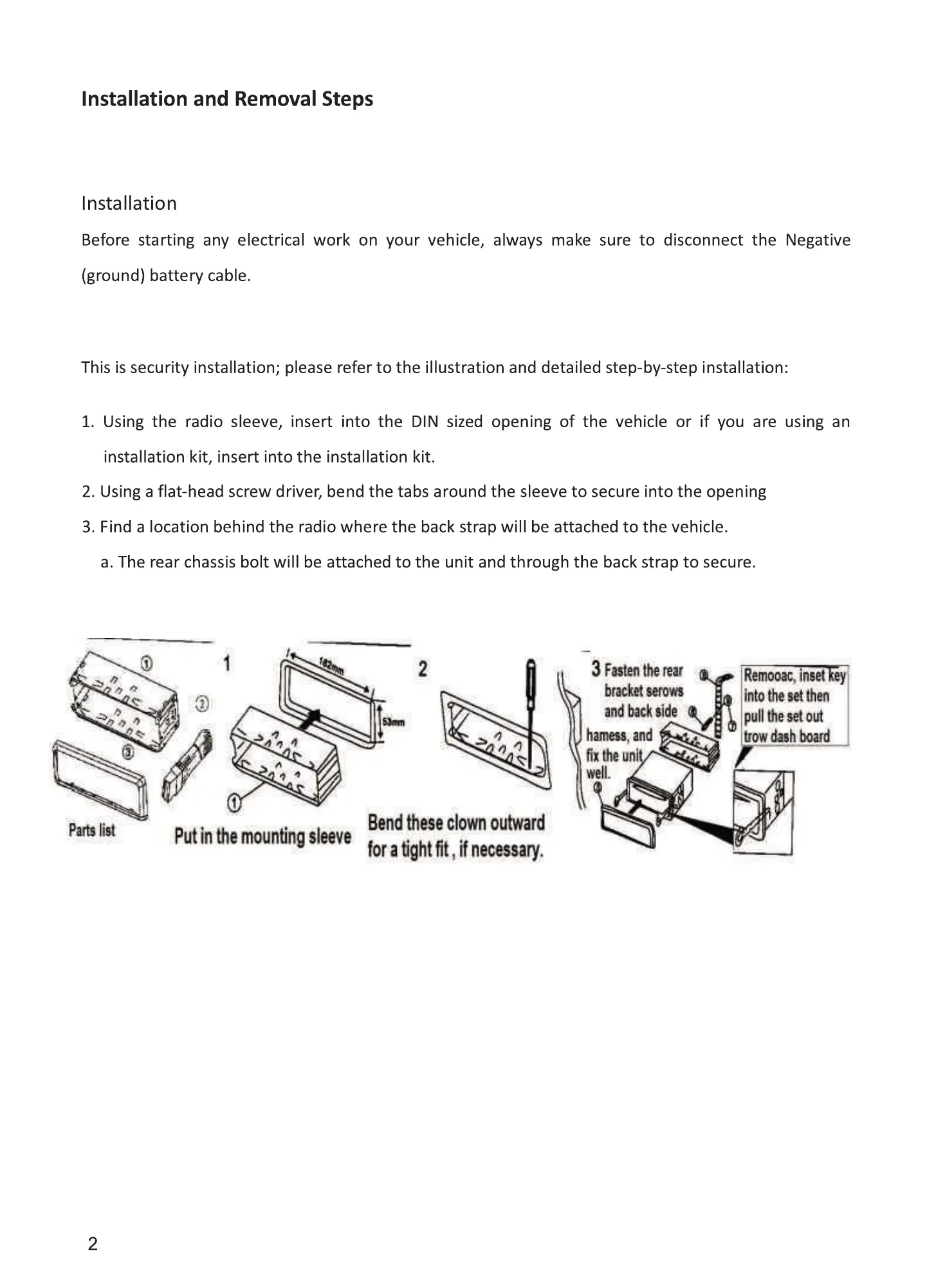
This is security installation; please refer to the illustration and detailed step-by-step installation:
1. Using the radio sleeve, insert into the DIN sized opening of the vehicle or if you are using an
installation kit, insert into the installation kit.
2. Using a flat-head screw driver, bend the tabs around the sleeve to secure into the opening
3. Find a location behind the radio where the back strap will be attached to the vehicle.
a. The rear chassis bolt will be attached to the unit and through the back strap to secure.
2
Troubleshooting
If any issues should arise that are not covered below, please contact our technical service department.
Faults
Bluetooth
Does not play MP3 from
mobile device
Will not power on
No sound
Failureof reading, USB/SD
brxket won
and side
han, and
fixthe
hto tm
tow
Noises and
distortion
sound
Causes
Bluetooth cannot be
used
Bluetooth not connected.
Compatibility issue
It is not powered on
Fuse is burnt.
Audio is muted
Wires are improperly
connected.
Poor contact
Speakers
Speaker cables are
shorted.
Antenna not working
Putinthemountingsleeve
Bendtheseclownoutward
foraightfit,ifnecessary.
Failure Of Radio
Weak signal
n not work
cpu
normali$
Stop working
Files are damaged.
2
Solutions
Check if Bluetooth on mobile device is turned on, and
is paired and connected.
Please see above for Bluetooth.
Checkto see if your mobile device iscompatible with
audio streaming (A2DP)
If the vehicle power is properly installed, turn the key
to the ACCposition.
Replace the fuse with same type and rating. Check all
connections and make sure they are properly
terminated.
Adjust the volume to your required level.
Check the Wiring diagram and make sure Wires are
properly connected.
Pleasepull out the device and re-insert it.
The unit will only play MP3 files
Check speakers
properly connect wires.
Check your vehicle for a powered antenna connection
Change the "OX" or "Local" settings
Turn off the power and power it on again.
Skip this file and please select next file,
11


 To Next Page
 Loading...







