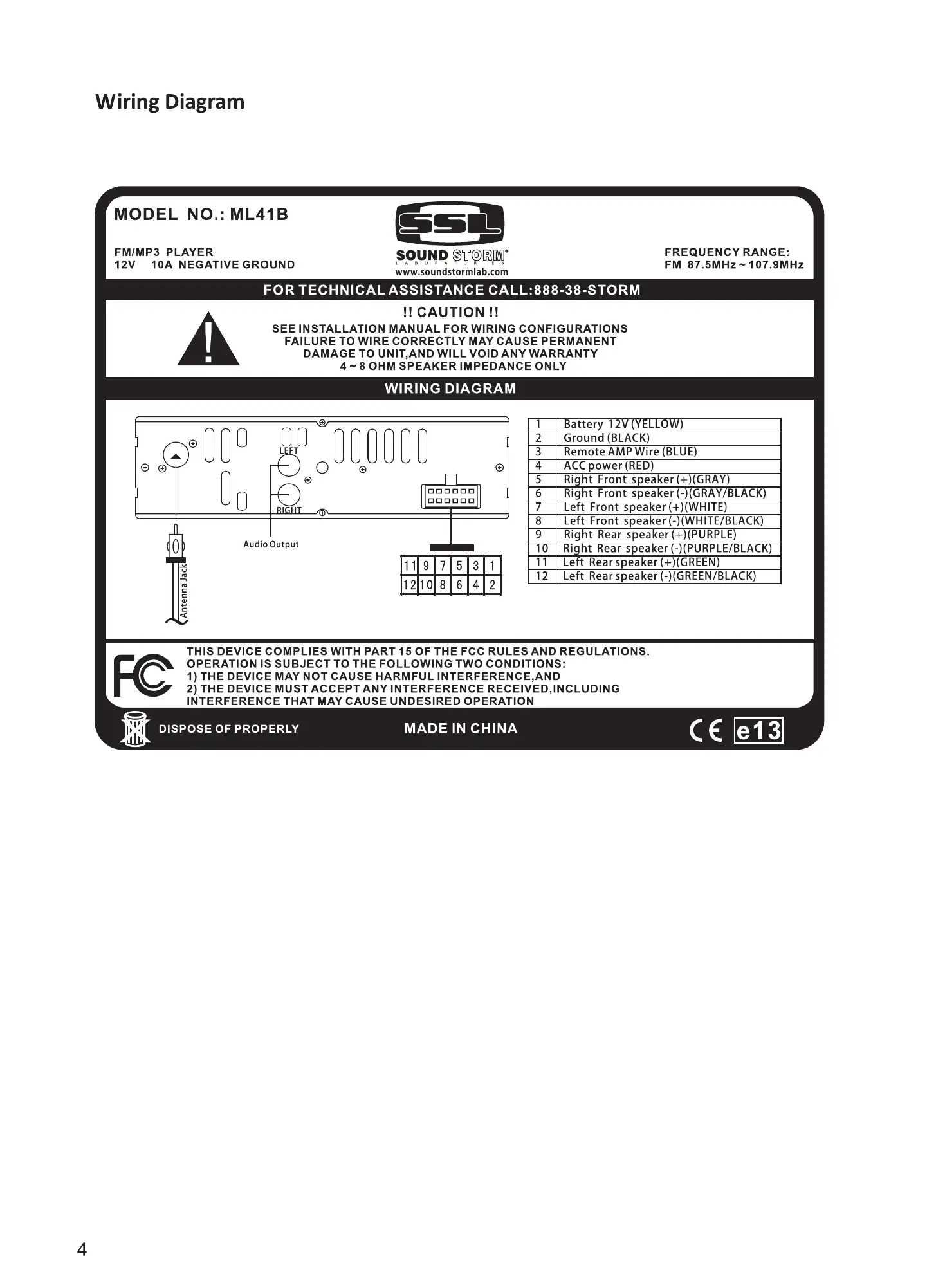
Wiring Diagram
MODEL NO.: ML41B
FM,'MP3 PLAYER
12V IOA NEGATIVE GROUND
F nt s ea -"(WHITE/BLA
Disconnect /connect mobile phone Bluetooth
4
Short press to stop Bluetooth function,short press
4
again to connect Bluetooth.
RDM RDM
(Only for the matched mobile phone Bluetooth)
SOUND
FOR TECHNICAL ASSISTANCE CALL;8B8-38-STORM
CAUTION
SEE INSTALLATION MANUAL FOR WIRING CONFIGURATIONS
FAILURE TO WIRE CORRECTLY MAY CAUSE PERMANENT
DAMAGE TO UNIT,ANO WILL VOID ANY WARRANTY
4 -g OHM SPEAKER IMPEDANCE ONLY
FREQUENCY RANGE:
FM 87SMHz-107SMHz
r GRA
Bluetooth Audio Streaming
While in Bluetooth mode, press
WIRING DIAGRAM
Audiooutnt
I I g i 531
rcaaaa
to start playing music from your mobile device*
ttery
(BLACK:
( *Note: your device must support A2DP, for music playback)
rant s
t ear
ears
To control tracks, use the
AUX-ln Mode
AUX
buttons.
eaker
THIS DEVICE COMPLIES WITH PART 15 OF THE FCC RULES ANO REGULATIONS.
OPERATION IS SUBJECT TO THE FOLLOWING TWO CONDITIONS,
1) THE DEVICE MAY NOT CAUSE HARMFUL INTERFERENCE.ANO
2) THE DEVICE MUST ACCEPT ANY INTERFERENCE RECEIVED, INCLUDING
INTERFERENCE THAT MAY c ALISE UNOESIRED OPERATION
DISPOSE OF PROPERLY
4
MADE IN CHINA
Change the MODE to AUX. A 3.5mm cable is required from the device to the unit.
(Note: Power, Mode, Volume, Loud, Mute are the only functions that function in Aux Mode)
9



 To Next Page