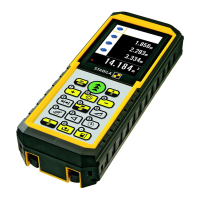
Keypad
See figure {E}:
1 On/measuring button
2 Menu/
Equal button
3 Plus (+) button
4 Digital pointfinder - button
5 Stake out - button
6 Area / volume button
7 Trapezium button
8 Tilt measurement - button
9 Clear/Off button
10 Storage/Memory button
11 Referenc
e button
12 Timer button
13 Indi
rect measurement (Pythagoras) bu
tton
14 Minus (-) button
15 Multiplication / Division - button
Display in normal mode
See drawing {F.1}.
The graphics scre
en of the measurement window is split into different
areas. Top left is the brightest field, which contains the currently selected
measuring program. Ju
st to the right appears the program submenu, which
shows the measuring programs that can be selected by pressing the same
key the requ
ired number of times.
The measurement field contains the individual measurements of the
measuring program w
ith reference to a series of separate distance measu-
rements. Three lines are provided for t
his. A horizontal line separates the
measurement field and the result bar from one another. A red triangle indi-
cat
es whether the selected measuring program has a detailed display avai-
lable.
1
Program selection with measuremen
t instructions
2 Program selection submenu
3 L
evel
4Timer
5 M
easurement field
6 Re
sult bar
7 Detailed disp
lay
8 S
tatus bar with (Laser ON, Reference plan
e, Display Long range mode,
Offset, Plus / Minus, Battery st
atus)
Display in "digital pointfinder" mode
Digital pointfinder (4x zoom)
The device has an integral digital pointfinder, which shows the target
directly on the display. The displayed crosshairs allow precise measure-
ments to b
e made even though the laser beam is not visible. See drawing
{F.2}
The integral
coloured digital pointfinder is a great help outdoors and can
be u
sed in every function. Longer distance
s and precise measurements on
detailed surfaces can even be accomplished in bright sunlight withou
t any
problem.
The 4x zoom allows the image to be magnified to suit the user's require-
ments.
Press the key to activate the fu
nction. Press the key again to
operate in a 1x, 2x or up to 4x zoom view.
The brightness of the camera can be adjusted through 5 levels using the


 To Next Page
 Loading...