Need help?
Do you have a question about the Stagg SMS12DP700 and is the answer not in the manual?
Socket for mounting speaker on a 35mm pole mount or tripod stand.
Points for flying or suspending the speaker in the air.
Component responsible for reproducing high frequency sounds.
Component reproducing midrange and low frequencies.
Built-in handle for secure and easy transportation.
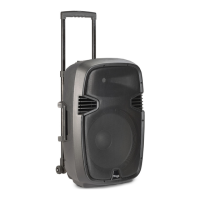
Wheels for easy carrying or pulling the unit.
Pin to secure the speaker in a pole mount configuration.
Port for connecting a microphone directly for public address.
Port for connecting a microphone directly.
Connection for line input signal from mixers or other line-level devices.
Connection for balanced line input signal from mixer or line-level device.
Used to send mixed incoming signals to another powered speaker.
Port for daisy-chaining this speaker to another powered speaker.
Connector for supplying main power via a detachable cord.
Housing for protective fuse; always replace with the exact same type.
Knob to increase or decrease the microphone volume.
Knob to regulate volume of source connected to Line Level Inputs.
Knob to regulate output volume and signal sent to another speaker.
Knob to regulate the amount of treble applied to the output signal.
Knob to regulate the amount of bass applied to the output signal.
LED lights up to indicate the speaker is on.
Indicates signal clipping; lower volume to stop clipping.
Switch to turn the speaker on or off.
Blue LCD screen displaying function and MP3 file information.
Front-selectable push switches for choosing functions like Repeat/EQ, Previous/Vol, Next/Vol, Play/Pause, Stop, USB/SD.
Slot for inserting SD/MMC memory card with MP3 files.
Port for plugging in a USB memory stick with MP3 files.
Controls playback: play, pause, and resume.
Stops the current song playback.
Mutes the sound from the MP3 player.
Controls song repeat function (single or all).
Chooses between SD card and USB stick as the audio source.
Adjusts the volume of the MP3 reader.
Navigates to the previous song.
Selects different equalization settings for the song.
Navigates to the next song.
Details remote control battery type (CR2025) and replacement advice.

 To Next Page
 General