Need help?
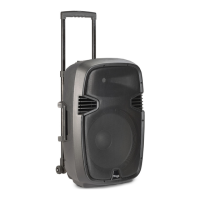
Do you have a question about the Stagg SMS12DP700LCD and is the answer not in the manual?
Explains symbols for hazardous live terminals, grounding, and AC voltage.
Defines WARNING and CAUTION labels used to describe safety precautions.
Apparatus should be protected from moisture and rain, not used near water.
Locate apparatus away from heat sources like radiators or stoves.
Do not block ventilation openings to prevent fire. Install per manufacturer instructions.
Prevent objects from falling into and liquids from spilling into the apparatus for safety.
Protect power cord from damage; do not defeat plug's safety purpose.
Connect only to the specified power supply type; unplug during lightning storms or long periods of no use.
Use recommended fuse type; turn off unit and disconnect from outlet before replacing fuse.
Improper electrical wiring may invalidate product warranty.
Clean only with a dry cloth; do not use solvents like benzol or alcohol.
Only perform servicing described in manual; refer all other servicing to qualified personnel.
Check shipping carton for damage, inspect units, and ensure all accessories are intact.
Socket for fitting a standard 35mm speaker pole mount or tripod speaker stand.
Points for flying or suspending the speaker in the air; follow flying outlines.
Unit used to reproduce the high frequency response.
High-powered woofer used to reproduce midrange and low frequencies.
Built-in heavy-duty handle for secure and easy transportation.
Wheels allowing the unit to be easily carried or pulled; do not use on stairs or rough surfaces.
Pin used to secure the speaker in place when mounting in a pole configuration.
Plug a microphone directly into this port for public address usage.
Plug a microphone directly into this port.
Accepts line input signals from mixers or other line level devices.
Accepts balanced line input signals from mixers or other line level devices.
Sends mixed incoming signals to another powered speaker.
Uses XLR cable to daisy chain this speaker to another powered speaker.
Connector for supplying main power via the included detachable power cord.
Houses fuse; always replace with the exact same type of fuse.
Knob to increase or decrease the volume of your microphone.
Regulates volume of source connected to Line Level Inputs.
Regulates output volume and signal sent to another powered speaker.
Regulates the amount of treble applied to the output signal.
Regulates the amount of bass applied to the output signal.
LED lights up to indicate the speaker is on.
Indicates signal clipping; lower volume if lit.
Switch to turn the unit on or off.
Blue LCD screen displaying function and MP3 file information.
Front-selectable push switches for choosing functions like Repeat/EQ, Previous/Vol-, Next/Vol+, Play/Pause, Stop, USB/SD.
Slot for inserting SD/MMC memory cards with MP3 files.
Port for plugging in USB memory sticks with MP3 files.
Buttons for Play/Pause, Stop, Mute, Repeat, Forward, and Volume adjustment.
Button to choose between SD card or USB stick as audio file sources.
Buttons for EQ Select and returning to previous selections.
Remote control requires a CR2025 battery; replace with the same type.


 To Next Page
 General