11
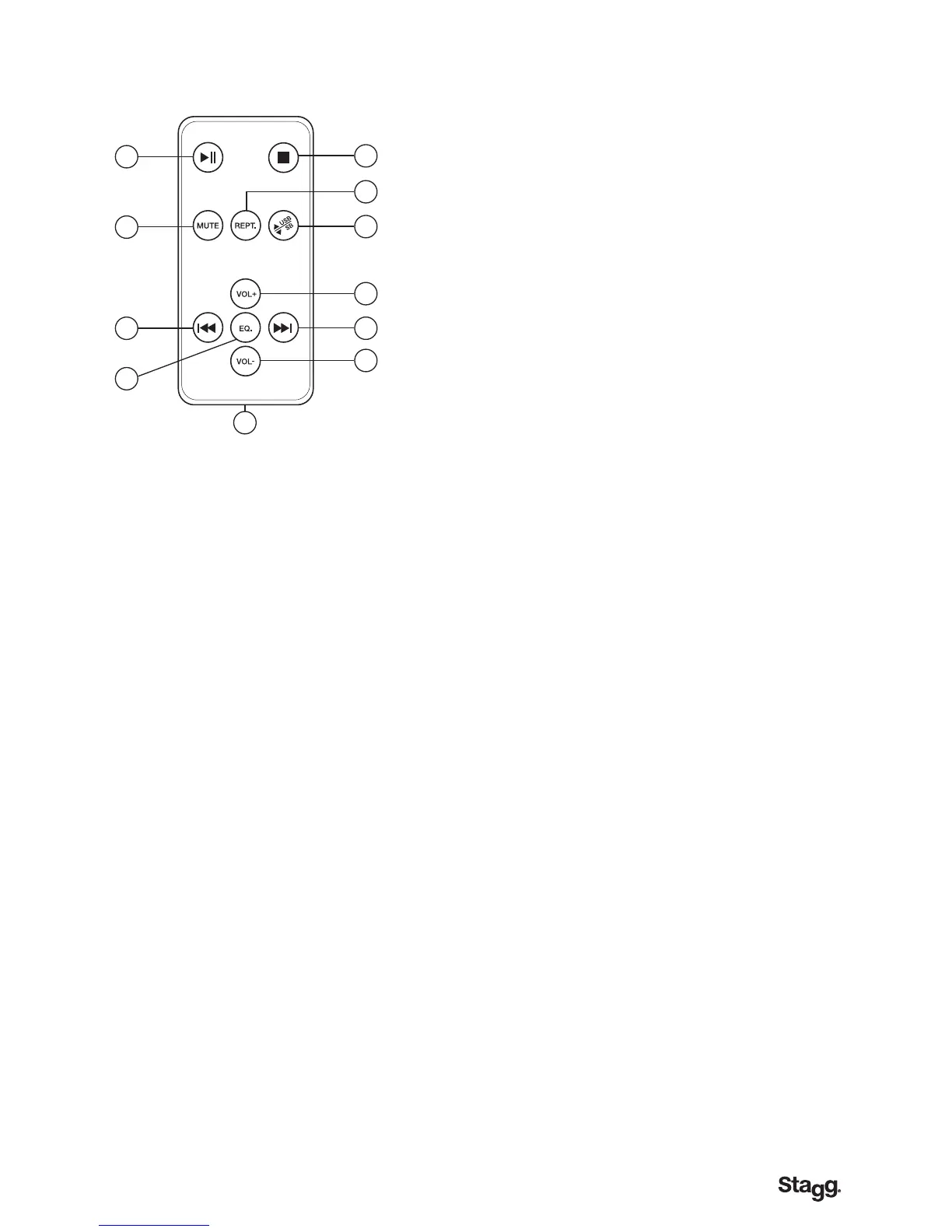
Remote control LCD Model only.
This device features all necessary push-switch selectable functions to easily operate your MP3
reader at a distance of up to 3 metres (approximately 9.8 feet) from your audio installation.
For details, please refer to the functions explained above on this page in paragraph n°2 (FUNCTION
SELECTOR), unless otherwise specied. The remote control included with your product may vary
from the one pictured here, depending on the region where it was originally purchased.
1. PLAY/PAUSE (see 2.D.)
2. STOP (see 2.E.)
3. MUTE – Mutes the sound from the MP3 player.
4. REPEAT (see 2.A.)
5. USB/SD SELECT - Use this button to choose among both audio
le memory sources available: either the SD card or the USB stick.
6. VOLUME + (see 2.C.)
7. BACK (see 2.B.)
8. EQ SELECT (see 2.A.)
9. FORWARD (see 2.C.)
10. VOLUME - (see 2.B.)
11. BATTERY - The remote control unit needs a CR2025 button-cell
battery to operate. In case of malfunction, always replace with
the same type of battery. Dispose properly of the used battery for
waste and recycling purposes.
1
3
7
8
11
9
10
6
5
4
2



 To Next Page