Power to Enforce.
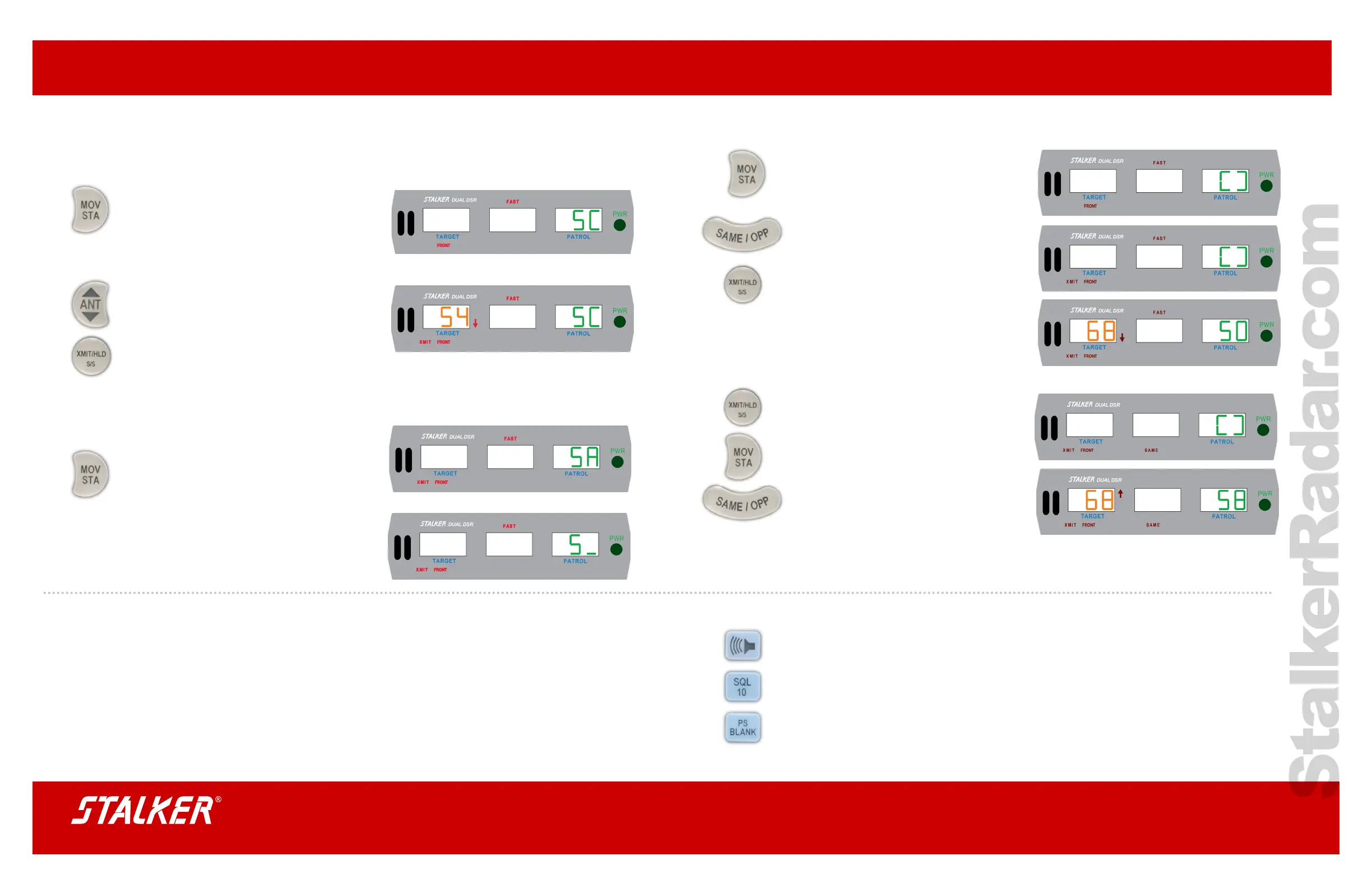
Opposite Moving Mode
Select moving mode by pressing the MOV/STA
key on the remote control. The patrol window will
contain either the patrol speed or a [ ]. The [ ]
indicates moving mode, but no ground speed.
Select opposite-direction mode by pressing the
SAME/OPP key until the SAME icon is not visible.
To transmit, press the XMIT/HLD key. The speed
of an approaching target will appear in the target
window and a Doppler audio tone will be heard.
Hold mode can be selected by pressing the XMIT/
HLD key on the remote control. The XMIT icon will
be off and no signal will be transmitted.
Same-Direction Moving Mode
To transmit, press the XMIT/HLD key. Select
moving mode by pressing the MOV/STA key,
then select same-direction mode by pressing the
SAME/OPP key. This mode is active when the
SAME icon is visible.
If a same-direction target is in the radar beam,
its speed will appear in the target window and
the difference speed audio will be heard from the
speaker.
Stalker DSR Quick Guide
Stationary Mode
Some departments require the tuning fork test
before using the radar for trafc enforcement.
(See back page)
Select one of the three stationary modes by
pressing the MOV/STA key on the remote control.
Select:
stationary closing (SC)
stationary away (SA)
bi-directional stationary (S_) modes.
Next select the front antenna by pressing the ANT
key. To transmit, press the XMIT/HLD key. The
XMIT icon will appear.
If a target is in range, the speed will appear in the
target window of the display unit and a Doppler
audio tone will be heard with arrow indicating
direction.
To select one of the other two stationary modes,
press the MOV/STA key on the ergonomic remote
control and select either: stationary away (SA) or
bi-directional stationary (S_) mode.
The only difference between the three stationary
modes is the direction of travel of the displayed
targets.
Locked Target Enunciators
Immediately after a target is locked, a 3-word voice enunciator announces a description of the target that
was just locked using an antenna/mode/direction format. For example, “FRONT STATIONARY CLOSING”
indicates a stationary mode target approaching the front of the patrol vehicle.
VSS Automates Switching Between Modes
If connected to VSS, Stalker’s DSR accesses the vehicle’s Vehicle Speed Sensor (VSS) data to automatically
switch between stationary and moving modes so you don’t have to manually.
Note: Be sure that the CAN/VSS cable ordered is the one made specically for your vehicle.
Audio Adjustment
To adjust Doppler Audio, press Audio key. Each press increments level from AUd 0-9
steps. (Some states do not allow audio “0”).
To adjust lock voice annunciation, press Audio key followed by SQL key.
Each press of SQL key increments voice level U 0 - 9 is shown.
To adjust Beep level, press Audio key followed by PS BLANK key.
Each press of PS BLANK increments the beep level. b 0 - 9 is shown.
To save changes, let display time out and return to normal radar function.



 To Previous Page
 Loading...