Stalker DUAL SL Quick Guide
Power to Enforce.
Stalker DUAL SL Quick Guide
Same-Direction Moving Mode
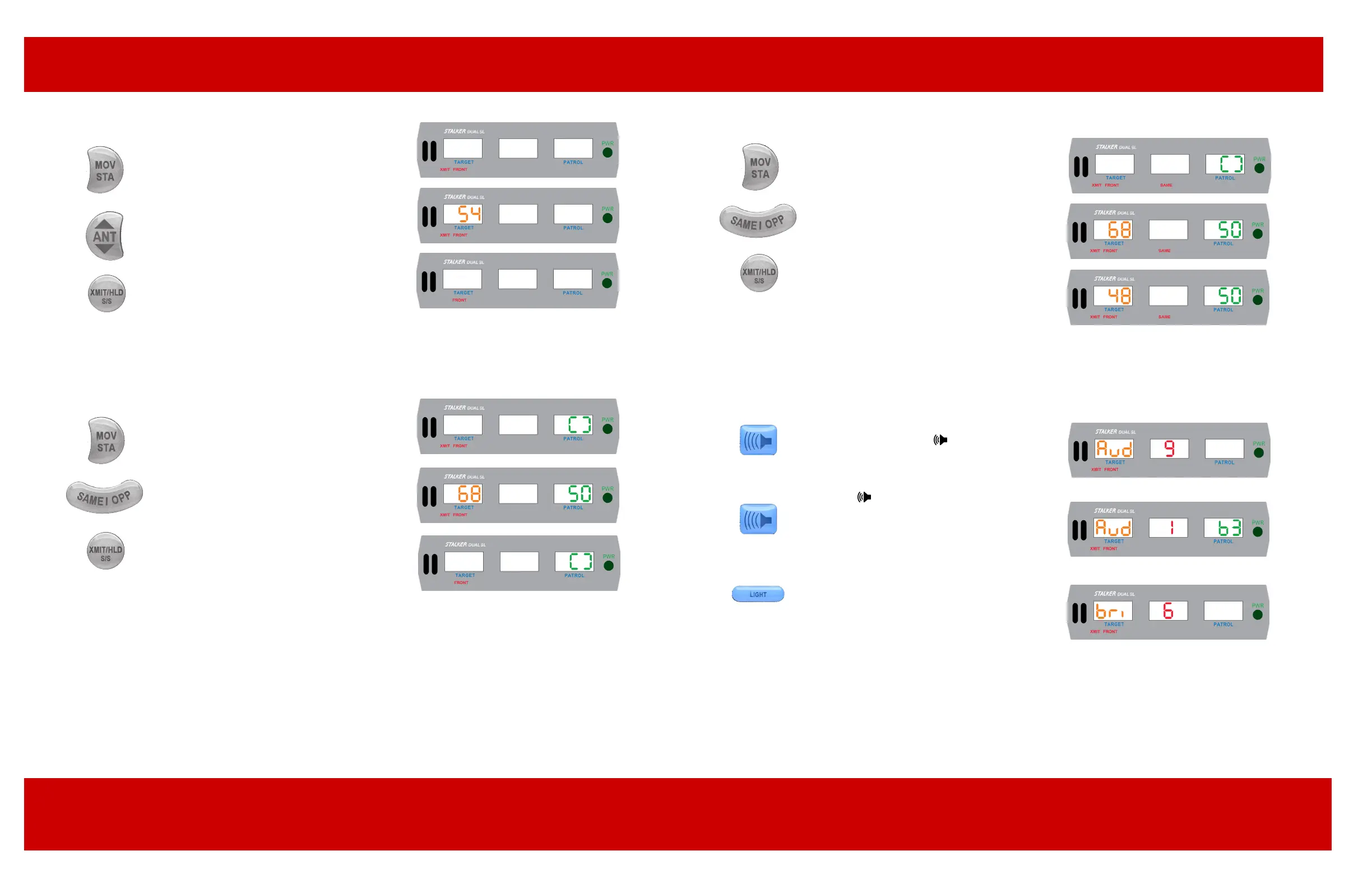
Select Moving Mode by pressing the MOV/STA
key, then select Same-Direction Mode by pressing
the SAME/OPP key. This mode is active when the
SAME icon is visible. To transmit, press the XMIT/
HLD key.
If a Same-Direction target is in the radar beam,
its speed will appear in the Target Window and
the dierence speed audio will be heard from the
speaker.
For targets slower than the patrol vehicle, the
Dual SL will automatically subtract the dierence
speed.
Stationary Mode
ACI recommends testing the radar unit prior to use
and after the last use of the shift.
Select Stationary Mode by pressing the MOV/STA
key on the remote control, then select the desired
antenna by pressing the ANT key. To transmit,
press the XMIT/HOLD key.
If a target is in range, such as one traveling 54
mph, the speed will appear in the Target Window of
the display unit.
Hold Mode can be selected by pressing the
XMIT/HOLD key on the remote control. In Hold
Mode, the XMIT icon will be o and no signal
will be transmitted, preventing detection by radar
detectors.
Opposite-Direction Moving Mode
Select Moving Mode by pressing the MOV/STA
key on the remote control. The Patrol Window will
contain either the patrol speed or a [ ]. The [ ]
indicates Moving Mode but no ground speed.
Select Opposite-Direction Mode by pressing the
SAME/OPP key until the OPP icon is visible. To
transmit, press the XMIT/HLD key. The speed
of an approaching target will appear in the Target
Window and a Doppler audio tone will be heard.
Hold Mode can be selected by pressing the
XMIT/HOLD key on the remote control. In Hold
Mode, the XMIT icon will be o and no signal
will be transmitted, preventing detection by radar
detectors.
Audio Adjustment
Doppler Audio
The speaker volume can be adjusted through
nine levels by pressing the key. Maximum
audio volume is indicated by Aud 9 and
minimum audio by Aud 1.
Beep Tones
Press the key followed by the PS BLANK
key to cycle the display through: nine levels of
Beep Tone volume, ranging from the lowest, b
0, to the loudest, b 9.
Display Lighting
A single depression of the LIGHT key activates
the keyboard backlight for 6 seconds. Two
rapid depressions of the LIGHT key activate the
display unit’s brightness control, and additional
depressions of the LIGHT key cycle the display
intensity through six levels of brightness,
ranging from low (bri 1) to high (bri 6).



 To Previous Page
 Loading...