15
PROGRAM DESCRIPTIONS
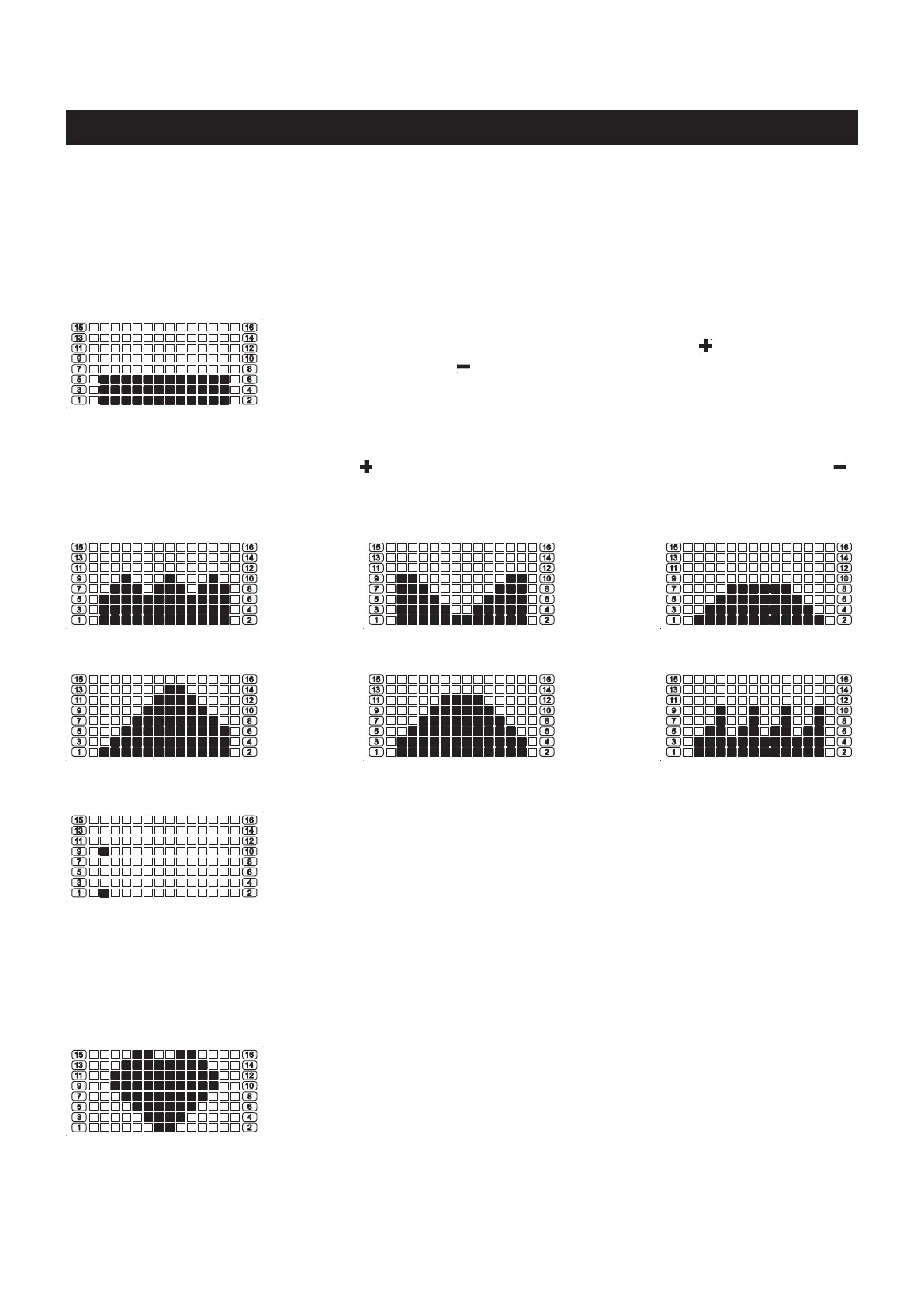
This computer contains 13 dierent programs. You can preset the program time and the computer will divide
the time into 12 intervals. If you do not set the program time in advance, the computer will use 1 minute for
each interval of Program 1 (Manual program) and cycle through the program, or the computer will use 3
minutes for each interval for other programs and cycle through the program prole.
(PROGRAM 1) MANUAL
MANUAL PROGRAM: Program 1 is a manual program allowing the user
to have full manual control of the workload. Use the “ ” button to increase
the load. Use the “ ” button to decrease the load.
PRESET PROGRAMS: Program 2 to Program 7 are preset automatic programs. The proles are shown
on the face of the computer. Use the “
” button to increase the load level of the program. Use the “ ”
button to decrease the load level of the program.
(PROGRAM 2) ROLLING (PROGRAM 3) VALLEY
(PROGRAM 5) RAMP (PROGRAM 6) MOUNTAIN
(PROGRAM 4) FAT BURN
(PROGRAM 7) INTERVALS
COMPUTER INSTRUCTIONS
TARGET HEART RATE CONTROL PROGRAM: To use this program,
you must wear the HEART RATE TRANSMITTER(103) around your chest
so the receiver which is built into the rower registers your heart rate from
the HEART RATE TRANSMITTER(103) for working with this program.
(PROGRAM 9)
Target Heart Rate
Once Program 9 is selected, the PULSE window displays ashing “90” for you to input desired target heart
rate, from 90 to 220. The program will monitor your heart rate and adjust the workload automatically during
exercise to keep your heart rate within the zone which is plus & minus 5 Heart Beats from the target heart
rate you setup.
COMPETITION PROGRAM: There are two parts of the display. The upper
part shows the workout distance, each bar means 1/10 of preset distance.
The lower part shows the workout time, each bar means 1/10 of preset
time. So this program is for you to nish 1/10 of the preseted distance
during every 1/10 of the preseted time.
(PROGRAM 8) COMPETITION
When the user nishes each interval of time, and the distance is less than 1/10 of the preset distance, the
distance bar will ash for warning. Otherwise the bars will move to next interval, and it means you workout
well. If you do not set the program time and distance in advance, the computer will use 10 minutes and 4
kilometer to run the program.



 To Next Page