14
NOTE:
1.
You may preset values for several functions. The preset function values will start to count down. When you
complete one of the preset functions, the value of this completed function will start to count up, while the other
preset functions will continue to count down.
2. The Meter will shut off automatically after 4 minutes of inactivity. All function values will be kept. You can
continue to work out with these function values. Or, press the RESET or MODE button and hold it down for two
seconds to reset all functions to zero, except ODOMETER. The ODOMETER will be reset to zero after batteries
are removed for battery replacement or storage of the unit.
OPERATIONAL INSTRUCTIONS
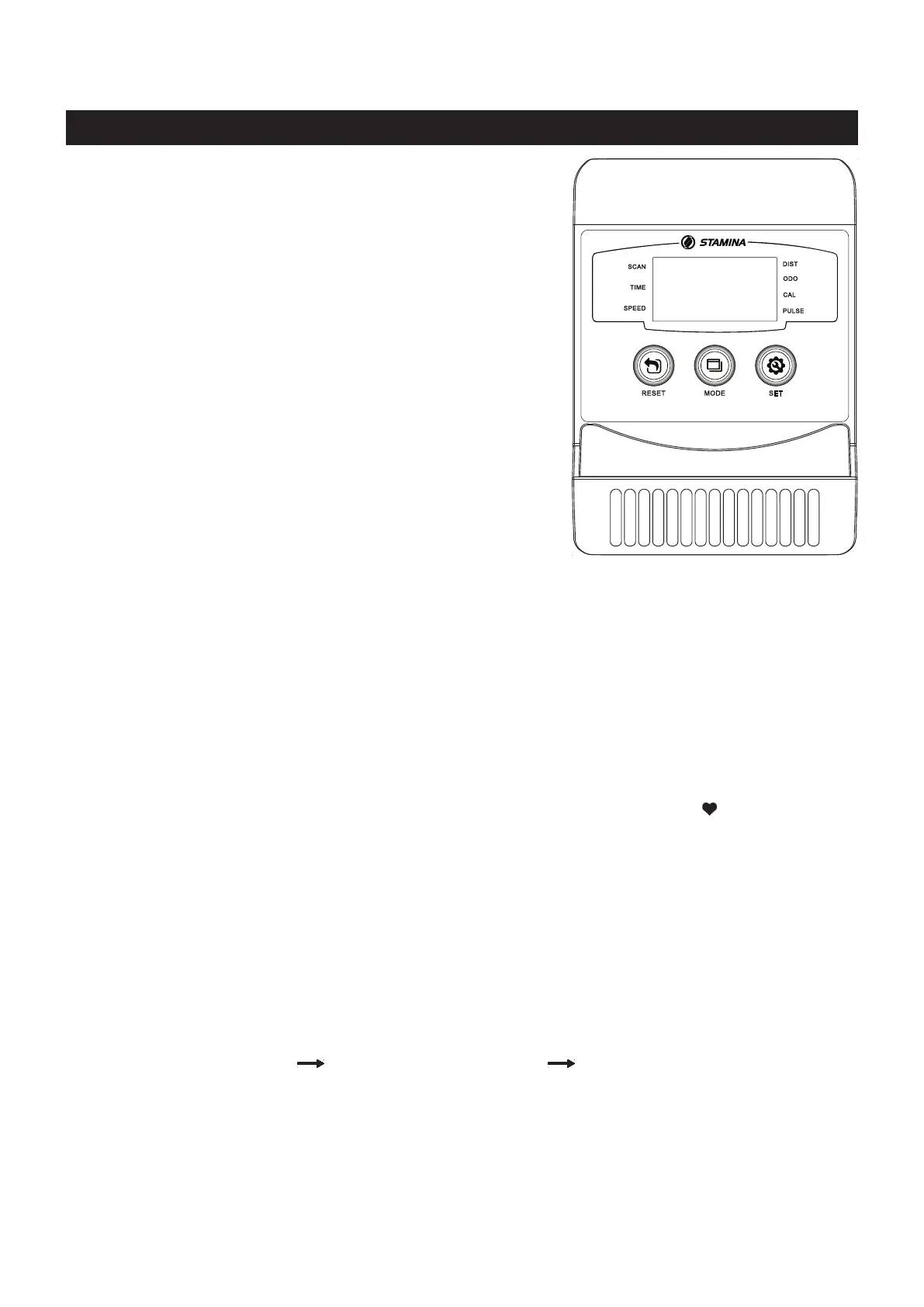
In the STOP mode, press to set target values for TIME,
DISTANCE, and CALORIES. Press the button and hold it
down for two seconds, the meter will continue to add the
values, release the button to stop.
USING THE FITNESS METER
POWER OFF:
Automatically shuts o after 4 minutes of inactivity.
POWER ON:
FUNCTIONS:
FUNCTION BUTTONS :
MODE :
Press and release to select functions for display or to preset
target values.
Press the button and hold it down for two seconds to reset
all functions to zero, except ODOMETER.
In the STOP mode, press the button to reset the setting
values to zero.
Press the button and hold it down for two seconds to reset
all functions to zero, except ODOMETER.
RESET :
Move the pedals or press any button.
PRESET VALUES OPERATION:
You can begin pedaling to power on the meter and workout with the meter directly. Or, you can preset the function
values for counting down. Press and release the MODE button until “SCAN” does not appear on display, the meter
will enter setting mode. Use SET and RESET buttons to input the values, and press MODE button to conrm. Or, just
press the MODE button to skip the setting and move on to the next function. After all the desired settings are chosen,
begin pedaling to start the workout.
Time (1:00 to 99:00)
Distance (1.00 to 999.0 mile) Calories (1.0 to 999.0 Kcal)
SET :
Automatically scans TIME, SPEED, DISTANCE, CALORIES, ODOMETER, and PULSE in
sequence with a change every six seconds. Press and release the MODE button until “SCAN”
appears on display.
Displays the time from 1 sec. up to 99:59 minutes. Counts down from preset value.
Displays the current speed from zero to 999.9 miles per hour.
Displays distance from zero to 999.9 Miles. Counts down from preset value.
Displays the total accumulated distance you have traveled from zero to 999.9 miles. The total
accumulated distance is retained when the meter is turned o, until the batteries are removed.
Displays the calories burned from zero to 999.9 Kcal. Counts down from preset value.
The calorie readout is an estimate for an average user. It should be used only as a comparison
between workouts on this unit.
Displays your pulse rate in beats per minute. To display pulse, select the PULSE mode and grasp
the pulse sensors on the handlebar, one in each hand. The heart symbol “ “ will begin ashing
when the meter senses your pulse. Your pulse will be displayed approximately ve (5) seconds after
the heart symbol is displayed. If the heart symbol does not appear, relax your grip or change your
grip on the pulse sensors.
NOTE: The pulse function is a great tool to optimize your workout, but should be used as a
reference only.
SCAN:
TIME:
SPEED:
DISTANCE:
ODOMETER:
CALORIES:
PULSE:



 To Next Page