EasyManua.ls Logo

Standard Horizon Eclipse GX1400 - User Manual

Standard Horizon Eclipse GX1400
98 pages
Print Icon
To Next Page IconTo Next Page
Loading...
ECLIPSE GPS
GX1400GPS GX1400GPS/E
(
European Version
)
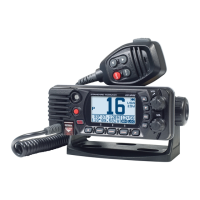
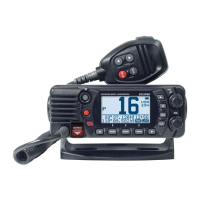
ECLIPSE
GX1400
Meets ITU-R M.493-13 class D DSC (Digital Selective Calling)
(European version: Meets ITU-R M.493-14)
Input and Output of GPS information to NMEA 0183 compatible devices
Integrated 66 Channel Internal GPS receiver (GX1400GPS and GX1400GPS/E only)
Built in Separate Receiver for CH70 (Receiving DSC Calls)
Automatic DSC polling of up to 6 ships GPS positions*
Auto DSC channel selection & DSC test call
DSC distress, individual, group, all ships, position request and position report
Large Viewable Display, Easy to Mount, Submersible IPX8 (5 feet or 1.5 m for 30 minutes)
Noise canceling microphone with channel change, 16/S and H/L key buttons
GPS position and time shown on a full dot matrix display*
Preset Key used to recall up to 10 favorite channels
Programmable scan, priority scan, and Multi Watch (Dual Watch or Triple Watch)
Noise cancelling microphone with channel change selection, 16/S and H/L keys
ATIS Mode for European Inland Waterways (GX1400GPS/E only)
*External GPS device required for GX1400.
Owners Manual

Table of Contents

Questions and Answers

  • R
    Richard PaulAug 19, 2025
    How to fix a Standard Horizon Eclipse GX1400 that fails to power up?
    • J
      Jordan TravisAug 19, 2025
      If your Standard Horizon Radio fails to power up, there are a couple of things to check: * First, ensure that the 12 VDC battery connections are secure and the fuse is in good condition. * Second, make sure the VOL knob is rotated clockwise to turn the radio on.
  • K
    Karen CrawfordAug 21, 2025
    What to do if my Standard Horizon Eclipse GX1400 blows a fuse when connected to the power supply?
    • S
      Stephanie SmithAug 21, 2025
      If your Standard Horizon Radio blows a fuse when connected to the power supply, the power wires may be reversed. Check the power cable for DC voltage and replace the fuse (6 A 250 V). Ensure the red wire is connected to the positive (+) battery post and the black wire to the negative (-) battery post. If the fuse continues to blow, contact your Dealer.
  • H
    Heidi BrownAug 23, 2025
    Why does my Standard Horizon Eclipse GX1400 Radio show “HI BATTERY” or “LO BATTERY” message?
    • G
      George GreeneAug 23, 2025
      If your Standard Horizon Radio displays a “HI BATTERY” or “LO BATTERY” message when turned on, it means the power supply voltage is either too high or too low. Verify that the connected power supply voltage is between 11 and 16.6 volts DC. Also, check if the generator has malfunctioned.
  • D
    David AdkinsAug 26, 2025
    How to eliminate popping or whining noise from Standard Horizon Radio speaker when engine runs?
    • R
      robertchavezAug 26, 2025
      If you're hearing popping or whining noises from the speaker of your Standard Horizon Radio while the engine is running, it's likely due to engine noise. Try rerouting the DC power cables away from the engine. You can also add a noise suppressor on the power cable, switch to resistive spark plug wires, and/or add an alternator whine filter.
  • C
    Caleb ReynoldsAug 28, 2025
    What to do if my Standard Horizon Eclipse GX1400 has low transmit power?
    • A
      Andrew MatthewsAug 28, 2025
      If a receiving station reports low transmit power from your Standard Horizon Radio, even when set to HI power, the antenna may be the issue. Have the antenna checked or test the transceiver with another antenna. If the problem continues, contact your Dealer for servicing.
  • D
    Dana DavisAug 30, 2025
    Why is my position not displayed on my Standard Horizon Radio?
    • C
      Christopher Rich MDAug 30, 2025
      If your position is not displayed on your Standard Horizon Radio, there could be a couple of reasons: * Check the accessory cable connection. Some GPS units use the battery ground line for NMEA connection. * Verify the output signal format of the GPS navigation receiver. The radio requires NMEA0183 format with GLL, RMC, GGA, or GNS sentence as an output signal. If the GPS has a baud rate setting, ensure it is set to 4800 and parity is set to NONE.
  • S
    sparrishSep 1, 2025
    What to do if sound is not emitted from Standard Horizon Radio speaker?
    • L
      lambertchristopherSep 1, 2025
      If no sound is coming from the internal or external speaker of your Standard Horizon Radio, check the connections of the accessory cable. There may be a short circuit on the External speaker cable WHITE/SHIELD.
  • T
    Thomas DavisSep 4, 2025
    How to fix a Standard Horizon Radio that won't turn on?
    • A
      Alexandra PerezSep 4, 2025
      First, check the 12 VDC battery connections and the fuse. Then, make sure the VOL knob is rotated clockwise to turn the Standard Horizon Radio on.
  • J
    Jennifer AndersenSep 6, 2025
    What to do if my Standard Horizon Eclipse GX1400 keeps blowing fuses?
    • W
      williambrandtSep 6, 2025
      Check the power cable for DC voltage and replace the fuse (6 A 250 V). Ensure the red wire is connected to the positive (+) battery post and the black wire to the negative (-) battery post. If the Standard Horizon Radio fuse still blows, contact your Dealer.
  • J
    jessicaleachSep 8, 2025
    Why does my Standard Horizon Eclipse GX1400 Radio say 'HI BATTERY' or 'LO BATTERY'?
    • K
      Kelly WrightSep 8, 2025
      The power supply voltage is either too high or too low. Make sure the connected power supply voltage is between 11 volts and 16.6 volts DC. Also, check that the generator hasn't malfunctioned.

Summary

Safety Precautions

Types and meanings of the marks

Explains the meaning of Danger, Warning, and Caution marks used in the manual.

Types and meanings of symbols

Explains the meaning of symbols indicating prohibited or required actions.

GETTING STARTED

DISTRESS AND HAILING (CHANNEL 16)

Procedure for making a distress call using Channel 16.

CONTROLS AND INDICATORS

FRONT PANEL

Description of the controls and indicators on the front panel of the transceiver.

INSTALLATION

SAFETY; WARNING INFORMATION

Important safety and RF exposure guidelines for installation.

ELECTRICAL CONNECTIONS

Guidance on connecting the power cord, antenna, and other accessories.

Initial Setup Required

Maritime Mobile Service Identity (MMSI)

Procedure for programming the essential MMSI number for DSC functions.

GPS CONFIGURATION

BASIC OPERATION

DIGITAL SELECTIVE CALLING (DSC)

DISTRESS ALERT

Procedure for transmitting and receiving DSC distress alerts.

ALL SHIPS CALL

How to transmit and receive All Ships calls (Safety/Urgency).

INDIVIDUAL CALL

Initiating and responding to DSC individual calls.

SETUP MENU

MAINTENANCE

TROUBLESHOOTING CHART

Guide to diagnosing and resolving common operational problems.

Standard Horizon Eclipse GX1400 Specifications

General IconGeneral
BrandStandard Horizon
ModelEclipse GX1400
CategoryRadio
LanguageEnglish

Related product manuals