OPERATING VEHICLE DIRECTION SELECTOR OPERATION
34 35
Read all of SAFETY and this section before attempting any procedure.
Pay particular attention to Notices, Cautions, Warnings and Dangers
The necessary distance to stop a loaded vehicle is more than the necessary
distance to stop a vehicle without a load. In wet weather conditions, apply
light pressure to the brakes to supply enough friction to dry the brake unit.
Wet brakes lose much of their effect. If you drive on a steep hill and can’t get
enough traction, do not try to turn around on the hill. Slowly drive in reverse
and use the brake to control the speed.
DIRECTION SELECTOR OPERATION
To prevent loss of control, do not move the direction selector to a different
position while the vehicle is in motion. If you move the selector, the speed will
immediately decrease and a warning device activates.
Move the direction selector to FWD (forward) to move in the forward direction.
Move the direction selector to REV (reverse) to move in the reverse direction.
A reverse warning buzzer activates when the direction selector is moved to the
REV (reverse) position. The position between FWD (forward) and REV (reverse)
is the neutral position. When you leave the vehicle, turn the key to the OFF
position and remove it from the key switch and apply the parking brake.
ACCELERATOR AND BRAKE PAD OPERATION
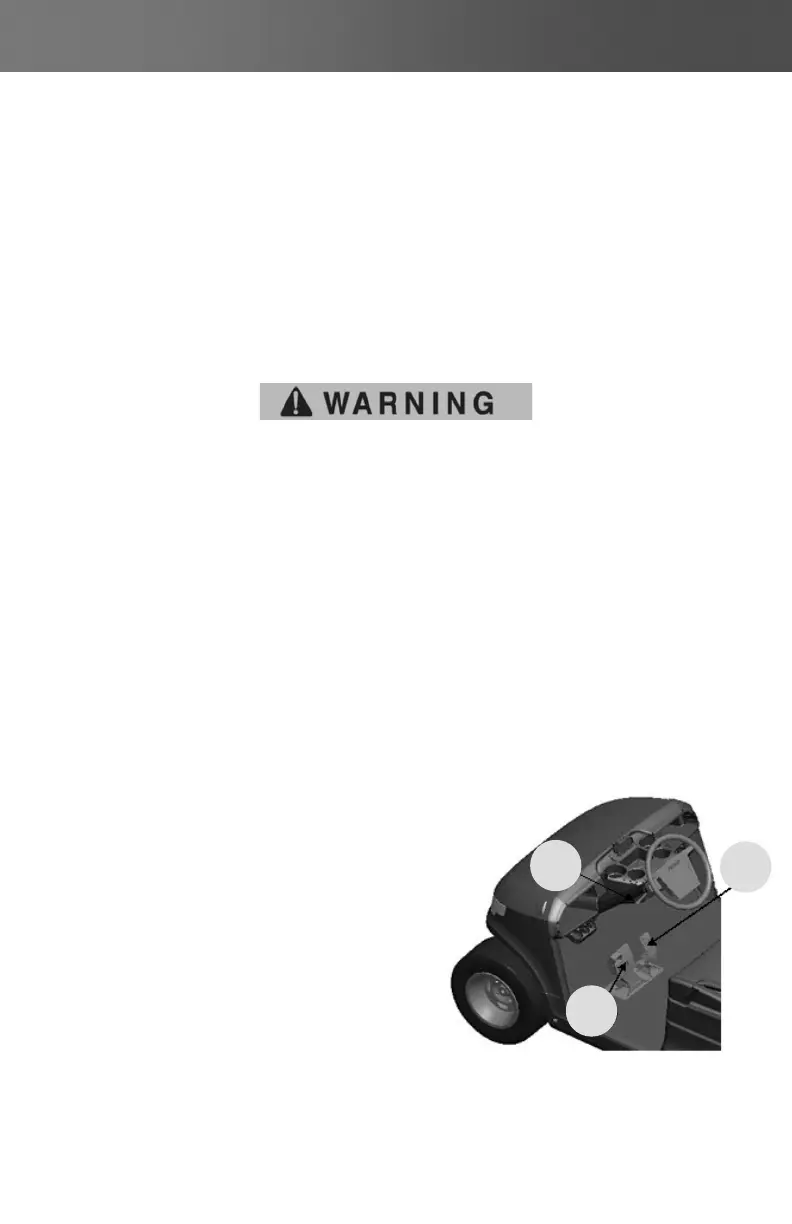
With the key switch in the FWD (forward) or REV (reverse)
position press the accelerator pedal (1),
which starts the motor and the vehicle
moves in the direction indicated on the key
switch / direction selector. To stop the vehicle
quickly,press the brake pedal (2)
(Figure 16 - Accelerator and Brake Pedal Operation)
HORN (if equipped)
If the vehicle is equipped with a horn, the
horn button (3) is located on the turn signal
switch. Pressing the button (3) will sound
the vehicle’s horn.
(Figure 16 - Accelerator and Brake Pedal Operation)
(Figure 16 - Accelerator and
Brake Pedal Operation)
3.
1.
2.


 To Next Page