Operating Instructions
Start up
Fit wash pump filter, drain upstand and scrap trays, and shut door.
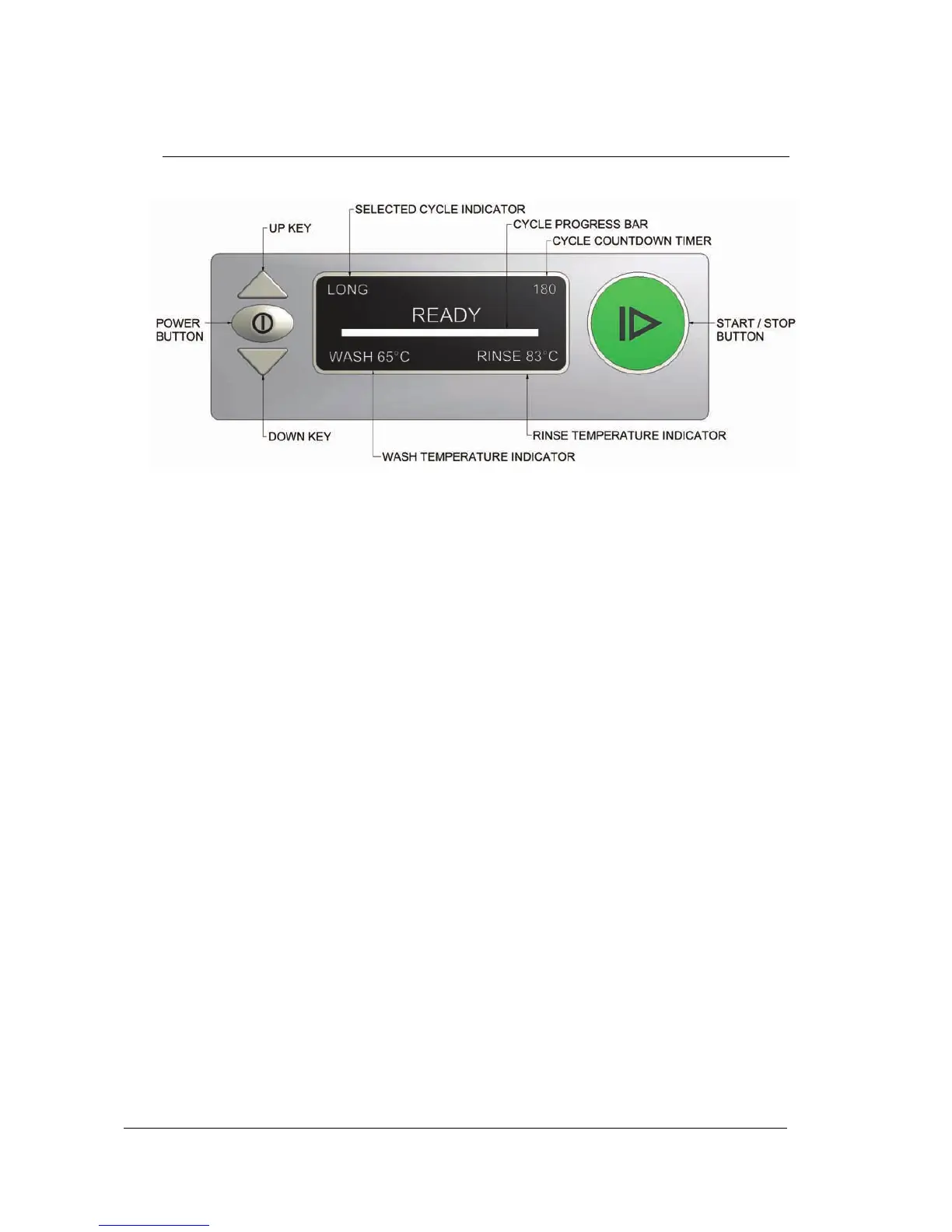
Turn wall power switch on and press machine Power Button for 1 second.
Start/Stop button glows white and machine fills automatically.
Machine starts heating when wash tank is full.
Start/Stop button glows orange while heating.
Start/Stop button glows green when rinse temperature is up to required.
Operation
Select SHORT, MEDIUM, LONG or MANUAL CYCLE by pressing Up or
Down keys. SHORT, MEDIUM and LONG CYCLES correspond to 1, 2 and
3 minute cycles accordingly.
Load rack into machine and shut door to start the cycle.
For undecounter models press Start/Stop button to start the cycle.
The Start/Stop button glows red while machine operates.
Pressing the Start/Stop button during operation will terminate the cycle.
When red light goes out, cycle is complete.
When MANUAL WASH is selected the washing cycle is not timed.
The MANUAL WASH is started by pressing the Start/Stop button.
Washing continues until the Start/Stop button is pressed again.
Rinsing and draining follow washing to complete the dishwashing cycle.
NOTE: The cycle time might be longer than specified if water supply
temperature is below required.
Shut down every night
Select DRAIN & STANDBY CYCLE by pressing Up or Down keys.
Remove drain upstand, close door and press Start/Stop button.
Machine will drain for 100 seconds with a cleaning rinse in a middle of cycle.
When drain & clean are complete machine will go in to standby mode.
Remove scrap trays and filter and rinse clean.
Replace filter, drain upstand and scrap trays.


 To Next Page