8
|
Get to know your TV Streamer Get to know your TV Streamer
|
9
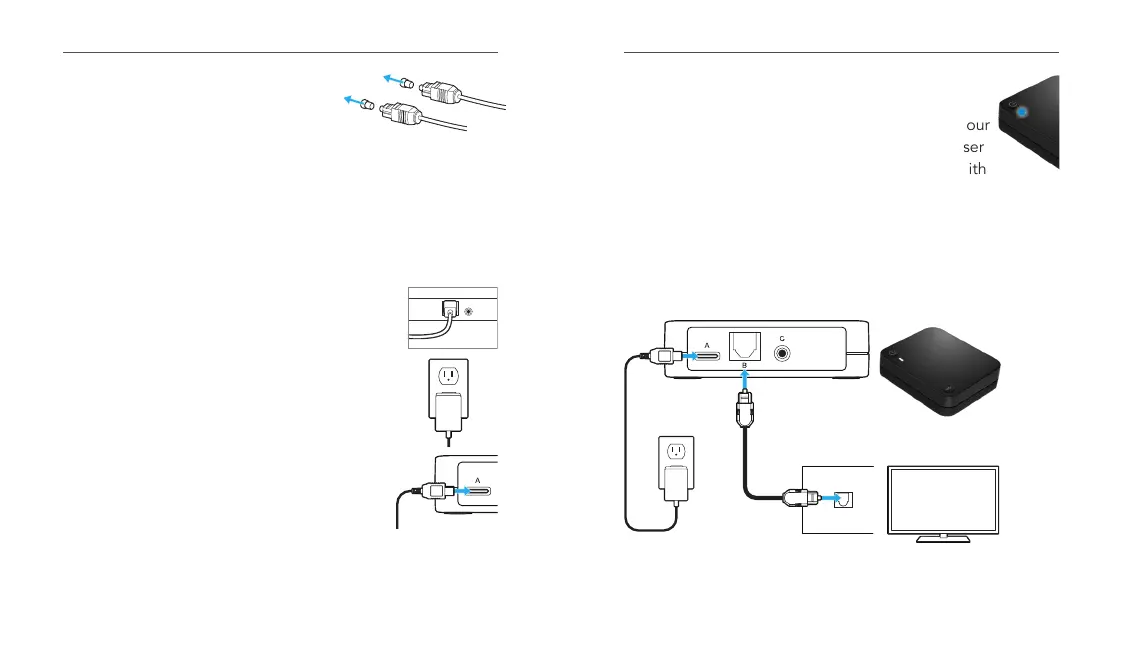
1. Remove the plastic caps from both
ends of the optical TOSLINK cable.
2. Attach the optical TOSLINK cable
into the audio OUT jack on your electronic audio source.
Power ON your electronic audio source.
• NOTE: If there is no TOSLINK audio OUT jack on
your electronic audio source, try a different electronic
audio source or try the 3.5mm-to-RCA cable.
3. Attach the other end of the optical
TOSLINK cable into the optical TOSLINK
jack on the back of the TV Streamer.
4. Plug the power adapter into the wall.
5. Insert the power adapter into the power
supply jack on the back of the TV Streamer.
B
C
6. Your TV Streamer is ready to go!
7. Turn on your TV and start the TV stream to your
hearing aids in the My Starkey app, with a user
control (if your professional set one up,) or with
your Remote Control favorite button.
8. The LED will illuminate blue during streaming.
Typical setup
TV Streamer
Television
Audio Out
Done! Head to the next page to start using your TV Streamer.


 To Next Page