11
|
Get to know your Remote Microphone +
STEP 3: Pair your Remote Mic + with
your hearing aid(s):
1. Ensure your hearing aids
are not connected to nearby
Bluetooth devices:
• Turn OFF Bluetooth
on
your mobile phone.
• Turn OFF any wireless
accessories already paired
to your hearing aids.
2. Place your hearing aids within
6 inches (15 cm) of your Remote
Mic +.
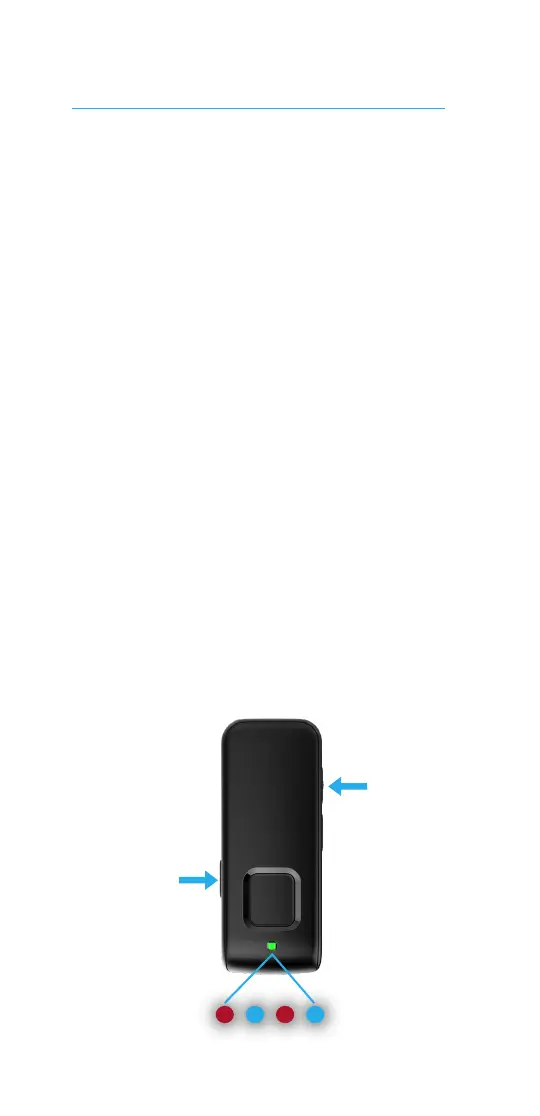
3. Press the Input Mode and Volume
Up (+) buttons simultaneously for
7 seconds until the status indicator
light alternately blinks blue and red.
Set up your Remote Mic +
Input
Mode
Volume +



 To Next Page