WWW.STEALTHCAM.NET
Toll Free 877-269-8490
13
SETUPANDPROGRAMMING
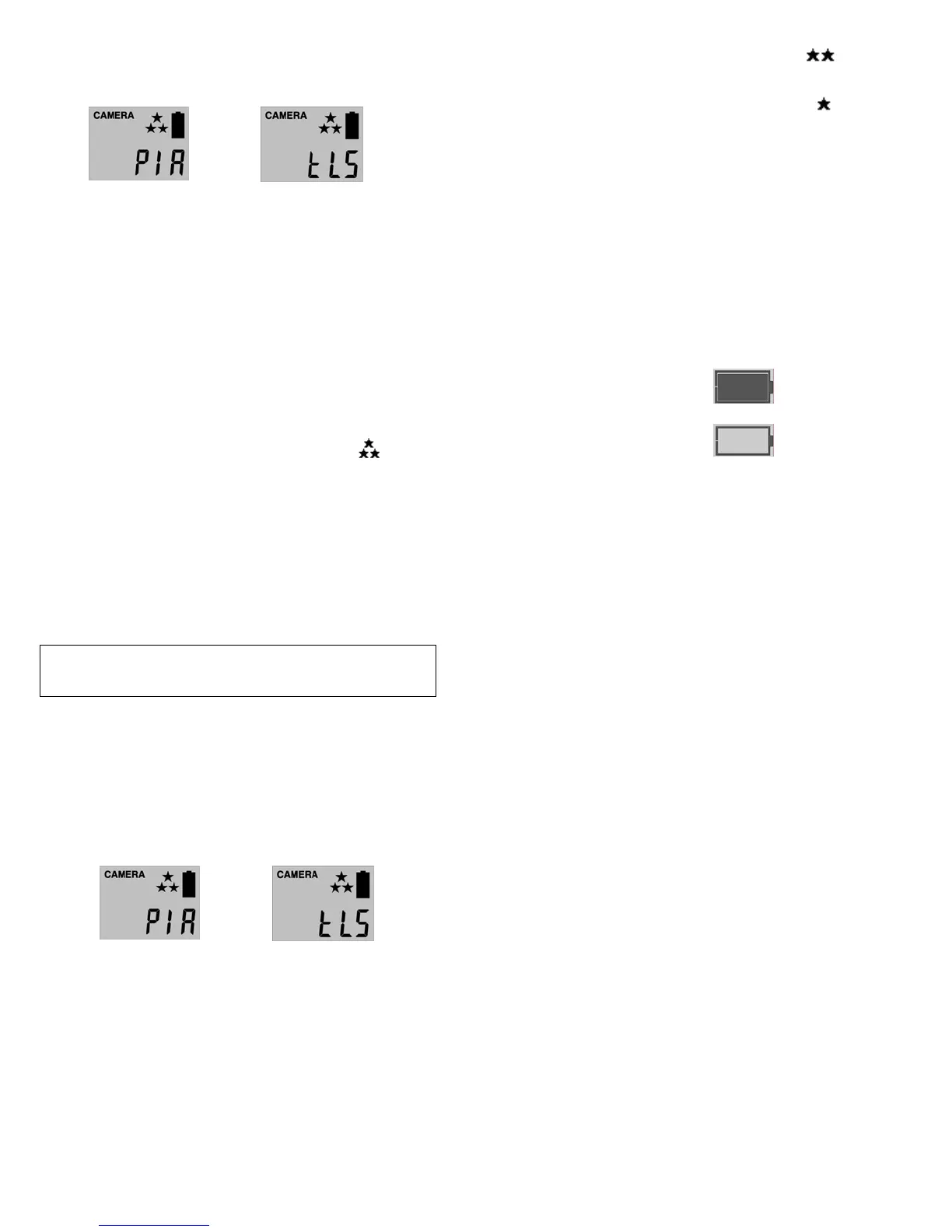
Whenthecameraisfirstturnedon,theinternalLCDscreendisplay s
thecamerastatus.Thefollowinginformationispresentonthisscreen.
(PIRMODE)(TIMELAPSEMODE)
Ifnobuttons are pressed after 30seconds theLCDscreenwillpower
downtoconservebatterylifeandenter1minutecountdowntoenter
PIR detection mode.To re‐power the display screen, press and hold
theUPorDOWNbuttonuntilyouseethestatusscreen.
Definition
• DayandTime:Displaysthedateandtimethatyouhaveset.
• Operationmode:
¾ PIR:CameratakesImage/VideoperPIRtrigger.
¾ TimeLapse(tLS):Cameratakesthestillimageperpresettime.
• CapturingSequencemode:
¾ 1P‐9P:1to9burstmodeimagecapturingper
PIRtrigger.
¾ Video:10to180seconds’adjustablevideoperPIRtrigger.
• ResolutionforImages:ColorDaytime/Black&WhiteNighttime
¾ 3Stars(7Mp):Selectthisoptiontocapturea
7.0Mpixelsimage.(Highimagequality)
WWW.STEALTHCAM.NET
Toll Free 877-269-8490
14
¾ 2Stars(3Mp):Selectthisoptiontocapturea3.0Mpixels
image.(Lowimagequality)
¾ 1Star(1.3Mp):Selectthisoptiontocapturea1.3Mpixels
image.(Baseimagequality)(Default)
• ResolutionforVideo:ColorDaytime/Black&WhiteNighttime
¾ VGA:640x480*ONLYresolution*
•
Timeout:To settheamountoftimeinsecondsandminutesthe
camerawillsleepbetweenPIRtriggering.
• Moonphase:Displaysthemoonphases.
• Tempstamp:Tempe raturestampwilldisplayonstillimagesand
firstframeonlyonvideofiles.
• Zoom:Digitalenhancementstodifferentzoom
level.
¾ 1X:Normal–theword“ZOOM”willnotdisplay.
¾ 2X:Twotimeszoom–theword“ZOOM”willdisplay.
¾ 4X:Fourtimeszoom–Theword“ZOOM”willblink.
• BatteryStatus:Show sthebatterystatus.
¾ Full:Thebatteryisfull.
¾ Low:Thebattery
islow.(FrontLowBatteryindicatorwillalso
blink.)
WWW.STEALTHCAM.NET
Toll Free 877-269-8490
15
NOTE:Whenthecameradetectslowbatteries,thecameraunitwill
poweroffwithin30secondsautomatically.Pleasereplacewithnew
batteries;otherwisethecameramaynotworkproperly.
SettingtheCamera’sOperationMode:
YourStealthCamcanbeprogr ammedtooperationeitherinPIR
DetectionmodeorTimeLapsemode.
• SwitchthecameratotheONposition.
¾ LCDscreenwilldisplaythecamerastatusscreen.
• Pressthe[MENU]buttononcewithin30secondstoenterthe
programmingmode,thewordPIR
ortLSwillbeblinking.
• Pressthe[UP]or[DN]buttontoselectthePIRortLS.
• Press[OK]tosaveyourselection.
• Press[MENU]buttontoexit.
SettingtheCamera’sResolutioninPIRoper ationmode:
YourStealthCamcanbeprogr ammedto3differentresolutions,
High(3Stars‐7Mp),Low(2Stars–3Mp),Base(1Star–1.3Mp).
WWW.STEALTHCAM.NET
Toll Free 877-269-8490
16
• SwitchthecameratotheONposition.
¾ LCDscreenwilldisplaythecamerastatusscreen.
• Pressthe[MENU]buttononcewithin30secondstoenterthe
programmingmode.
• ThewordPIRwillbeblinking,pressOKtoconfirmthecamera
operationbyPIRdetection.
• Theword
CAMERAandtheSTARSwillbeblinking.
• Pressthe[OK]buttonONCEtochoosetheselection.
• Pressthe[UP]or[DN]buttontoselectthedesire dresolution.
• Press[OK]tosaveyourselection.
• Press[MENU]buttontoexit.




 To Next Page