WWW.STEALTHCAM.NET
Toll Free 877-269-8490
33
ViewingVideoClipsonhandheldLCDmonitororhome
TVmonitor
• Followthecableattachinginstructi onlistedinprevioussection.
• Youwillseeaseriesofthumbnailimagesonyourmonitor.
• Pressthe[UP]or[DN]buttontochoosethevideoclipyouwantto
watch.
• Pressthe[OK]buttontoplaythevideoclip.
• Youmay
pausethevideoclipbypressingthe[OK]buttonduring
theplayback.Press[OK]buttontoresumeplaying.
• Attheendofthevideoclip,pressthe[UP]or[DN]buttonto
proceedtothenextvideoorimage.Ifitisavideoclipfile,thenit
will
automaticallystarttoplay.Ifitisstillimagefilethenitwill
showtheimageinfullscreen.
• Whenyouviewstillimagesinfullscreen,youcanreturnto
thumbnailimageselectionviewbypressingthe[OK]button.
NOTE:Allvideosarerecordedwithaudiobutonly
hassoundwhen
viewingplaybackonaPC.
WWW.STEALTHCAM.NET
Toll Free 877-269-8490
34
Viewingfi lesbycomputer
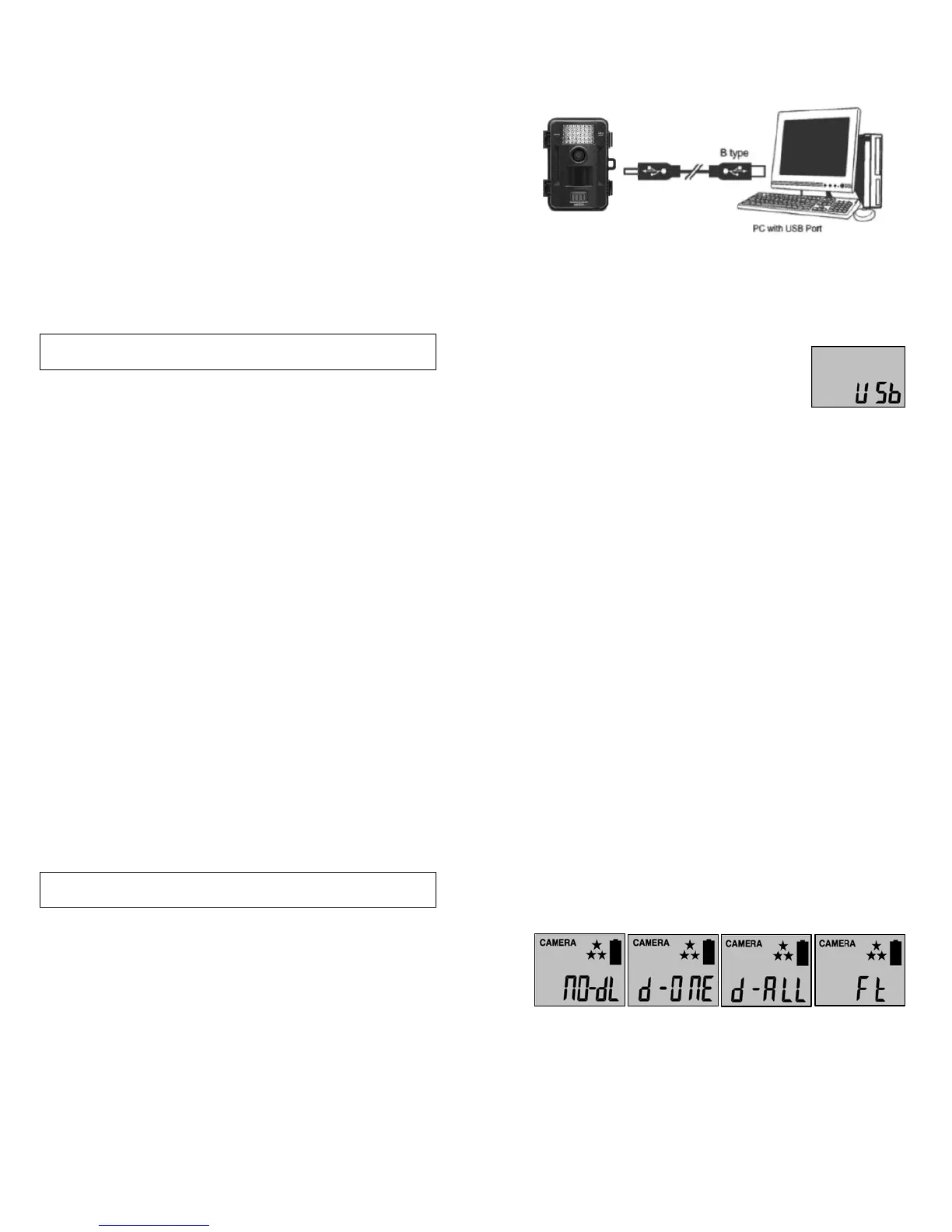
Your Stealth Cam Digital Scouting Camera is a plug and play USB
storagedeviceforusersofWindows2000/ME/XP/Vista/Windows
7operatingsystems.ThiscameraisnotMACcompa t ible.
ViewingfilesonyourcomputerviaUSBconnection.
• Makesurethecamera’spowerswitchisintheOFFposition.
• PlugthelargerendoftheUSBcableintoanavailableUSBporton
yourcomputer.
• PlugthesmallerendofUSBcableintothecamera’ssidepanel.
• The camera will automatically power ON and
displaythewordUSbonthedisplayscreen.
• At the same time, your computerwill recognize the camera as a
RemovableStoragedevice.YouwillfinditunderMYCOMPUTER.
WWW.STEALTHCAM.NET
Toll Free 877-269-8490
35
• Atthispointyouhaveseveraloptions:
¾ To view your images or play your videos: Click on the
RemovableStoragedeviceandthendrilldowntothefileyou
wanttoseeanddoubleclickonthefilename.
¾ Tosaveyourimagesandvideos:Highlightthefile
orfilesyou
wanttosaveanddragthemtoyourharddrive.
¾ To delete your images and videos:Highlightthefiles orfiles
youwanttodeleteandpressthe[DELETE]button.
¾ To erase all files and reformat you SD memory card: Right
click on the Removable
Storage device under My Computer
and select FORMAT then click START. You wi ll receive a
Warningmessagepress[OK].ThenCLOSEtoexit.
NOTE: Make sure before you FORMAT you are certain it is the
RemovableStoragedeviceforthecamera.
• Once you’re done, simply unplug the cable from both your
computerandthecamera.ThecamerawillturnOFFautomatically.
WWW.STEALTHCAM.NET
Toll Free 877-269-8490
36
Deletingfilesinthefield
• SwitchthecameratotheONposition.
¾ LCDscreenwilldisplaythecamerastatusscreen.
• Pressthe[MENU]buttonwithin30secondstoenterthe
programmingmodeshowingeitherPIRortLS.
• Pressthe[UP]or[DN]buttontoenterPIRmode,thenpre ss[OK].
• Press
the[DN]buttonONCEtoenterthedeletemode.
• You’llseetheword‐dEL‐blinking.
• Press[OK]buttontoentertheDELETE&FORMA Tmenu.
• Press[UP]or[DN]buttontoselectthedesiredfunction.
¾ NO‐dL(NoDelete)‐Noimagesgetdeleted.
¾ d‐
ONE(Delet eOne)‐Onlythelast filewillgetdeleted.
¾ d‐ALL(DeleteALL)‐DeletesALLimagesontheSDcard.
¾ Ft(Format)‐DeletesallfilesandreformatstheSDcard.
• Press[OK]toconfirmyourselection.
• Press[MENU]buttontoexittheprogramsetting
andbacktothe
statusscreen.




 To Next Page