60
3. How to use Exercise Data Record?
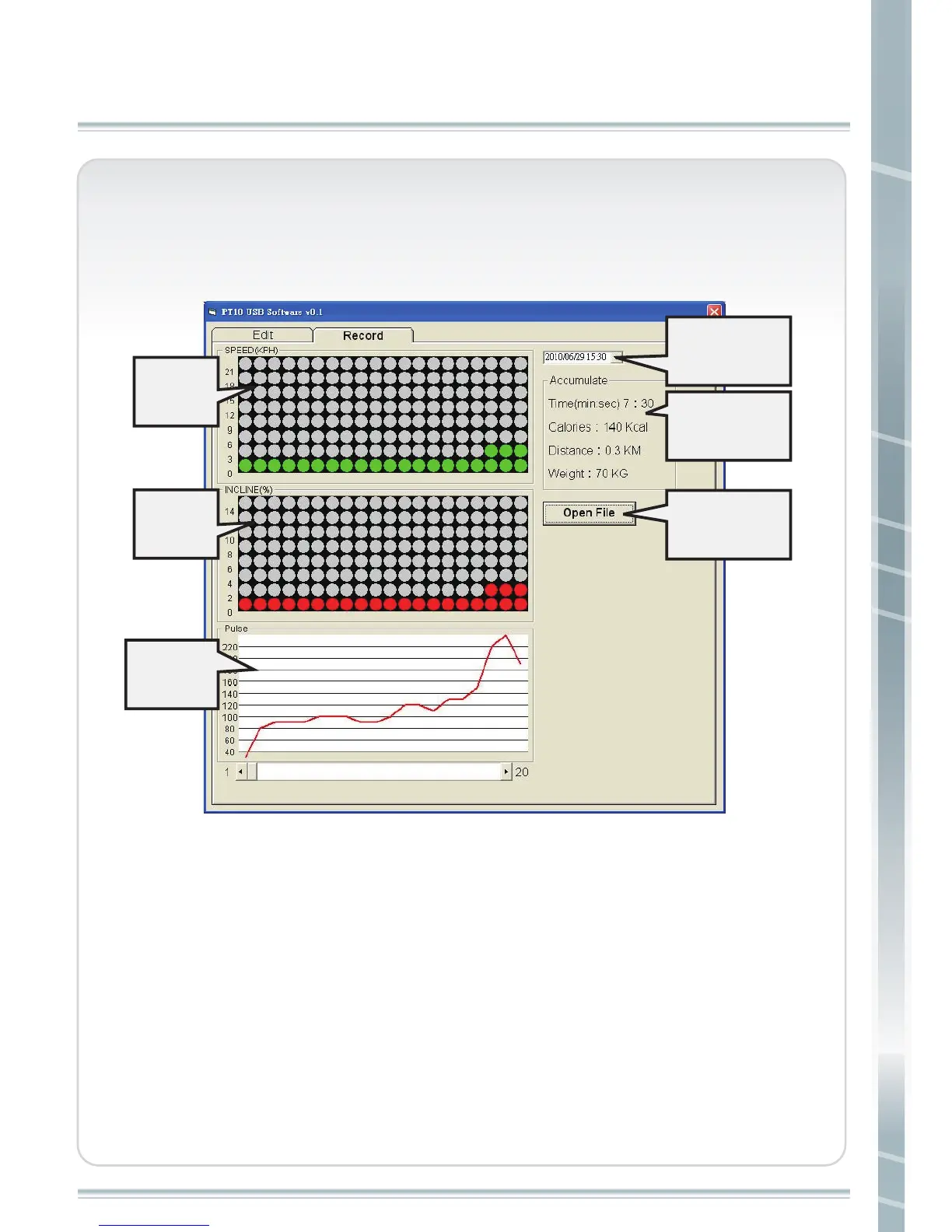
a. Record window
PT-7/10 USB USER MANUAL
Chosse
record time
Accumulated
exercise data
Open exercise
data file
Speed
graph
Incline
graph
Hear rate
graph
b. Operation
1. Open record from your USB storage. File name is PT10_REC. CUS or
PT7_REC.CUS (File name can not be changed, or it can not be read.)
2. Every record’s date and time will be shown in “ Choose record time”.
3. In accumulate column, it shows every workout time, every workout
time accumulated calories, and distance.
4.Data is recorded every 30 seconds. The longer you exercise on the
treadmill, the more data will be recorded. Under Pulse window, there is
a scroll. If data of every record is over 20, you can use scroll to see more
information of speed, incline and pulse.



 To Next Page