8
POWER
POWER ON/OFF
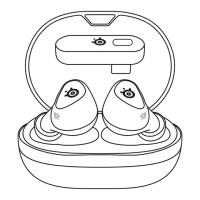
Remove GameBuds™ from Charging Case – The GameBuds™ Status
LEDs (2) will illuminate indicating the battery level.
If the GameBuds™ shut o outside of the Charging Case, they can be
powered on with a 3-second press on one of the Gesture Control Buttons
(1) on either GameBud.
The Charging Case LED (6) shows the Charging Case battery level even
when the lid is opened or closed.
BATTERY LEVEL
GAMEBUD LED BATTERY LEVEL
Green 100 % – 66 %
Yellow 65 % – 26 %
Red 25 % – 10 %
Red Quick Breathing 9 % – 0 %
CHARGING CASE LED BATTERY LEVEL
Green 100 % – 66 %
Yellow 65 % – 26 %
Red 25 % – 10 %
Red Quick Breathing 9 % – 0 %
CHARGING
To charge the GameBuds™ simply place them in the Charging Case.
To charge your Charging Case, use the provided USB-C to USB-C
Charging Cable (13) or place the Qi Charging Surface (9) on your Qi
Wireless Charger.
The Charging Case LED (6) will breathe to indicate its level while the
Charging Case charges.
SolidGreen 100 %
Green Breathing 99 % – 66 %
Yellow Breathing 65 % – 26 %
Red Breathing < 25 %


 To Next Page