9
2.4 GHz PAIRING
Note: The GameBuds™ and Dongle come paired. Only follow these steps if
you experience any issues.
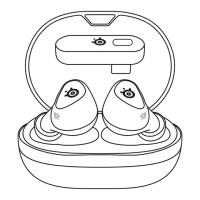
1 To enter Pairing Mode, place both GameBuds™ in the Charging Case.
2 Hold one of the Gesture Control Buttons (1) on either GameBud for
3 seconds to activate Bluetooth Pairing Mode.
3 The GameBuds™ Status LEDs (2) will be blinking blue.
4 Press one of the Gesture Control Buttons (1) again.
5 The GameBuds™ Status LEDs (2) will blink green. You are now in
2.4 Ghz Pairing Mode.
6 Plug in your Dongle to your PS5 or other device. Press and hold the
Pairing Button (11) for 3 seconds.
7 Your GameBuds™ and Dongle are now re-paired.


 To Next Page