7N”
4. Then press “CD I /USB/SD skip forward or skip backward “ button to select “ Y “.
5. Press the “CD I /USB/SD REC “ button again to confirm the format.
E-10
Remark :
- All the files inside the USB storage media or SD card will be deleted completely after confirming to “ Yes “ mode.
Removing of USB / memory card
To remove the USB / memory card, turn off the power or switch the function mode to either Tape or Phono first. For USB
port – un-plug it by pulling out the USB socket directly, for memory card –pull out the SD/MMC card straightly without bending.
Line out connection
You can connect the system to your whole hi-fi system by connecting the line out socket (43) to the auxiliary input socket with
a RCA cable (not included).
Subwoofer jack
Connect a powered or active Subwoofer (not supplied) to the Subwoofer Jack (46) on the rear of this unit to add
extra BASS sound. The sound of the Subwoofer can only be adjusted by its own controls.
Earphone connection
Connect your earphone(not included) to the earphone jack to get your private listening and adjust the volume to comfortable
level.
Remark :
- Avoid extended play at very high volume as it may impair your hearing.
- If you experience ringing in your ears, reduce the volume or shut off your unit.
- Keep the volume at a reasonable level even if your headset is an open-air type designed to allow you to hear outside sounds.
Please note that excessively high volume may still block outside sounds.
X-bass sound effect
Press the x-bass button (28) to active x-bass function and enhance the bass effect at “ on “ position.
Remote control transmitter
Battery installation (battery not provided)
The infra-red transmitter requires 2 pc AAA size battery for operation
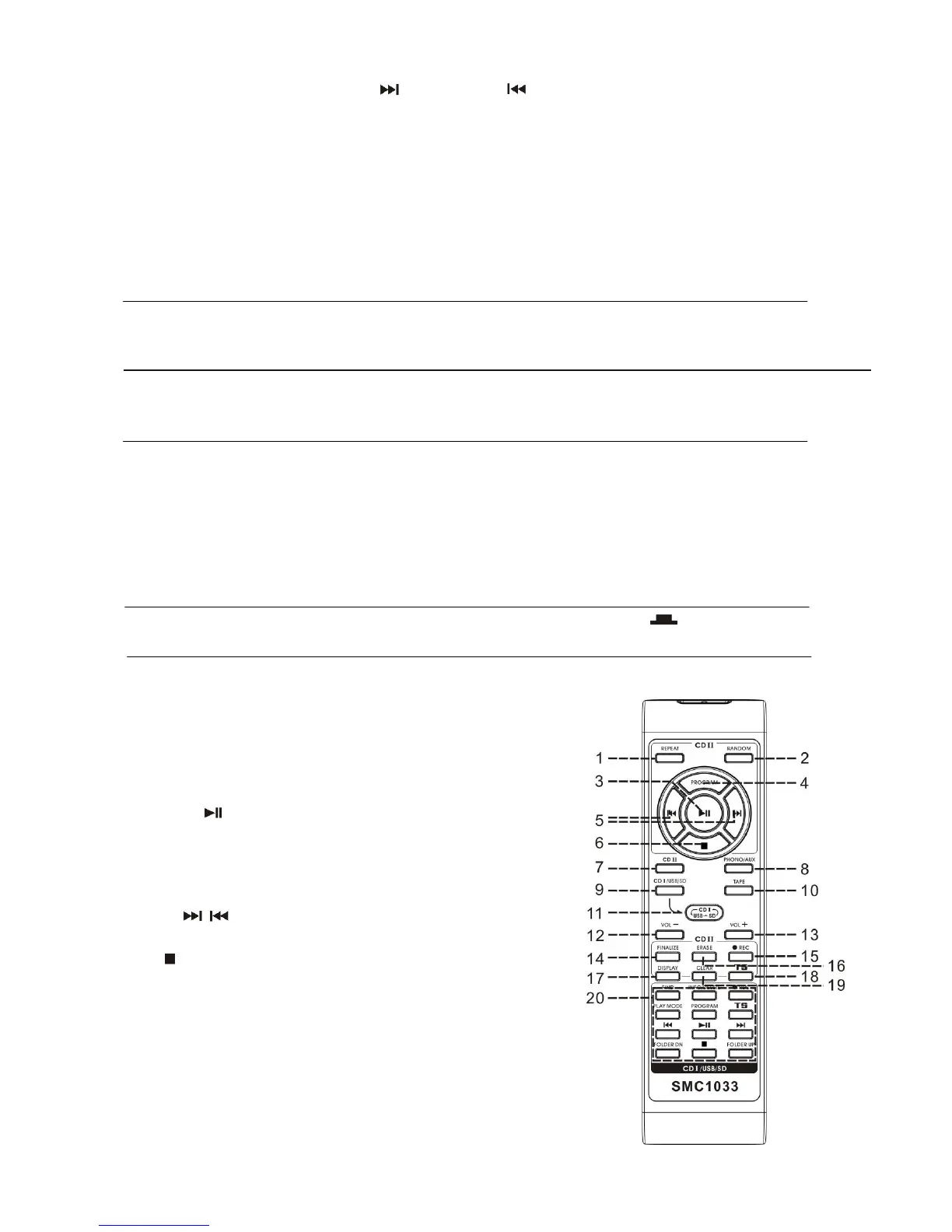
Button description
1) Repeat In CDII mode, press to active repeat
play function
2) Random In CDII mode, press to active random
play function
3) Play/pause In CDII mode, press once to start
playback. Press again to enter pause
mode
4) Program In CDII mode, press to active
programming function
5) Skip up / down In CDII mode press to select previous /
next tracks
6) stop In CD mode, press to stop playback
7) CDII Press to select CDII function
8) Phono/Aux Press to select Phono/Aux function
9) CD I Press to select CD I function
10) Tape Press to select tape function
11) CD I /USB/SD alternative Press to exchange the function between
CD I /USB/SD
12) Volume +/- Press to adjust the volume level


 To Next Page
 Loading...