LINE OUT CONNECTION
You can link this system to another Hi-Fi system or Amplifier by connecting the Line Out socket (41 - R + L) to the
Auxiliary Input socket of the other unit with an RCA cable (not provided).
AUX-IN CONNECTION
Connect another audio device, e.g. (portable) CD player, MP3 player, (portable) Cassette player etc. to this system
via a cord with 3.5mm dia jack plugs (not supplied). Connect one end of this cord to the 3.5mm dia. Headphone
jack on the external device and the other end to the Aux-in jack (29) on the front panel of this unit.
When connected in this way it is possible to play back or record the music already on the connected device
.
X-BASS OPTION
To add extra Bass sound during playback, press this button, press it again to switch this function off.
SUBWOOFER JACK
Connect a powered or active Subwoofer (not supplied) to the Subwoofer Jack (44) on the rear of this unit to add
extra BASS sound. The sound of the Subwoofer can only be adjusted by its own controls.
REMOTE CONTROL TRANSMITTER
BATTERY INSTALLATION)
The infra-red transmitter requires 2 x 1.5V/‘AAA’ size batteries to operate (not supplied).
Open the rear compartment and insert 2 batteries, observing the correct polarities as indicated inside the
compartment, replace the cover.
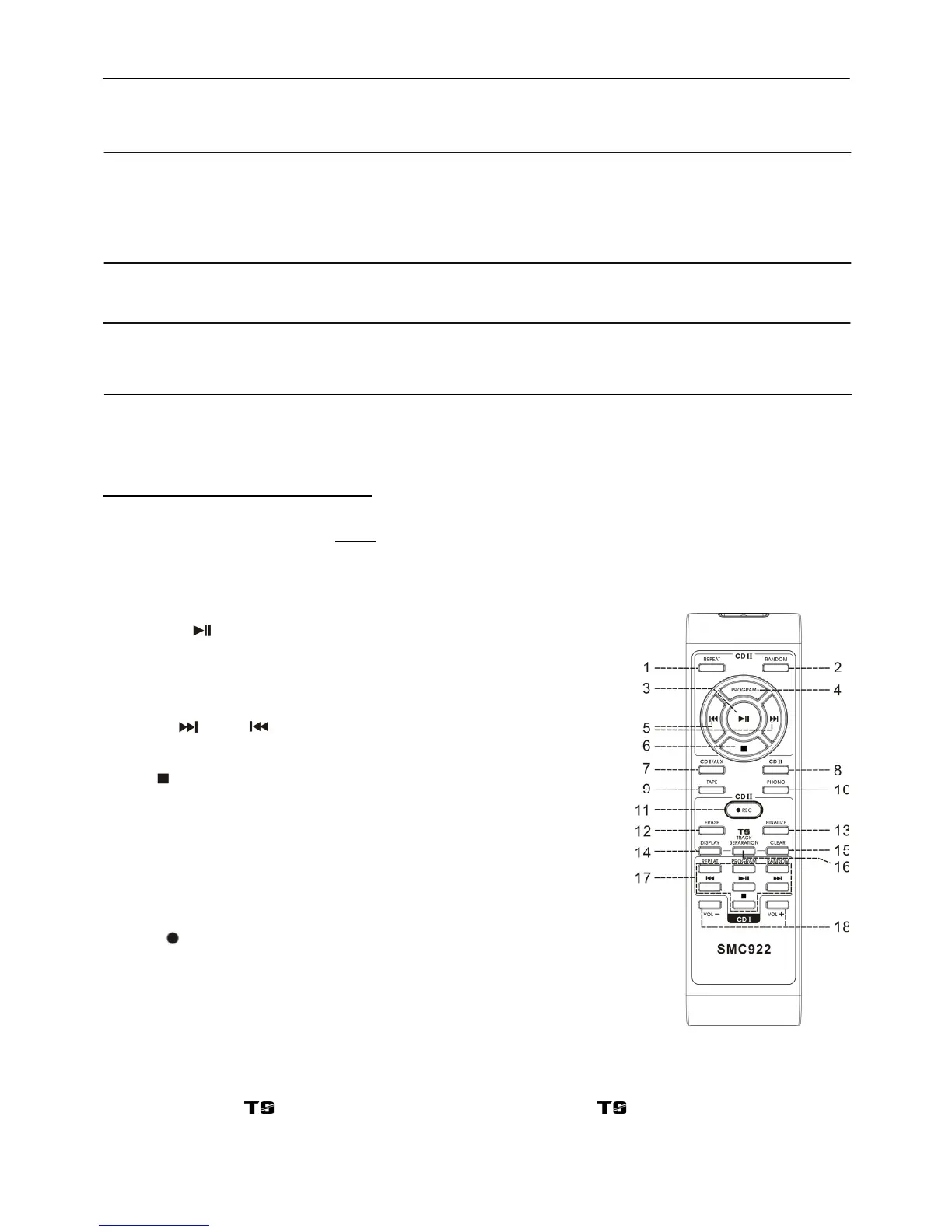
BUTTON FUNCTION DESCRIPTION
EXCLUSIVE FUNCTIONS FOR CD II (1-6, 11-16)
1)
Repeat In CD II Mode, press to activate the Repeat Play function.
2) Random In CD II Mode, press to activate Random Play function.
3) Play/pause In CD II Mode, press once to start Playback.
Press again to enter Pause Mode.
4) Program In CD II Mode, press to activate Programming
function.
5) Skip Up /Down Press to select previous / next tracks in CD
Mode.
6) Stop
In CD II Mode, press to stop playback.
7) CD
I/Aux Press to select the CD I/Aux function.
8) CD II Press to select the CD II function.
9) Tape Press to select the Tape function.
10) Phono Press to select the Phono (Turntable) function.
11) REC
Press to activate CD II Recording function.
12) Erase Press to erase or unfinalize a CD-RW disc.
13) Finalize Press to finalize the CD-R(W) disc after
recording.
14) Display Press to change the CD playback information on the LCD display.
15) Clear Press to clear the programmed tracks.
16) Track separation “ “ In CD Recording Mode, press to switch the “ “ function on or off.
E-8


 To Next Page