ENGLISH
Front Panel
■
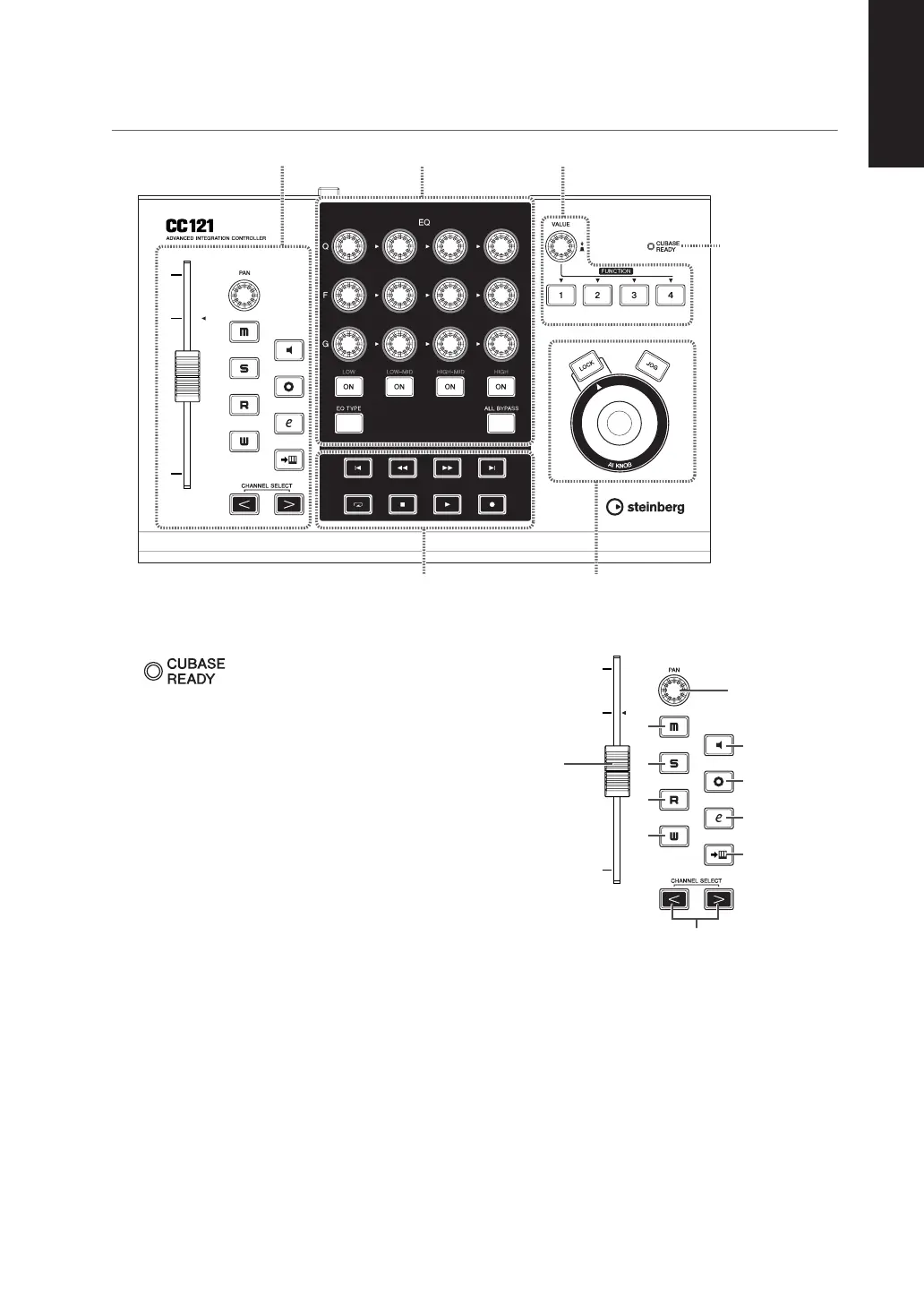
CUBASE READY lamp
This LED lamp indicates whether the CC121 is
turned on or not and whether communication
between the CC121 and the computer is enabled or
not. This lamp flashes to indicate that the CC121 is
bus-powered from the connected computer. When
the lamp is lit continuously, communication with the
computer is enabled and Link functions are avail-
able.
IMPORTANT
To use the Link function between the CC121 and
Cubase, you will need to install Cubase/Cubase AI
version 4.5 or higher. For details, refer to the following
website.
■
Channel sections
This section lets you control the track selected on
Cubase. When the Read Automation is turned on,
the events generated via the operations in this sec-
tion will be recorded to the current track on Cubase.
1
Fader
This 100 mm touch-sensitive motorized fader lets
you control the mixer fader of the current track on
Cubase.
Channel sections
EQ sections
Function section
AI KNOB section
Transport section
CUBASE READY
lamp
http://service.steinberg.de/goto.nsf/show/
supportupdates_cc121_gb
3
7
8
9
)
!
4
5
6
2
1


 To Next Page